

त्वरित नेविगेशन
| ऑब्जेक्ट | विवरण | फ़ील्ड्स पैरामीटर |
|---|---|---|
| पोस्ट (Tweet) | पोस्ट्स, जवाब, रीपोस्ट और कोट पोस्ट | tweet.fields |
| उपयोगकर्ता | अकाउंट प्रोफ़ाइल और मेटाडेटा | user.fields |
| स्पेस | लाइव ऑडियो बातचीत | space.fields |
| सूची | अकाउंट्स के चुने हुए संग्रह | list.fields |
| मीडिया | इमेज, वीडियो, GIF | media.fields |
| पोल | पोल प्रश्न और विकल्प | poll.fields |
| स्थान | लोकेशन और जियो डेटा | place.fields |
विशिष्ट फ़ील्ड्स का अनुरोध करने के लिए फ़ील्ड्स पैरामीटर का उपयोग करें, और संबंधित ऑब्जेक्ट शामिल करने के लिए expansions का उपयोग करें।
पोस्ट (Tweet)
id, text, edit_history_tweet_ids
अतिरिक्त फ़ील्ड्स का अनुरोध करने के लिए tweet.fields का उपयोग करें और संबंधित ऑब्जेक्ट्स शामिल करने के लिए expansions का उपयोग करें।
पोस्ट के सभी फ़ील्ड्स
| फ़ील्ड का मान | type | विवरण | इसे कैसे इस्तेमाल किया जा सकता है |
|---|---|---|---|
| id (डिफ़ॉल्ट) | string | अनुरोधित Tweet का अद्वितीय पहचानकर्ता। | किसी विशिष्ट Tweet को प्रोग्रामेटिक रूप से प्राप्त करने के लिए इसका उपयोग करें। |
| text (डिफ़ॉल्ट) | स्ट्रिंग | Tweet का वास्तविक UTF-8 टेक्स्ट। मान्य वर्णों के बारे में जानकारी के लिए twitter-text देखें। | कीवर्ड निष्कर्षण और भाव विश्लेषण/वर्गीकरण। |
| edit_history_tweet_ids (डिफ़ॉल्ट) | ऑब्जेक्ट | ऐसे अद्वितीय पहचानकर्ता जो किसी Tweet के सभी संस्करणों को दर्शाते हैं। जिन Tweets में कोई संपादन नहीं हुआ है, उनके लिए एक ID होगी। जिन Tweets का संपादन इतिहास है, उनके लिए कई IDs होंगी। | किसी Tweet का संपादन इतिहास पता लगाने के लिए इस जानकारी का उपयोग करें। |
| article | ऑब्जेक्ट | इस Tweet में मौजूद Article का मेटाडेटा शामिल है। | किसी Article का टेक्स्ट और entities प्राप्त करने के लिए इसका उपयोग करें। |
| attachments | object | यह इस Tweet में मौजूद attachments के type (यदि कोई हों) को निर्दिष्ट करता है। | अनुरोधित expansions के लिए लौटाए गए objects को समझने के लिए। |
| author_id | string | इस Tweet को पोस्ट करने वाले यूज़र का अद्वितीय पहचानकर्ता। | यूज़र ऑब्जेक्ट को हाइड्रेट करना, सहकर्मी समीक्षा के लिए डेटासेट साझा करना। |
| card_uri | string | इस Tweet में मौजूद Card का URI। | |
| community_id | string | उस Community का अद्वितीय पहचानकर्ता, जिससे यह पोस्ट संबंधित है। | |
| context_annotations | array | इसमें Tweet के संदर्भ एनोटेशन शामिल हैं। | इकाई पहचान/निष्कर्षण, विषयगत विश्लेषण। |
| conversation_id | string | वार्तालाप के मूल Tweet की Tweet ID (जिसमें सीधे जवाब और जवाबों के जवाब शामिल हैं)। | किसी Tweet से बातचीत को फिर से बनाने के लिए इसका उपयोग करें। |
| created_at | दिनांक (ISO 8601) | Tweet के बनाए जाने का समय। | समय-श्रृंखला विश्लेषण के लिए और यह समझने के लिए उपयोगी कि कोई Tweet कब बनाया गया था। |
| display_text_range | सरणी | एक ऐसी सरणी, जिसमें प्रदर्शित होने वाले टेक्स्ट के हिस्से के लिए आरंभ और अंत इंडेक्स शामिल हैं। | यह जानने के लिए उपयोगी है कि लंबे पोस्ट्स में डिफ़ॉल्ट रूप से टेक्स्ट का कौन-सा हिस्सा प्रदर्शित होता है। |
| edit_controls | ऑब्जेक्ट | यह बताता है कि Tweet को और कितनी देर तक संपादित किया जा सकता है और कितने संपादन शेष हैं। | यह निर्धारित करने के लिए इसका उपयोग करें कि कोई Tweet संपादन के योग्य है या नहीं। |
| entities | object | Tweet के टेक्स्ट से पार्स की गई एंटिटीज़। Twitter Objects में entities देखें। | हैशटैग, URL, उल्लेख आदि के बारे में अतिरिक्त जानकारी देता है। |
| geo | object | जियो-टैग किए गए Tweet के स्थान को दर्शाता है। | जियो-टैग किए गए Tweet का स्थान जानने के लिए इसका उपयोग करें। |
| in_reply_to_user_id | string | यदि संबंधित Tweet एक उत्तर है, तो इस फ़ील्ड में मूल Tweet के लेखक की ID होगी। | यह निर्धारित करें कि कोई Tweet किसी दूसरे Tweet के जवाब में था या नहीं। |
| lang | string | अगर Twitter ने इसका पता लगाया है, तो Tweet की भाषा। | बोली जाने वाली भाषा के आधार पर Tweets को वर्गीकृत करें। |
| non_public_metrics | object | अनुरोध के समय Tweet के लिए गैर-सार्वजनिक एंगेजमेंट मेट्रिक्स। इसके लिए यूज़र कॉन्टेक्स्ट ऑथेंटिकेशन आवश्यक है। | Tweet के लिए उत्पन्न कुल इम्प्रेशन्स निर्धारित करें। |
| note_tweet | ऑब्जेक्ट | लंबे-फ़ॉर्म पोस्ट्स (>280 वर्ण) के लिए पोस्ट का पूरा टेक्स्ट शामिल है। | किसी पोस्ट का पूरा टेक्स्ट प्राप्त करें। |
| organic_metrics | object | अनुरोध के समय Tweet के लिए ऑर्गेनिक संदर्भ में ट्रैक किए गए एंगेजमेंट मेट्रिक्स। इसके लिए यूज़र कॉन्टेक्स्ट ऑथेंटिकेशन आवश्यक है। | Tweet के लिए ऑर्गेनिक एंगेजमेंट मापें। |
| possibly_sensitive | boolean | यह दर्शाता है कि सामग्री को संभावित रूप से संवेदनशील माना जा सकता है या नहीं। | कुछ प्रकार की सामग्री के प्रसार का अध्ययन करें। |
| promoted_metrics | ऑब्जेक्ट | अनुरोध के समय Tweet के लिए प्रचारित संदर्भ में ट्रैक किए गए एंगेजमेंट मेट्रिक्स। इसके लिए उपयोगकर्ता-संदर्भ प्रमाणीकरण आवश्यक है। | Tweet के प्रमोट किए जाने पर उसकी सहभागिता मापें। |
| public_metrics | ऑब्जेक्ट | अनुरोध के समय Tweet के लिए सार्वजनिक सहभागिता मेट्रिक्स। | Tweet की सहभागिता मापें। |
| referenced_tweets | ऐरे | उन Tweets की सूची, जिनका संदर्भ यह Tweet देता है, जैसे Retweets, उद्धृत Tweets या जवाब. | रेट्वीट आदि के संवाद-संबंधी पहलुओं को समझें. |
| reply_settings | string | यह दर्शाता है कि किसी दिए गए Tweet का जवाब कौन दे सकता है. विकल्प हैं “everyone”, “mentioned_users”, और “followers”. | Tweet के लिए बातचीत के जवाब की सेटिंग तय करें। |
| withheld | ऑब्जेक्ट | रोकी गई सामग्री से संबंधित रोक विवरण शामिल हैं। | |
| scopes | ऑब्जेक्ट | Tweet के स्कोप का विवरण शामिल है। | यह बताता है कि पोस्ट को कौन देख सकता है। यह केवल प्रचारित पोस्ट्स के लिए लौटाया जाता है। |
| media_metadata | array | इसमें Tweet के मीडिया अटैचमेंट्स का मेटाडेटा शामिल है। | किसी Tweet के मीडिया अटैचमेंट का alt_text जैसे अतिरिक्त मेटाडेटा प्राप्त करें. |
$BEARER_TOKEN को अपने जनरेट किए गए बेयरर टोकन से बदलना न भूलें।
curl --request GET 'https://api.x.com/2/tweets?ids=1212092628029698048&tweet.fields=attachments,author_id,context_annotations,created_at,entities,geo,id,in_reply_to_user_id,lang,possibly_sensitive,public_metrics,referenced_tweets,text,withheld&expansions=referenced_tweets.id' --header 'Authorization: Bearer $BEARER_TOKEN'
{
  "data": [
    {
      "text": "We believe the best future version of our API will come from building it with YOU. Here’s to another great year with everyone who builds on the Twitter platform. We can’t wait to continue working with you in the new year. https://t.co/yvxdK6aOo2",
      "edit_history_tweet_ids": [
        "1212092628029698048"
      ],
      "lang": "en",
      "in_reply_to_user_id": "2244994945",
      "entities": {
        "urls": [
          {
            "start": 222,
            "end": 245,
            "url": "https://t.co/yvxdK6aOo2",
            "expanded_url": "https://x.com/LovesNandos/status/1211797914437259264/photo/1",
            "display_url": "pic.x.com/yvxdK6aOo2",
            "media_key": "16_1211797899316740096"
          }
        ],
        "annotations": [
          {
            "start": 42,
            "end": 44,
            "probability": 0.5359,
            "type": "Other",
            "normalized_text": "API"
          },
          {
            "start": 144,
            "end": 150,
            "probability": 0.9832,
            "type": "Other",
            "normalized_text": "Twitter"
          }
        ]
      },
      "author_id": "2244994945",
      "referenced_tweets": [
        {
          "type": "replied_to",
          "id": "1212092627178287104"
        }
      ],
      "id": "1212092628029698048",
      "public_metrics": {
        "retweet_count": 7,
        "reply_count": 3,
        "like_count": 38,
        "quote_count": 1
      },
      "context_annotations": [
        {
          "domain": {
            "id": "29",
            "name": "Events [Entity Service]",
            "description": "Real world events. "
          },
          "entity": {
            "id": "1186637514896920576",
            "name": " New Years Eve"
          }
        },
        {
          "domain": {
            "id": "29",
            "name": "Events [Entity Service]",
            "description": "Real world events. "
          },
          "entity": {
            "id": "1206982436287963136",
            "name": "Happy New Year: It’s finally 2020 everywhere!",
            "description": "Catch fireworks and other celebrations as people across the globe enter the new year.\nPhoto via @GettyImages "
          }
        },
        {
          "domain": {
            "id": "119",
            "name": "Holiday",
            "description": "Holidays like Christmas or Halloween"
          },
          "entity": {
            "id": "1186637514896920576",
            "name": " New Years Eve"
          }
        },
        {
          "domain": {
            "id": "119",
            "name": "Holiday",
            "description": "Holidays like Christmas or Halloween"
          },
          "entity": {
            "id": "1206982436287963136",
            "name": "Happy New Year: It’s finally 2020 everywhere!",
            "description": "Catch fireworks and other celebrations as people across the globe enter the new year.\nPhoto via @GettyImages "
          }
        },
        {
          "domain": {
            "id": "30",
            "name": "Entities [Entity Service]",
            "description": "Entity Service top level domain, every item that is in Entity Service should be in this domain"
          },
          "entity": {
            "id": "781974596752842752",
            "name": "Services"
          }
        },
        {
          "domain": {
            "id": "47",
            "name": "Brand",
            "description": "Brands and Companies"
          },
          "entity": {
            "id": "10045225402",
            "name": "Twitter"
          }
        },
        {
          "domain": {
            "id": "131",
            "name": "Unified Twitter Taxonomy",
            "description": "A taxonomy of user interests. "
          },
          "entity": {
            "id": "10045225402",
            "name": "Twitter"
          }
        },
        {
          "domain": {
            "id": "131",
            "name": "Unified Twitter Taxonomy",
            "description": "A taxonomy of user interests. "
          },
          "entity": {
            "id": "847868745150119936",
            "name": "Family & relationships",
            "description": "Hobbies and interests"
          }
        },
        {
          "domain": {
            "id": "131",
            "name": "Unified Twitter Taxonomy",
            "description": "A taxonomy of user interests. "
          },
          "entity": {
            "id": "1196446161223028736",
            "name": "Social media"
          }
        },
        {
          "domain": {
            "id": "29",
            "name": "Events [Entity Service]",
            "description": "Real world events. "
          },
          "entity": {
            "id": "1206982436287963136",
            "name": "Happy New Year: It’s finally 2020 everywhere!",
            "description": "Catch fireworks and other celebrations as people across the globe enter the new year.\nPhoto via @GettyImages "
          }
        },
        {
          "domain": {
            "id": "119",
            "name": "Holiday",
            "description": "Holidays like Christmas or Halloween"
          },
          "entity": {
            "id": "1206982436287963136",
            "name": "Happy New Year: It’s finally 2020 everywhere!",
            "description": "Catch fireworks and other celebrations as people across the globe enter the new year.\nPhoto via @GettyImages "
          }
        }
      ],
      "created_at": "2019-12-31T19:26:16.000Z",
      "attachments": {
        "media_keys": [
          "16_1211797899316740096"
        ]
      },
      "possibly_sensitive": false
    }
  ],
  "includes": {
    "tweets": [
      {
        "text": "These launches would not be possible without the feedback you provided along the way, so THANK YOU to everyone who has contributed your time and ideas. Have more feedback? Let us know ⬇️ https://t.co/Vxp4UKnuJ9",
        "edit_history_tweet_ids": [
          "1212092627178287104"
        ],
        "lang": "en",
        "in_reply_to_user_id": "2244994945",
        "entities": {
          "urls": [
            {
              "start": 187,
              "end": 210,
              "url": "https://t.co/Vxp4UKnuJ9",
              "expanded_url": "https://twitterdevfeedback.uservoice.com/forums/921790-twitter-developer-labs",
              "display_url": "twitterdevfeedback.uservoice.com/forums/921790-…",
              "status": 200,
              "title": "Updates on our feedback channels",
              "description": "We build our developer platform in the open, with your input and feedback. Over the past year, hearing directly from you and the users of your apps has helped us build developer products that cater to the use case you helped us identify. We want to make this the way we build products, and moving forward, we are consolidating our feedback channels. Meeting you where you are Effective today, we are going to retire our UserVoice feedback channel in favor of more frequent direct engagements with y...",
              "unwound_url": "https://devcommunity.x.com/t/updates-on-our-feedback-channels/169706"
            }
          ]
        },
        "author_id": "2244994945",
        "referenced_tweets": [
          {
            "type": "replied_to",
            "id": "1212092626247110657"
          }
        ],
        "id": "1212092627178287104",
        "public_metrics": {
          "retweet_count": 2,
          "reply_count": 1,
          "like_count": 19,
          "quote_count": 0
        },
        "created_at": "2019-12-31T19:26:16.000Z",
        "possibly_sensitive": false
      }
    ]
  }
User
user.fields का उपयोग करें।
user ऑब्जेक्ट Tweet ऑब्जेक्ट में एक चाइल्ड ऑब्जेक्ट के रूप में भी मिल सकता है और इसे expand भी किया जा सकता है। केवल डिफ़ॉल्ट फ़ील्ड्स वाला संक्षिप्त ऑब्जेक्ट पाने के लिए, यह ऑब्जेक्ट ?expansions=author_id या ?expansions=in_reply_to_user_id के साथ expansion के लिए उपलब्ध है। ऑब्जेक्ट को पूरा करने के लिए अतिरिक्त फ़ील्ड्स का अनुरोध करते समय, फ़ील्ड्स पैरामीटर user.fields के साथ expansion का उपयोग करें।
| फ़ील्ड मान | Type | विवरण | इसका उपयोग कैसे किया जा सकता है |
|---|---|---|---|
| id (डिफ़ॉल्ट) | string | इस उपयोगकर्ता की विशिष्ट पहचान।"id": "2244994945" | किसी विशिष्ट Twitter उपयोगकर्ता के बारे में जानकारी प्रोग्राम के माध्यम से प्राप्त करने के लिए इसका उपयोग करें। |
| नाम (डिफ़ॉल्ट) | स्ट्रिंग | उपयोगकर्ता का वह नाम, जैसा उन्होंने अपनी प्रोफ़ाइल पर तय किया है। यह ज़रूरी नहीं कि वह किसी व्यक्ति का वास्तविक नाम ही हो। आम तौर पर यह 50 वर्णों तक सीमित होता है, लेकिन इसमें बदलाव हो सकता है।"name": "Twitter Dev" | |
| यूज़रनेम (डिफ़ॉल्ट) | स्ट्रिंग | इस उपयोगकर्ता का Twitter screen name, handle या alias, जिससे वह अपनी पहचान बताता है। यूज़रनेम अद्वितीय होते हैं, लेकिन समय के साथ बदल सकते हैं। आम तौर पर इनकी अधिकतम लंबाई 15 वर्ण होती है, लेकिन कुछ पुराने खातों में इससे लंबे नाम भी मिल सकते हैं।"username": "TwitterDev" | |
| affiliation | object | इसमें उपयोगकर्ता की संबद्धता का विवरण होता है। | इसका उपयोग उपयोगकर्ता का अफ़िलिएट बैज प्राप्त करने के लिए किया जा सकता है। |
| confirmed_email | string | प्रमाणीकृत उपयोगकर्ता का पुष्टि किया गया ईमेल पता। | |
| connection_status | ऐरे | प्रमाणित उपयोगकर्ता और देखे जा रहे उपयोगकर्ता के बीच संबंधों की एक सूची प्रदान करता है, जैसे फ़ॉलो करना, फ़ॉलो किया जाना, फ़ॉलो अनुरोध भेजा गया, फ़ॉलो अनुरोध प्राप्त हुआ, ब्लॉक करना, म्यूट करना ”connection_status”: [ “follow_request_received”, “follow_request_sent”, “blocking”, “followed_by”, “following”, “muting” ] | प्रमाणीकृत उपयोगकर्ता और जिस उपयोगकर्ता को खोजा जा रहा है, उनके बीच कनेक्शन की स्थिति निर्धारित करने के लिए इसका उपयोग किया जा सकता है। |
| created_at | दिनांक (ISO 8601) | UTC दिनांक-समय, जब उपयोगकर्ता का खाता Twitter पर बनाया गया था।"created_at": "2013-12-14T04:35:55.000Z" | इसका उपयोग यह निर्धारित करने के लिए किया जा सकता है कि कोई व्यक्ति Twitter का उपयोग कितने समय से कर रहा है |
| विवरण | स्ट्रिंग | इस उपयोगकर्ता की प्रोफ़ाइल के विवरण का टेक्स्ट (जिसे bio भी कहा जाता है), अगर उपयोगकर्ता ने इसे दिया हो।"description": "The voice of the X Dev team and your official source for updates, news, and events, related to the X API." | |
| entities | ऑब्जेक्ट | उपयोगकर्ता के विवरण में ऐसे टेक्स्ट का विवरण शामिल है जिसका एक विशेष अर्थ होता है।"entities": { <br/> "url": { <br/> "urls": [ <br/> { <br/> "start": 0, <br/> "end": 23, <br/> "url": "https://t.co/3ZX3TNiZCY", <br/> "expanded_url": "/content/developer-twitter/en/community", <br/> "display_url": "developer.x.com/en/community" <br/> } <br/> ] <br/> }, <br/> "description": { <br/> "urls": [ <br/> { <br/> "start": 0, <br/> "end": 23, <br/> "url": "https://t.co/3ZX3TNiZCY", <br/> "expanded_url": "/content/developer-twitter/en/community", <br/> "display_url": "developer.x.com/en/community" <br/> }, <br/> "hashtags": [ <br/> { <br/> "start": 23, <br/> "end": 30, <br/> "tag": "DevRel" <br/> }, <br/> { <br/> "start": 113, <br/> "end": 130, <br/> "tag": "BlackLivesMatter" <br/> }, <br/> "mentions": [ <br/> { <br/> "start": 0, <br/> "end": 10, <br/> "tag": "TwitterDev" <br/> }, <br/> "cashtags": [ <br/> { <br/> "start": 12, <br/> "end": 16, <br/> "tag": "twtr" <br/> } <br/> ] <br/> } <br/> } | एंटिटीज़ JSON ऑब्जेक्ट होते हैं, जो description से जुड़े hashtags, urls, user mentions, और cashtags के बारे में अतिरिक्त जानकारी देते हैं। अधिक जानकारी के लिए प्रत्येक संबंधित entity का संदर्भ लें। सभी user start indices समावेशी हैं, जबकि सभी user end indices अपवर्जी हैं। |
| is_identity_verified | boolean | यह इंगित करता है कि उपयोगकर्ता की ID सत्यापित है या नहीं। | |
| location | string | यदि उपयोगकर्ता ने अपनी प्रोफ़ाइल में कोई स्थान दिया है, तो वही यहाँ दिखता है। चूँकि यह एक मुक्त-रूप मान है, यह ज़रूरी नहीं कि किसी मान्य स्थान को दर्शाए, लेकिन स्थान क्वेरी के साथ खोज करते समय इसका अनुमानित मिलान के आधार पर मूल्यांकन किया जा सकता है।"location": "127.0.0.1" | |
| most_recent_tweet_id | string | इस उपयोगकर्ता के सबसे हालिया Tweet का अद्वितीय पहचानकर्ता। | उपयोगकर्ता के सबसे हालिया Tweet की पहचान करें। |
| parody | boolean | यह बताता है कि इस उपयोगकर्ता खाते पर Parody लेबल है या नहीं। | |
| pinned_tweet_id | string | इस उपयोगकर्ता के पिन किए गए Tweet की अद्वितीय पहचान।"pinned_tweet_id": "1255542774432063488" | उपयोगकर्ता की प्रोफ़ाइल के शीर्ष पर पिन किए गए Tweet की पहचान करें। संभावित रूप से इसका उपयोग उपयोगकर्ता की भाषा निर्धारित करने के लिए भी किया जा सकता है। |
| profile_banner_url | string | इस उपयोगकर्ता की प्रोफ़ाइल पर दिखने वाले प्रोफ़ाइल बैनर का URL।"profile_banner_url": "https://pbs.twimg.com/profile_banners/1716450569358098432/1721022977" | इस उपयोगकर्ता की प्रोफ़ाइल बैनर छवि डाउनलोड करने के लिए इसका उपयोग किया जा सकता है। |
| profile_image_url | string | इस उपयोगकर्ता की प्रोफ़ाइल छवि का URL, जैसा कि उसकी प्रोफ़ाइल पर दिखाया जाता है।"profile_image_url": "https://pbs.twimg.com/profile_images/1267175364003901441/tBZNFAgA_normal.jpg" | इस उपयोगकर्ता की प्रोफ़ाइल इमेज डाउनलोड करने के लिए इसका उपयोग किया जा सकता है। |
| protected | boolean | यह बताता है कि क्या इस उपयोगकर्ता ने अपने Tweets को सुरक्षित रखा है (अर्थात, क्या इस उपयोगकर्ता के Tweets निजी हैं)।"protected": false | |
| public_metrics | object | इस उपयोगकर्ता की गतिविधि का विवरण शामिल है।"public_metrics": { "followers_count": 507902, "following_count": 1863, "tweet_count": 3561, "listed_count": 1550 } | इसका संभावित रूप से उपयोग किसी Twitter उपयोगकर्ता की पहुँच या प्रभाव का निर्धारण करने, उसकी रुचियों के दायरे का आकलन करने, और Twitter पर उसकी सहभागिता के स्तर को मापने के लिए किया जा सकता है। |
| receives_your_dm | बूलियन | यह दर्शाता है कि यह उपयोगकर्ता प्रमाणीकृत उपयोगकर्ता का DM प्राप्त करेगा या नहीं। | |
| subscription | object | इसमें इस बारे में विवरण शामिल है कि उपयोगकर्ता ने प्रमाणीकृत उपयोगकर्ता की सदस्यता ली है या नहीं। | |
| subscription_type | string | एक स्ट्रिंग, जो प्रमाणीकृत उपयोगकर्ता के पास मौजूद X Premium सदस्यता के type को दर्शाती है। उदाहरण: None, Basic, Premium,PremiumPlus। यदि उपयोगकर्ता प्रमाणीकृत उपयोगकर्ता नहीं है, तो यह हमेशा None लौटाएगा। | |
| url | string | उपयोगकर्ता की प्रोफ़ाइल में दिया गया URL, यदि उपलब्ध हो।"url": "https://t.co/3ZX3TNiZCY" | Twitter उपयोगकर्ता द्वारा अपनी प्रोफ़ाइल में दिया गया URL। यह होमपेज हो सकता है, लेकिन ज़रूरी नहीं कि हमेशा ऐसा ही हो। |
| verified | बूलियन | यह दर्शाता है कि यह उपयोगकर्ता एक सत्यापित Twitter उपयोगकर्ता है या नहीं।"verified": true | यह दर्शाता है कि इस Twitter उपयोगकर्ता का खाता सत्यापित है या नहीं। सत्यापित खाता लोगों को यह समझने में मदद करता है कि सार्वजनिक रुचि वाला खाता प्रामाणिक है। |
| verified_followers_count | स्ट्रिंग | उपयोगकर्ता के सत्यापित फ़ॉलोअर्स की संख्या को दर्शाने वाली एक स्ट्रिंग। | |
| verified_type | string | उपयोगकर्ता के सत्यापन के प्रकार को दर्शाने वाली एक string। उदाहरण: “blue”, “business”, “government” | |
| withheld | object | यदि लागू हो, तो रोकी गई सामग्री से संबंधित विवरण शामिल हैं। |
$BEARER_TOKEN को अपने द्वारा जनरेट किए गए बेयरर टोकन से बदलें।
  curl --request GET 'https://api.x.com/2/users?
  ids=2244994945&user.fields=created_at,description,entities,id,location,name,pinned_tweet_id,profile_image_url,protected,url,username,verified,withheld&expansions=pinned_tweet_id'
  --header 'Authorization: Bearer $BEARER_TOKEN'
  }
    "data": [
        {
            "id": "2244994945",
            "name": "Twitter Dev",
            "username": "TwitterDev",
            "location": "127.0.0.1",
            "entities": {
                "url": {
                    "urls": [
                        {
                            "start": 0,
                            "end": 23,
                            "url": "https://t.co/3ZX3TNiZCY",
                            "expanded_url": "/content/developer-twitter/en/community",
                            "display_url": "developer.x.com/en/community"
                        }
                    ]
                },
                "description": {
                    "hashtags": [
                        {
                            "start": 23,
                            "end": 30,
                            "tag": "DevRel"
                        },
                        {
                            "start": 113,
                            "end": 130,
                            "tag": "BlackLivesMatter"
                        }
                    ]
                }
            },
            "verified": true,
            "description": "Twitter के #DevRel टीम की आवाज़, और Twitter के API के बारे में अपडेट, समाचार और इवेंट के लिए आपका आधिकारिक स्रोत। \n\n#BlackLivesMatter",
            "url": "https://t.co/3ZX3TNiZCY",
            "profile_image_url": "https://pbs.twimg.com/profile_images/1267175364003901441/tBZNFAgA_normal.jpg",
            "protected": false,
            "pinned_tweet_id": "1255542774432063488",
            "created_at": "2013-12-14T04:35:55.000Z"
        }
    ],
    "includes": {
        "tweets": [
            {
                "id": "1255542774432063488",
                "text": "इन अभूतपूर्व समयों में, Twitter पर जो हो रहा है वह दुनिया को महामारी को बेहतर ढंग से समझने & उसका जवाब देने में मदद कर सकता है। \n\nहम एक मुफ्त COVID-19 स्ट्रीम एंडपॉइंट लॉन्च कर रहे हैं ताकि योग्य डेवलपर & शोधकर्ता वास्तविक समय में सार्वजनिक बातचीत का अध्ययन कर सकें। https://t.co/BPqMcQzhId"
            }
        ]
    }
}
Space
expansions query parameter में host_ids, creator_id, speaker_ids, mentioned_user_ids में से कम-से-कम एक जोड़कर expansion के लिए उपलब्ध कराया जा सकता है।
Tweets के विपरीत, Spaces अस्थायी होते हैं और उनके समाप्त होने के बाद या उनके creator द्वारा रद्द किए जाने पर उपलब्ध नहीं रहते। जब आपका ऐप Spaces डेटा को हैंडल करता है, तो सबसे अद्यतित जानकारी लौटाना आपकी ज़िम्मेदारी होती है और जो डेटा अब प्लेटफ़ॉर्म पर उपलब्ध नहीं है, उसे हटाना भी ज़रूरी है। Spaces lookup endpoints यह सुनिश्चित करने में आपकी मदद कर सकते हैं कि आप उपयोगकर्ताओं की अपेक्षाओं और मंशा का सम्मान करें।
| Field Value | Type | Description | How it can be used |
|---|---|---|---|
| id (default) | string | अनुरोधित Space का अद्वितीय पहचानकर्ता।"id": "1zqKVXPQhvZJB" | रिस्पॉन्स में लौटाए गए Space की विशिष्ट पहचान करें। |
| state (default) | string | यह बताता है कि Space शुरू हो चुका है, शुरू होगा, या समाप्त हो चुका है।"state": "live" | लाइव या शेड्यूल किए गए Spaces को फ़िल्टर करें। |
| created_at | date (ISO 8601) | इस Space के बनाए जाने का समय।"created_at": "2021-07-04T23:12:08.000Z" | समझें कि Space कब बनाया गया था और समय के अनुसार क्रमबद्ध करें। |
| creator_id | string | Space creator का अद्वितीय पहचानकर्ता।"creator_id": "2244994945" | |
| ended_at | date (ISO 8601) | यदि लागू हो, तो वह समय जब Space समाप्त हुआ।"ended_at": "2021-07-04T00:11:44.000Z" | अवधि जानने के लिए निर्धारित करें कि लाइव Space कब समाप्त हुआ। |
| host_ids | array | Space hosts के अद्वितीय पहचानकर्ता।"host_ids": ["2244994945", "6253282"] | User ऑब्जेक्ट्स expand करें, सहभागिता समझें। |
| lang | string | यदि पता चल सके, तो Space की भाषा।"lang": "en" | Spaces को भाषा के आधार पर वर्गीकृत करें। |
| is_ticketed | boolean | यह बताता है कि क्या यह टिकट वाला Space है।"is_ticketed": false | रुचिकर सामग्री को प्रमुखता दें। |
| invited_user_ids | array | speakers के रूप में आमंत्रित user IDs की सूची।"invited_user_ids": ["2244994945", "6253282"] | User ऑब्जेक्ट्स expand करें, सहभागिता समझें। |
| participant_count | integer | Space में users की संख्या, जिसमें Hosts और Speakers शामिल हैं।"participant_count": 420 | सहभागिता समझें, रिपोर्ट बनाएँ। |
| subscriber_count | integer | उन लोगों की संख्या जिन्होंने Space के लिए रिमाइंडर सेट किया।"subscriber_count": 36 | इवेंट में रुचि समझें। |
| scheduled_start | date (ISO 8601) | Space का निर्धारित शुरू होने का समय।"scheduled_start": "2021-07-14T08:00:00.000Z" | कैलेंडर सूचनाओं के साथ एकीकृत करें। |
| speaker_ids | array | उन users की सूची जिन्होंने किसी भी समय बात की।"speaker_ids": ["2244994945", "6253282"] | User ऑब्जेक्ट्स expand करें, सहभागिता समझें। |
| started_at | date (ISO 8601) | Space का वास्तविक शुरू होने का समय।"started_at": "2021-07-14T08:00:12.000Z" | Space के शुरू होने का समय निर्धारित करें। |
| title | string | Space का शीर्षक।"title": "Say hello to the Space data object!" | कीवर्ड, hashtags, mentions समझें। |
| topic_ids | array | Space creator द्वारा चुने गए topics की IDs।"topic_ids": ["2244994945", "6253282"] | कीवर्ड, hashtags, mentions समझें। |
| updated_at | date (ISO 8601) | Space metadata का सबसे हाल का अपडेट।"updated_at": "2021-07-11T14:44:44.000Z" | जानकारी को अद्यतित रखें। |
$BEARER_TOKEN को अपने जनरेट किए गए बेयरर टोकन से बदलना न भूलें।
curl "https://api.x.com/2/spaces/1DXxyRYNejbKM?space.fields=created_at,creator_id,created_athost_ids,lang,is_ticketed,invited_user_ids,participant_count,scheduled_start,speaker_ids,started_at,state,title,updated_at&expansions=creator_id,host_ids,invited_user_ids,speaker_ids" --header "Authorization: Bearer $BEARER_TOKEN"
{
  "data": {
    "id": "1zqKVXPQhvZJB",
    "state": "live",
    "created_at": "2021-07-04T23:12:08.000Z",
    "host_ids": [
      "2244994945",
      "6253282"
    ],
    "lang": "en",
    "is_ticketed": false,
    "invited_user_ids": [
      "2244994945",
      "6253282"
    ],
    "participant_count": 420,
    "scheduled_start": "2021-07-14T08:00:00.000Z",
    "speaker_ids": [
      "2244994945",
      "6253282"
    ],
    "started_at": "2021-07-14T08:00:12.000Z",
    "title": "Say hello to the Space data object!",
    "updated_at": "2021-07-11T14:44:44.000Z"
  },
  "includes": {
    "users": [
      {
        "id": "2244994945",
        "name": "Twitter Dev",
        "username": "TwitterDev"
      },
      {
        "id": "6253282",
        "name": "Twitter API",
        "username": "TwitterAPI"
      }
    ]
  }
}
सूची
list.fields का उपयोग करें।
सूची ऑब्जेक्ट अन्य डेटा ऑब्जेक्ट्स के child के रूप में नहीं मिलता। हालांकि, user ऑब्जेक्ट्स user resource में मिल सकते हैं और उन्हें expand किया जा सकता है। ये ऑब्जेक्ट्स, expansions query parameter में owner_id जोड़कर expansion के लिए उपलब्ध हो जाते हैं। प्राथमिक सूची ऑब्जेक्ट को पूरा करने के लिए अतिरिक्त फ़ील्ड्स का अनुरोध करते समय, इस expansion का उपयोग list.fields फ़ील्ड्स पैरामीटर के साथ करें, और expansion ऑब्जेक्ट को पूरा करने के लिए user.fields का उपयोग करें।
| Field Value | Type | Description | How it can be used |
|---|---|---|---|
| id (default) | string | इस सूची का अद्वितीय पहचानकर्ता।"id": "2244994945" | किसी विशिष्ट सूची के बारे में प्रोग्राम के माध्यम से जानकारी प्राप्त करने के लिए इसका उपयोग करें। |
| name (default) | string | सूची का नाम, जैसा कि सूची बनाते समय निर्धारित किया गया था।"name": "Twitter Lists" | |
| created_at | date (ISO 8601) | वह UTC datetime जब सूची बनाई गई थी।"created_at": "2013-12-14T04:35:55.000Z" | यह निर्धारित करें कि कोई सूची Twitter पर कब से मौजूद है। |
| description | string | उपयोगकर्ताओं को सूची के बारे में बताने के लिए एक संक्षिप्त विवरण।"description": "People that are active members of the Bay area cycling community on Twitter." | |
| follower_count | integer | यह दिखाता है कि इस सूची को कितने उपयोगकर्ता फ़ॉलो करते हैं।"follower_count": 198 | |
| member_count | integer | यह दिखाता है कि इस सूची में कितने सदस्य हैं।"member_count": 60 | |
| private | boolean | यह बताता है कि सूची निजी है या नहीं।"private": false | |
| owner_id | string | इस सूची के स्वामी का अद्वितीय पहचानकर्ता।"owner_id": "1255542774432063488" | इसका उपयोग यह पता लगाने के लिए किया जा सकता है कि क्या यह उपयोगकर्ता अन्य सूचियों का स्वामी है, और User ऑब्जेक्ट्स को expand करने के लिए भी। |
$BEARER_TOKEN को अपने जनरेट किए गए बेयरर टोकन से बदलें।
curl --request GET 'https://api.x.com/2/lists/1355797419175383040?list.fields=created_at,description,private,follower_count,member_count,owner_id&expansions=owner_id' --header 'Authorization: Bearer $BEARER_TOKEN'
{
"data": {
"name": "Twitter Comms",
"member_count": 60,
"id": "1355797419175383040",
"private": false,
"description": "",
"follower_count": 198,
"owner_id": "257366942",
"created_at": "2021-01-31T08:37:48.000Z"
},
"includes": {
"users": [
{
"created_at": "2011-02-25T07:51:26.000Z",
"name": "Ashleigh Hay 🤸🏼♀️",
"id": "257366942",
"username": "shleighhay",
"verified": false
}
]
}
}
मीडिया
?expansions=attachments.media_keys के साथ expansion के लिए उपलब्ध है। ऑब्जेक्ट को पूरा करने के लिए अतिरिक्त फ़ील्ड्स का अनुरोध करते समय फ़ील्ड पैरामीटर media.fields के साथ expansion का उपयोग करें।
| Field value | Type | Description | How it can be used |
|---|---|---|---|
| media_key (default) | string | विस्तारित मीडिया सामग्री का अद्वितीय identifier। "media_key": "13_1263145212760805376" | मीडिया को प्रोग्राम के माध्यम से प्राप्त करने के लिए उपयोग किया जा सकता है |
| type (default) | string | सामग्री का प्रकार (animated_gif, photo, video)। "type": "video" | मीडिया को photo, GIF या video के रूप में वर्गीकृत करें |
| url | string | Twitter पर मीडिया फ़ाइल का सीधा URL। | photos के लिए URL फ़ील्ड के साथ एक Media ऑब्जेक्ट लौटाता है |
| duration_ms | integer | जब type video हो, तब उपलब्ध। वीडियो की अवधि milliseconds में। "duration_ms": 46947 | |
| height | integer | pixels में इस सामग्री की ऊँचाई। "height": 1080 | |
| non_public_metrics | object | अनुरोध के समय मीडिया सामग्री के लिए गैर-सार्वजनिक engagement metrics। user context authentication आवश्यक है। "non_public_metrics": { "playback_0_count": 1561, "playback_100_count": 116, "playback_25_count": 559, "playback_50_count": 305, "playback_75_count": 183,} | वीडियो engagement निर्धारित करें: कितने उपयोगकर्ताओं ने वीडियो के प्रत्येक चौथाई हिस्से तक उसे चलाया। |
| organic_metrics | object | अनुरोध के समय मीडिया सामग्री के लिए engagement metrics, जिन्हें organic context में track किया गया है। user context authentication आवश्यक है। "organic_metrics": { "playback_0_count": 1561, "playback_100_count": 116, "playback_25_count": 559, "playback_50_count": 305, "playback_75_count": 183, "view_count": 629} | organic मीडिया engagement निर्धारित करें। |
| preview_image_url | string | इस सामग्री के स्थिर placeholder preview का URL। "preview_image_url": "https://pbs.twimg.com/media/EYeX7akWsAIP1_1.jpg" | |
| promoted_metrics | object | अनुरोध के समय मीडिया सामग्री के लिए engagement metrics, जिन्हें promoted context में track किया गया है। user context authentication आवश्यक है। "promoted_metrics": { "playback_0_count": 259, "playback_100_count": 15, "playback_25_count": 113, "playback_50_count": 57, "playback_75_count": 25, "view_count": 124} | जब Tweet promoted किया गया हो, तब मीडिया engagement निर्धारित करें। |
| public_metrics | object | अनुरोध के समय मीडिया सामग्री के लिए सार्वजनिक engagement metrics। "public_metrics": { "view_count": 6865141} | Tweet से संलग्न वीडियो के लिए views की कुल संख्या निर्धारित करें। |
| width | integer | pixels में इस सामग्री की चौड़ाई। "width": 1920 | |
| alt_text | string | accessibility को सक्षम बनाने और समर्थन देने के लिए किसी इमेज का विवरण। यह 1000 वर्णों तक लंबा हो सकता है। फिलहाल alt text केवल images में जोड़ा जा सकता है। "alt_text": "Rugged hills along the Na Pali coast on the island of Kauai" | यदि कोई उपयोगकर्ता दृष्टिबाधित हो, तो इमेज का लिखित विवरण प्रदान करने के लिए इसका उपयोग किया जा सकता है। |
| variants | array | प्रत्येक मीडिया ऑब्जेक्ट में अलग-अलग resolutions या formats के साथ कई display या playback variants हो सकते हैं। "variants": [{ "bit_rate": 632000, "content_type": "video/mp4", "url": "https://video.twimg.com/ext_tw_video/1527322141724532740/pu/vid/320x568/lnBaR2hCqE-R_90a.mp4?tag=12"}] |
attachment.media_keys एक्सपैंशन आवश्यक है। $BEARER_TOKEN को अपने स्वयं के जनरेट किए गए बेयरर टोकन से बदलना न भूलें।
curl --request GET 'https://api.x.com/2/tweets?ids=1263145271946551300&expansions=attachments.media_keys&media.fields=duration_ms,height,media_key,preview_image_url,public_metrics,type,url,width,alt_text' --header 'Authorization: Bearer $BEARER_TOKEN'
{
  "data": [
    {
      "text": "परीक्षण, परीक्षण...\n\nबिल्कुल उन लोगों के साथ बातचीत करने का एक नया तरीका जिन्हें आप चाहते हैं। हम वैश्विक स्तर पर एक छोटे % के साथ शुरुआत कर रहे हैं, इसलिए इसे कार्रवाई में देखने के लिए अपनी 👀 खुली रखें। https://t.co/pV53mvjAVT",
      "id": "1263145271946551300",
      "attachments": {
        "media_keys": [
          "13_1263145212760805376"
        ]
      }
    }
  ],
  "includes": {
    "media": [
      {
        "duration_ms": 46947,
        "type": "video",
        "height": 1080,
        "media_key": "13_1263145212760805376",
        "public_metrics": {
          "view_count": 6909260
        },
        "preview_image_url": "https://pbs.twimg.com/media/EYeX7akWsAIP1_1.jpg",
        "width": 1920
      }
    ]
  }
}
पोल
?expansions=attachments.poll_ids के साथ expansion हेतु उपलब्ध है। ऑब्जेक्ट को पूरा करने के लिए अतिरिक्त फ़ील्ड्स का अनुरोध करते समय poll.fields फ़ील्ड्स पैरामीटर के साथ इस expansion का उपयोग करें।
| फ़ील्ड मान | प्रकार | विवरण |
|---|---|---|
| id (default) | string | expanded पोल का अद्वितीय पहचानकर्ता। |
{"id": "1199786642791452673"} | ||
| options (default) | array | संदर्भित पोल में हर विकल्प का वर्णन करने वाले ऑब्जेक्ट्स शामिल हैं। |
{"options": [ { "position": 1, "label": "“C Sharp”", "votes": 795 }, { "position": 2, "label": "“C Hashtag”", "votes": 156 } ]} | ||
| duration_minutes | integer | इस पोल की कुल अवधि बताता है। |
{"duration_minutes": 1440} | ||
| end_datetime | date (ISO 8601) | इस पोल की समाप्ति की तारीख और समय बताता है। |
{"end_datetime": "2019-11-28T20:26:41.000Z"} | ||
| voting_status | string | बताता है कि यह पोल अभी भी सक्रिय है और वोट ले सकता है, या मतदान अब बंद हो चुका है। |
{"voting_status": "closed"} |
attachments.poll_id expansion आवश्यक है। $BEARER_TOKEN को अपने जनरेट किए गए बेयरर टोकन से बदलना न भूलें।
curl --request GET 'https://api.x.com/2/tweets?ids=1199786642791452673&expansions=attachments.poll_ids&poll.fields=duration_minutes,end_datetime,id,options,voting_status' --header 'Authorization: Bearer $BEARER_TOKEN'
{
  "data": [
    {
      "text": "C#",
      "id": "1199786642791452673",
      "attachments": {
        "poll_ids": [
          "1199786642468413448"
        ]
      }
    }
  ],
  "includes": {
    "polls": [
      {
        "id": "1199786642468413448",
        "voting_status": "closed",
        "duration_minutes": 1440,
        "options": [
          {
            "position": 1,
            "label": "“C Sharp”",
            "votes": 795
          },
          {
            "position": 2,
            "label": "“C Hashtag”",
            "votes": 156
          }
        ],
        "end_datetime": "2019-11-28T20:26:41.000Z"
      }
    ]
  }
}
स्थान
?expansions=geo.place_id के साथ expansion के लिए उपलब्ध है। ऑब्जेक्ट को पूरा करने के लिए अतिरिक्त फ़ील्ड्स का अनुरोध करते समय field parameter place.fields के साथ expansion का उपयोग करें।
| फ़ील्ड मान | प्रकार | विवरण | इसका उपयोग कैसे किया जा सकता है |
|---|---|---|---|
| full_name (default) | string | स्थान का अधिक विस्तृत, लंबा नाम। | किसी विशिष्ट स्थान-नाम के आधार पर Tweet को वर्गीकृत करें |
"full_name": "Manhattan, NY" | |||
| id (default) | string | expanded स्थान का विशिष्ट पहचानकर्ता, अगर यह Tweet में टैग किया गया कोई point of interest है। | इसका उपयोग करके किसी स्थान को प्रोग्राम के माध्यम से प्राप्त करें |
"id": "01a9a39529b27f36" | |||
| contained_within | array | उन ज्ञात स्थानों के पहचानकर्ता लौटाता है जिनके भीतर संदर्भित स्थान शामिल है। | |
| country | string | उस देश का पूरा नाम जिससे यह स्थान संबंधित है। | देश के नाम के आधार पर Tweet को वर्गीकृत करें |
"country": "United States" | |||
| country_code | string | उस देश का ISO Alpha-2 country code जिससे यह स्थान संबंधित है। | country code के आधार पर Tweet को वर्गीकृत करें |
"country_code": "US" | |||
| geo | object | इसमें GeoJSON format में स्थान का विवरण शामिल होता है। | |
| `json | |||
| ”geo”: | |||
| “type”: “Feature”, | |||
| “bbox”: [ | |||
| -74.026675, | |||
| 40.683935, | |||
| -73.910408, | |||
| 40.877483 | |||
| ], | |||
| “properties”: | |||
| } | |||
| ` | |||
| name | string | इस स्थान का संक्षिप्त नाम। | किसी विशिष्ट स्थान-नाम के आधार पर Tweet को वर्गीकृत करें |
"name": "Manhattan" | |||
| place_type | string | यह बताता है कि इस स्थान की जानकारी किस विशेष प्रकार की जानकारी दर्शाती है, जैसे शहर का नाम या point of interest. | किसी विशिष्ट प्रकार के स्थान के आधार पर Tweet को वर्गीकृत करें |
"place_type": "city" |
geo.place_id expansion आवश्यक है। $BEARER_TOKEN को अपने जनरेट किए गए बेयरर टोकन से बदलना न भूलें।
curl --request GET 'https://api.x.com/2/tweets?ids=1136048014974423040&expansions=geo.place_id&place.fields=contained_within,country,country_code,full_name,geo,id,name,place_type' --header 'Authorization: Bearer $BEARER_TOKEN'
{
  "data": [
    {
      "text": "We’re sharing a live demo of the new Twitter Developer Labs program, led by a member of our DevRel team, @jessicagarson #TapIntoTwitter https://t.co/ghv7f4dW5M",
      "id": "1136048014974423040",
      "geo": {
        "place_id": "01a9a39529b27f36"
      }
    }
  ],
  "includes": {
    "places": [
      {
        "geo": {
          "type": "Feature",
          "bbox": [
            -74.026675,
            40.683935,
            -73.910408,
            40.877483
          ],
          "properties": {}
        },
        "country_code": "US",
        "name": "Manhattan",
        "id": "01a9a39529b27f36",
        "place_type": "city",
        "country": "संयुक्त राज्य अमेरिका",
        "full_name": "Manhattan, NY"
      }
    ]
  }
}
Direct Message ईवेंट्स
- sender_id - उस अकाउंट की ID जिसने संदेश भेजा, या जिसने किसी प्रतिभागी को ग्रुप वार्तालाप में आमंत्रित किया
- partricipants_ids - अकाउंट IDs की एक array। ParticipantsJoin और ParticipantsLeave ईवेंट्स के लिए, इस array में उस अकाउंट की एक ही ID होगी जिसने ईवेंट बनाया
- attachments - उस कॉन्टेंट के लिए media IDs देता है जिसे प्रेषक ने Twitter पर अपलोड किया है
- referenced_tweets - अगर text फ़ील्ड में कोई Tweet URL मिलता है, तो उस Tweet की ID रिस्पॉन्स में शामिल की जाती है
| फ़ील्ड मान | Type | विवरण | इसे कैसे उपयोग किया जा सकता है |
| id (default) | string | इवेंट का अद्वितीय पहचानकर्ता। “id”: “1050118621198921728” | इसका उपयोग प्रोग्राम के ज़रिए किसी विशिष्ट वार्तालाप इवेंट को प्राप्त करने के लिए करें (v1.1 endpoints के साथ उपलब्ध)। |
| event_type (default) | string | इवेंट के प्रकार का वर्णन करता है। वर्तमान में तीन प्रकार समर्थित हैं: * MessageCreate * ParticipantsJoin * ParticipantsLeave “event_type”: “MessageCreate” | किसी वार्तालाप का इतिहास प्राप्त करते समय, इससे यह समझा जा सकता है कि संदेश कब बनाए गए थे, और समूह वार्तालापों में प्रतिभागी कब जुड़े और कब बाहर गए। सभी GET methods, event_type= query parameter के साथ विशिष्ट इवेंट प्रकारों पर फ़िल्टरिंग का समर्थन करती हैं। |
| text (default) | string | Direct Message का वास्तविक UTF-8 टेक्स्ट। “text”: “Hello, just you!“ | chatbots के साथ, इसका उपयोग संदेश सामग्री का विश्लेषण करने और स्वचालित रिस्पॉन्स तय करने के लिए किया जा सकता है। इसका उपयोग वार्तालाप खोज सुविधाएँ बनाने के लिए भी किया जा सकता है। |
| entities | object | वे entities जो DM के टेक्स्ट से पार्स की गई हैं। | hashtags, URLs, mentions आदि के बारे में अतिरिक्त जानकारी प्रदान करता है। |
| sender_id | string | इवेंट बनाने वाले User की ID। रिस्पॉन्स में इस object का विस्तार करने के लिए, sender_id को expansion के रूप में शामिल करें और रुचि के User object attributes निर्दिष्ट करने के लिए user.fields query parameter का उपयोग करें। “sender_id”: “906948460078698496” | MessageCreate या ParticipantsJoin इवेंट बनाने वाले User object को प्राप्त करें। |
| participant_ids | array (of strings) | समूह वार्तालाप में शामिल होने और छोड़ने वाले प्रतिभागियों की IDs। नए समूह वार्तालाप बनाते समय भी इसका उपयोग किया जाता है। रिस्पॉन्स में this object का विस्तार करने के लिए, participant_ids को expansion के रूप में शामिल करें और रुचि के User object attributes निर्दिष्ट करने के लिए user.fields query parameter का उपयोग करें। “participant_ids”: [ “906948460078698496” ] | समूह वार्तालापों में शामिल होने और छोड़ने वाले प्रतिभागियों के User objects प्राप्त करने के लिए उपयोग किया जाता है। |
| dm_conversation_id | string | उस वार्तालाप का अद्वितीय पहचानकर्ता, जिसका यह इवेंट हिस्सा है। “dm_conversation_id”: “1584988213961031680” | इसका उपयोग प्रोग्राम के ज़रिए किसी वार्तालाप से इवेंट प्राप्त करने और उसमें Direct Messages जोड़ने के लिए करें। |
| created_at | date (ISO 8601) | Tweet का निर्माण समय (UTC)। “created_at”: “2019-06-04T23:12:08.000Z” | इस फ़ील्ड का उपयोग यह समझने के लिए किया जा सकता है कि Direct Message कब बनाया गया था या वार्तालाप के प्रतिभागी कब जुड़े या कब बाहर गए। |
| referenced_tweets | array | Direct Message टेक्स्ट में उल्लिखित किसी भी Tweet की ID। रिस्पॉन्स में इस object का विस्तार करने के लिए, referenced_tweets.id को expansion के रूप में शामिल करें और रुचि के Tweet object attributes निर्दिष्ट करने के लिए tweet.fields query parameter का उपयोग करें। “referenced_tweets”: [ “id”: “1578868150510456833” ] | जब Direct Messages किसी Tweet का संदर्भ देते हैं, तो इन IDs का उपयोग Tweet का विवरण देखने के लिए किया जा सकता है। |
| attachments | object | संलग्न Media वाले Direct Messages के लिए, अपलोड की गई सामग्री (photo, video, या GIF) की media key प्रदान करता है। रिस्पॉन्स में इस object का विस्तार करने के लिए, attachments.media_keys को expansion के रूप में शामिल करें और रुचि के media object attributes निर्दिष्ट करने के लिए media.fields query parameter का उपयोग करें। वर्तमान में, एक attachment समर्थित है। “attachments”: “media_keys”: [ “3_1136048009270239232” ] | Direct Messages से जुड़े media objects को समझने के लिए। |
- मूलभूत event attributes, जैसे यह कब बनाया गया था और यह किस वार्तालाप का हिस्सा है (dm_conversation)।
- Direct Message भेजने वाले का account ID और description।
- किसी भी referenced Tweet का टेक्स्ट, और वह कब पोस्ट किया गया था।
- किसी भी referenced Tweet author का account ID और description।
?dm_event.fields=id,sender_id,text,created_at,dm_conversation_id&expansions=sender_id,referenced_tweets.id&tweet.fields=created_at,text,author_id&user.fields=description
      curl --request GET 'https://api.x.com/2/dm_conversations/with/:participant_id/dm_events?tweet.fields=created_at,text,author_id&user.fields=description&expansions=sender_id,participant_ids,referenced_tweets.id&dm_event.fields=id,sender_id,text,participant_ids,created_at,'
    --header 'Authorization: Bearer $BEARER_TOKEN'
      {
	"data": [{
			"id": "1585047616894574596",
			"sender_id": "944480690",
			"text": "नमस्ते, बस तुम!",
			"created_at": "2022-10-25T23:16:15.000Z",
			"event_type": "MessageCreate",
			"dm_conversation_id": "944480690-906948460078698496"
		},
		{
			"id": "1581048670673260549",
			"sender_id": "944480690",
			"text": "सरल ट्वीट लिंक: https://t.co/IYFbRIdXHg",
			"referenced_tweets": [{
				"id": "1578900353814519810"
			}],
			"created_at": "2022-10-14T22:25:52.000Z",
			"event_type": "MessageCreate",
			"dm_conversation_id": "944480690-906948460078698496"
		},
		{
			"id": "1580705121553420292",
			"sender_id": "944480690",
			"text": "एक नया 1-से-1 डायरेक्ट मैसेज जोड़ना।",
			"created_at": "2022-10-13T23:40:43.000Z",
			"event_type": "MessageCreate",
			"dm_conversation_id": "944480690-906948460078698496"
		}
	],
	"includes": {
		"users": [{
				"name": "API Demos",
				"description": "TwitterDev इंटीग्रेशन होस्ट करना... @TwitterDev #DevRel",
				"id": "944480690",
				"username": "FloodSocial"
			},
			{
				"name": "the SnowBot",
				"description": "@TwitterDev SnowBot का घर... बर्फ रिपोर्ट, बर्फ की तस्वीरें और बर्फ अनुसंधान लिंक प्रदान करना... चैटबॉट वर्तमान में Twitter APIv2 के लिए पुनर्निर्मित किया जा रहा है।",
				"id": "906948460078698496",
				"username": "SnowBotDev"
			}
		],
		"tweets": [{
				"text": "थोड़ा बुरा लग रहा है कि मैंने सभी को नए कोलोराडो वाटर ईयर की शुभकामनाएं नहीं दीं…\n\nमेरे सभी कोलोराडो मित्रों और सहयोगियों को, नए और पुराने, हैप्पी वाटर ईयर… \n\nकाश यह एक उदार जल वर्ष हो, हालांकि बहुत अधिक उदार नहीं…",
				"id": "1578900353814519810",
				"created_at": "2022-10-09T00:09:13.000Z",
				"author_id": "944480690",
				"edit_history_tweet_ids": [
					"1578900353814519810"
				]
			}
		]
	},
	"meta": {
		"result_count": 3,
		"next_token": "18LAA581J5II7LA00C00ZZZZ",
		"previous_token": "1BLC45G1H8CAL5DG0G00ZZZZ"
	}
}
Community
| Field value | Type | Description | |
|---|---|---|---|
| created_at | date (ISO 8601) | Community के बनाए जाने का समय। | |
| id | string | Community का अद्वितीय पहचानकर्ता। | |
| name | string | Community का नाम। | |
| description | string | अगर दिया गया हो, तो Community के विवरण का टेक्स्ट। | |
| access | string | Community का एक्सेस स्तर। यह इनमें से एक हो सकता है: | |
- Public | |||
- Closed | |||
| join_policy | string | Community की जॉइन नीति। यह इनमें से एक हो सकता है: | |
- Open | |||
- RestrictedJoinRequestsDisabled | |||
- RestrictedJoinRequestsRequireAdminApproval | |||
- RestrictedJoinRequestsRequireModeratorApproval | |||
- SuperFollowRequired | |||
| member_count | integer | Community में शामिल हुए सदस्यों की संख्या। |
$BEARER_TOKEN को अपने जनरेट किए गए बेयरर टोकन से बदलना न भूलें।
curl --location 'https://api.x.com/2/communities/search?query=anime&community.fields=access,created_at,description,id,join_policy,member_count,name' --header 'Authorization: $BEARER_TOKEN'
{
  "data": [
    {
      "id": "Q29tbXVuaXR5OjE3NTg3NDc4MTc2NDI3MDA5MjI=",
      "description": "Welcome to the Anime Community! Where anime fans gather to share their favorite shows and discuss everything anime-related.",
      "join_policy": "Open",
      "access": "Public",
      "member_count": 39915,
      "name": "Anime Community",
      "created_at": "2024-02-17T06:58:50.000Z"
    },
    {
      "id": "Q29tbXVuaXR5OjE1MDY3OTM5NTMxMDYwNDI4OTE=",
      "description": "Join and text about anime 🥰",
      "join_policy": "Open",
      "access": "Public",
      "member_count": 26019,
      "name": "Anime World 🌸",
      "created_at": "2022-03-24T00:44:07.000Z"
    },
    {
      "id": "Q29tbXVuaXR5OjE0OTY3NzYyMTU5Mzk1MzQ4NDk=",
      "description": "For all anime lovers and creators!",
      "join_policy": "Open",
      "access": "Public",
      "member_count": 5612,
      "name": "Anime",
      "created_at": "2022-02-24T09:17:13.000Z"
    }
  ],
  "meta": {
    "next_token": "7140dibdnow9c7btw481s8m561gat797rboud5r80xvzm"
  }
}
फ़ील्ड्स और expansions का उपयोग कैसे करें
fields और expansions क्वेरी पैरामीटर का उपयोग करके अपने रिस्पॉन्स में अतिरिक्त ऑब्जेक्ट और फ़ील्ड्स कैसे प्राप्त करें।
इस गाइड में, हम नीचे दिए गए Tweet स्क्रीनशॉट में दिख रहे कई फ़ील्ड्स का अनुरोध करेंगे।
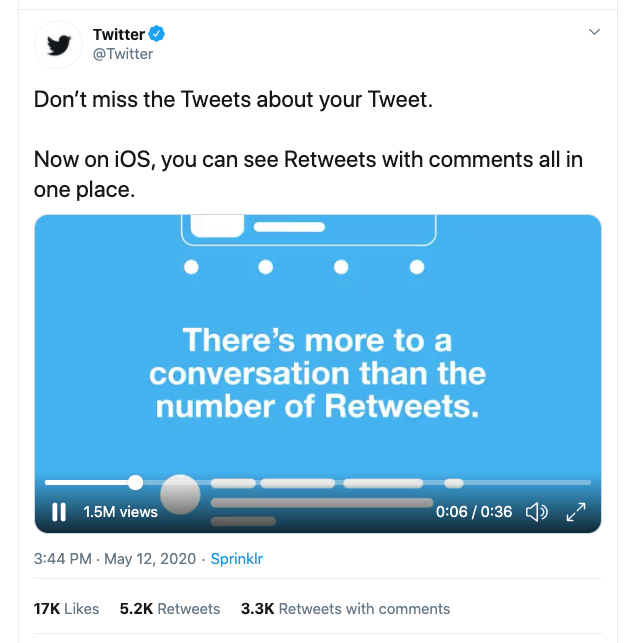 जैसा कि आप स्क्रीनशॉट में देख सकते हैं, Tweet से जुड़ी जानकारी के कई हिस्से दिखाई दे रहे हैं, जिनमें Tweet लेखक, Tweet मेट्रिक्स, बनाया गया टाइमस्टैम्प, वीडियो और वीडियो व्यू काउंट शामिल हैं। डेटा के कुछ ऐसे हिस्से भी हैं जो स्क्रीनशॉट में दिखाई नहीं देते, लेकिन फिर भी अनुरोध करने के लिए उपलब्ध हैं।
API को रिक्वेस्ट करते समय, डिफ़ॉल्ट रिस्पॉन्स सरल होता है और उसमें केवल डिफ़ॉल्ट Tweet फ़ील्ड्स (id और text) शामिल होते हैं। साथ ही, आपको केवल वही प्राथमिक ऑब्जेक्ट मिलेगा जो आपके द्वारा उपयोग किए जा रहे endpoint से लौटता है, उससे जुड़े अन्य संबद्ध डेटा ऑब्जेक्ट नहीं।
यह सरलता, फ़ील्ड्स और expansions पैरामीटर के साथ मिलकर, आपको अपने उपयोग के मामले के अनुसार केवल उन्हीं फ़ील्ड्स का अनुरोध करने में सक्षम बनाती है जिनकी आपको आवश्यकता है।
जैसा कि आप स्क्रीनशॉट में देख सकते हैं, Tweet से जुड़ी जानकारी के कई हिस्से दिखाई दे रहे हैं, जिनमें Tweet लेखक, Tweet मेट्रिक्स, बनाया गया टाइमस्टैम्प, वीडियो और वीडियो व्यू काउंट शामिल हैं। डेटा के कुछ ऐसे हिस्से भी हैं जो स्क्रीनशॉट में दिखाई नहीं देते, लेकिन फिर भी अनुरोध करने के लिए उपलब्ध हैं।
API को रिक्वेस्ट करते समय, डिफ़ॉल्ट रिस्पॉन्स सरल होता है और उसमें केवल डिफ़ॉल्ट Tweet फ़ील्ड्स (id और text) शामिल होते हैं। साथ ही, आपको केवल वही प्राथमिक ऑब्जेक्ट मिलेगा जो आपके द्वारा उपयोग किए जा रहे endpoint से लौटता है, उससे जुड़े अन्य संबद्ध डेटा ऑब्जेक्ट नहीं।
यह सरलता, फ़ील्ड्स और expansions पैरामीटर के साथ मिलकर, आपको अपने उपयोग के मामले के अनुसार केवल उन्हीं फ़ील्ड्स का अनुरोध करने में सक्षम बनाती है जिनकी आपको आवश्यकता है।
अतिरिक्त फ़ील्ड्स और ऑब्जेक्ट्स का अनुरोध करना।
curl --request GET --url 'https://api.x.com/2/tweets?ids=1260294888811347969' \
  --header 'Authorization: Bearer $BEARER_TOKEN'
{
    "data": [
        {
            "id": "1260294888811347969",
            "text": "Don’t miss the Tweets about your Tweet. \n\nNow on iOS, you can see Retweets with comments all in one place. https://t.co/oanjZfzC6y"
        }
    ]
}
- हमारे ऑब्जेक्ट मॉडल का उपयोग करके या एंडपॉइंट्स के API संदर्भ पृष्ठों में फ़ील्ड्स की सूची देखकर, उन अतिरिक्त फ़ील्ड्स की पहचान करें जिनका आप अनुरोध करना चाहते हैं। इस स्थिति में, हम निम्नलिखित अतिरिक्त फ़ील्ड्स का अनुरोध करेंगे: attachments, author_id, created_at, public_metrics.
-
ऊपर दिए गए फ़ील्ड्स को कॉमा-सेपरेटेड सूची के रूप में मान बनाकर
tweet.fieldsक्वेरी पैरामीटर बनाएँ:?tweet.fields=attachments,author_id,created_at,public_metrics - आपके द्वारा पहले किए गए GET /tweets अनुरोध में query parameter जोड़ें।
curl --request GET --url 'https://api.x.com/2/tweets?ids=1260294888811347969&tweet.fields=attachments,author_id,created_at,public_metrics' \ --header 'Authorization: Bearer $BEARER_TOKEN'
रिस्पॉन्स:
{
    "data": [
        {
            "id": "1260294888811347969",
            "text": "अपने ट्वीट के बारे में ट्वीट्स मिस न करें। \n\nअब iOS पर, आप एक ही जगह पर टिप्पणियों के साथ सभी रीट्वीट देख सकते हैं। https://t.co/oanjZfzC6y",
            "author_id": "783214",
            "public_metrics": {
                "retweet_count": 5219,
                "reply_count": 1828,
                "like_count": 17141,
                "quote_count": 3255
            },
            "attachments": {
                "media_keys": [
                    "13_1260294804770041858"
                ]
            },
            "created_at": "2020-05-12T19:44:51.000Z"
        }
    ]
}
- अब हम Tweet में शामिल वीडियो से जुड़े फ़ील्ड्स का अनुरोध करेंगे। इसके लिए
expansionsपैरामीटर का उपयोग करेंगे औरattachments.media_keysको इसका मान देते हुए इसे अनुरोध में जोड़ेंगे।
curl --request GET --url 'https://api.x.com/2/tweets?ids=1260294888811347969&tweet.fields=attachments,author_id,created_at,public_metrics&expansions=attachments.media_keys' \
  --header 'Authorization: Bearer $BEARER_TOKEN'
{
    "data": [
        {
            "id": "1260294888811347969",
            "text": "अपने Tweet के बारे में Tweets मिस न करें। \n\niOS पर अब आप एक ही जगह पर टिप्पणियों के साथ Retweets देख सकते हैं। https://t.co/oanjZfzC6y",
            "public_metrics": {
                "retweet_count": 5219,
                "reply_count": 1828,
                "like_count": 17141,
                "quote_count": 3255
            },
            "created_at": "2020-05-12T19:44:51.000Z",
            "attachments": {
                "media_keys": [
                    "13_1260294804770041858"
                ]
            },
            "author_id": "783214"
        }
    ],
    "includes": {
        "media": [
            {
                "media_key": "13_1260294804770041858",
                "type": "video"
            }
        ]
    }
}
- और अंत में, हम वीडियो का व्यू काउंट और अवधि प्राप्त करेंगे। ये डिफ़ॉल्ट फ़ील्ड्स नहीं हैं, इसलिए इन्हें अलग से अनुरोध करना होगा। अपने अनुरोध में
media.fieldsपैरामीटर के साथ कॉमा-सेपरेटेड वैल्यूpublic_metricsऔरduration_msका उपयोग करें।
curl --request GET --url 'https://api.x.com/2/tweets?ids=1260294888811347969&tweet.fields=attachments,author_id,created_at,public_metrics&expansions=attachments.media_keys&media.fields=duration_ms,public_metrics' --header 'Authorization: Bearer $BEARER_TOKEN'
रिस्पॉन्स, जिसमें अब वह सारा डेटा शामिल है जो Tweet के स्क्रीनशॉट में दिखाया गया है:
  {
    "data": [
        {
            "id": "1260294888811347969",
            "text": "अपने ट्वीट के बारे में ट्वीट्स मिस न करें। \n\nअब iOS पर, आप टिप्पणियों के साथ रीट्वीट एक ही जगह देख सकते हैं। https://t.co/oanjZfzC6y",
            "author_id": "783214",
            "public_metrics": {
                "retweet_count": 5219,
                "reply_count": 1828,
                "like_count": 17141,
                "quote_count": 3255
            },
            "created_at": "2020-05-12T19:44:51.000Z",
            "attachments": {
                "media_keys": [
                    "13_1260294804770041858"
                ]
            }
        }
    ],
    "includes": {
        "media": [
            {
                "duration_ms": 36503,
                "media_key": "13_1260294804770041858",
                "public_metrics": {
                    "view_count": 1534703
                },
                "type": "video"
            }
        ]
    }
}
- ids=1260294888811347969
- tweet.fields=attachments,author_id,created_at,public_metrics
- expansions=attachments.media_keys
- media.fields=public_metrics,duration_ms
?ids=1260294888811347969&tweet.fields=attachments,author\_id,created\_at,public\_metrics&expansions=attachments.media\_keys&media.fields=public\_metrics,duration\_ms
X API v2 के उदाहरण पेलोड
Tweet
{
  "data": [
    {
      "conversation_id": "1304102743196356610",
      "id": "1307025659294674945",
      "possibly_sensitive": false,
      "public_metrics": {
        "retweet_count": 11,
        "reply_count": 2,
        "like_count": 70,
        "quote_count": 1
      },
      "entities": {
        "urls": [
          {
            "start": 74,
            "end": 97,
            "url": "https://t.co/oeF3ZHeKQQ",
            "expanded_url": "https://dev.to/twitterdev/understanding-the-new-tweet-payload-in-the-twitter-api-v2-1fg5",
            "display_url": "dev.to/twitterdev/und…",
            "images": [
              {
                "url": "https://pbs.twimg.com/news_img/1317156296982867969/2uLfv-Bh?format=jpg&name=orig",
                "width": 1128,
                "height": 600
              },
              {
                "url": "https://pbs.twimg.com/news_img/1317156296982867969/2uLfv-Bh?format=jpg&name=150x150",
                "width": 150,
                "height": 150
              }
            ],
            "status": 200,
            "title": "Understanding the new Tweet payload in the X API v2",
            "description": "X recently announced the new X API v2, rebuilt from the ground up to deliver new features...",
            "unwound_url": "https://dev.to/twitterdev/understanding-the-new-tweet-payload-in-the-twitter-api-v2-1fg5"
          }
        ]
      },
      "text": "Here’s an article that highlights the updates in the new Tweet payload v2 https://t.co/oeF3ZHeKQQ",
      "in_reply_to_user_id": "2244994945",
      "created_at": "2020-09-18T18:36:15.000Z",
      "author_id": "2244994945",
      "referenced_tweets": [
        {
          "type": "replied_to",
          "id": "1304102743196356610"
        }
      ],
      "lang": "en",
      "source": "Twitter Web App"
    }
  ],
  "includes": {
    "users": [
      {
        "created_at": "2013-12-14T04:35:55.000Z",
        "profile_image_url": "https://pbs.twimg.com/profile_images/1283786620521652229/lEODkLTh_normal.jpg",
        "entities": {
          "url": {
            "urls": [
              {
                "start": 0,
                "end": 23,
                "url": "https://t.co/3ZX3TNiZCY",
                "expanded_url": "https://developer.x.com/en/community",
                "display_url": "developer.x.com/en/community"
              }
            ]
          },
          "description": {
            "hashtags": [
              {
                "start": 17,
                "end": 28,
                "tag": "TwitterDev"
              },
              {
                "start": 105,
                "end": 116,
                "tag": "TwitterAPI"
              }
            ]
          }
        },
        "id": "2244994945",
        "verified": true,
        "location": "127.0.0.1",
        "description": "The voice of the #TwitterDev team and your official source for updates, news, and events, related to the #TwitterAPI.",
        "pinned_tweet_id": "1293593516040269825",
        "username": "TwitterDev",
        "public_metrics": {
          "followers_count": 513961,
          "following_count": 2039,
          "tweet_count": 3635,
          "listed_count": 1672
        },
        "name": "Twitter Dev",
        "url": "https://t.co/3ZX3TNiZCY",
        "protected": false
      }
    ],
    "tweets": [
      {
        "conversation_id": "1304102743196356610",
        "id": "1304102743196356610",
        "possibly_sensitive": false,
        "public_metrics": {
          "retweet_count": 31,
          "reply_count": 12,
          "like_count": 104,
          "quote_count": 4
        },
        "entities": {
          "mentions": [
            {
              "start": 146,
              "end": 158,
              "username": "suhemparack"
            }
          ],
          "urls": [
            {
              "start": 237,
              "end": 260,
              "url": "https://t.co/CjneyMpgCq",
              "expanded_url": "https://x.com/TwitterDev/status/1304102743196356610/video/1",
              "display_url": "pic.x.com/CjneyMpgCq"
            }
          ],
          "hashtags": [
            {
              "start": 8,
              "end": 19,
              "tag": "TwitterAPI"
            }
          ]
        },
        "attachments": {
          "media_keys": [
            "13_1303848070984024065"
          ]
        },
        "text": "नए #TwitterAPI में Tweet पेलोड में कुछ सुधार शामिल हैं। आप शायद सोच रहे होंगे — मुख्य अंतर क्या हैं? 🧐\n\nइस वीडियो में, @SuhemParack v1.1 Tweet पेलोड की तुलना हमारे v2 endpoints से मिलने वाले पेलोड से करते हैं। https://t.co/CjneyMpgCq",
        "created_at": "2020-09-10T17:01:37.000Z",
        "author_id": "2244994945",
        "lang": "en",
        "source": "Twitter Media Studio"
      }
    ]
  }
}
Tweet का जवाब
{
  "data": [
    {
      "lang": "en",
      "conversation_id": "1296887091901718529",
      "text": "See how @PennMedCDH are using Twitter data to understand the COVID-19 health crisis 📊\n\nhttps://t.co/1tdA8uDWes",
      "referenced_tweets": [
        {
          "type": "replied_to",
          "id": "1296887091901718529"
        }
      ],
      "possibly_sensitive": false,
      "entities": {
        "annotations": [
          {
            "start": 30,
            "end": 36,
            "probability": 0.6318,
            "type": "Product",
            "normalized_text": "Twitter"
          }
        ],
        "mentions": [
          {
            "start": 8,
            "end": 19,
            "username": "PennMedCDH"
          }
        ],
        "urls": [
          {
            "start": 87,
            "end": 110,
            "url": "https://t.co/1tdA8uDWes",
            "expanded_url": "https://developer.x.com/en/use-cases/success-stories/penn",
            "display_url": "developer.x.com/en/use-cases/s…",
            "status": 200,
            "title": "Penn Medicine Center for Digital Health",
            "description": "Penn Med Center for Digital Health has created a COVID-19 Twitter map that includes charts detailing sentiment, symptoms reported, state-by-state data cuts, and border data on the COVID-19 outbreak. In addition, their Penn Med With You initiative uses aggregate regional information from Twitter to inform their website and text-messaging service. The service uses this information to disseminate relevant and timely resources.",
            "unwound_url": "https://developer.x.com/en/use-cases/success-stories/penn"
          }
        ]
      },
      "id": "1296887316556980230",
      "public_metrics": {
        "retweet_count": 9,
        "reply_count": 3,
        "like_count": 26,
        "quote_count": 2
      },
      "author_id": "2244994945",
      "in_reply_to_user_id": "2244994945",
      "context_annotations": [
        {
          "domain": {
            "id": "46",
            "name": "Brand Category",
            "description": "Categories within Brand Verticals that narrow down the scope of Brands"
          },
          "entity": {
            "id": "781974596752842752",
            "name": "Services"
          }
        },
        {
          "domain": {
            "id": "47",
            "name": "Brand",
            "description": "Brands and Companies"
          },
          "entity": {
            "id": "10045225402",
            "name": "Twitter"
          }
        },
        {
          "domain": {
            "id": "123",
            "name": "Ongoing News Story",
            "description": "Ongoing News Stories like 'Brexit'"
          },
          "entity": {
            "id": "1220701888179359745",
            "name": "COVID-19"
          }
        }
      ],
      "source": "Twitter Web App",
      "created_at": "2020-08-21T19:10:05.000Z"
    }
  ],
  "includes": {
    "users": [
      {
        "created_at": "2013-12-14T04:35:55.000Z",
        "id": "2244994945",
        "protected": false,
        "username": "TwitterDev",
        "verified": true,
        "entities": {
          "url": {
            "urls": [
              {
                "start": 0,
                "end": 23,
                "url": "https://t.co/3ZX3TNiZCY",
                "expanded_url": "https://developer.x.com/en/community",
                "display_url": "developer.x.com/en/community"
              }
            ]
          },
          "description": {
            "hashtags": [
              {
                "start": 17,
                "end": 28,
                "tag": "TwitterDev"
              },
              {
                "start": 105,
                "end": 116,
                "tag": "TwitterAPI"
              }
            ]
          }
        },
        "description": "The voice of the #TwitterDev team and your official source for updates, news, and events, related to the #TwitterAPI.",
        "pinned_tweet_id": "1293593516040269825",
        "public_metrics": {
          "followers_count": 513962,
          "following_count": 2039,
          "tweet_count": 3635,
          "listed_count": 1672
        },
        "location": "127.0.0.1",
        "name": "Twitter Dev",
        "profile_image_url": "https://pbs.twimg.com/profile_images/1283786620521652229/lEODkLTh_normal.jpg",
        "url": "https://t.co/3ZX3TNiZCY"
      },
      {
        "created_at": "2013-07-23T16:58:03.000Z",
        "id": "1615654896",
        "protected": false,
        "username": "PennMedCDH",
        "verified": false,
        "entities": {
          "url": {
            "urls": [
              {
                "start": 0,
                "end": 23,
                "url": "https://t.co/7eS9RuwIb9",
                "expanded_url": "http://centerfordigitalhealth.upenn.edu/",
                "display_url": "centerfordigitalhealth.upenn.edu"
              }
            ]
          },
          "description": {
            "mentions": [
              {
                "start": 0,
                "end": 13,
                "username": "PennMedicine"
              }
            ]
          }
        },
        "description": "@PennMedicine's Center for Digital Health advances science by researching the implications of the advancement of digital health technology in health care.",
        "public_metrics": {
          "followers_count": 1348,
          "following_count": 455,
          "tweet_count": 1288,
          "listed_count": 92
        },
        "location": "Philadelphia, PA",
        "name": "Penn Med CDH",
        "profile_image_url": "https://pbs.twimg.com/profile_images/1067488849725726723/MoO3FQ44_normal.jpg",
        "url": "https://t.co/7eS9RuwIb9"
      }
    ],
    "tweets": [
      {
        "lang": "en",
        "conversation_id": "1296887091901718529",
        "text": "Dr. @RainaMerchant and her team at the Penn Medicine CDH are helping build the future of health care.\n\nThe team is using insights from social data in many different ways — ranging from uncovering risk factors to shedding light on public sentiment. 🔎",
        "possibly_sensitive": false,
        "entities": {
          "annotations": [
            {
              "start": 39,
              "end": 55,
              "probability": 0.8274,
              "type": "Organization",
              "normalized_text": "Penn Medicine CDH"
            }
          ],
          "mentions": [
            {
              "start": 4,
              "end": 18,
              "username": "RainaMerchant"
            }
          ]
        },
        "id": "1296887091901718529",
        "public_metrics": {
          "retweet_count": 9,
          "reply_count": 7,
          "like_count": 32,
          "quote_count": 0
        },
        "author_id": "2244994945",
        "source": "Twitter Web App",
        "created_at": "2020-08-21T19:09:12.000Z"
      }
    ]
  }
}
Extended Tweet
{
  "data": [
    {
      "conversation_id": "1296121314218897408",
      "id": "1296121314218897408",
      "possibly_sensitive": false,
      "public_metrics": {
        "retweet_count": 54,
        "reply_count": 9,
        "like_count": 172,
        "quote_count": 23
      },
      "entities": {
        "urls": [
          {
            "start": 192,
            "end": 215,
            "url": "https://t.co/khXhTurm9x",
            "expanded_url": "https://devcommunity.x.com/t/hide-replies-now-available-in-the-new-twitter-api/140996",
            "display_url": "devcommunity.com/t/hide-replies…",
            "images": [
              {
                "url": "https://pbs.twimg.com/news_img/1296121315514957825/3CI24hSI?format=png&name=orig",
                "width": 400,
                "height": 400
              },
              {
                "url": "https://pbs.twimg.com/news_img/1296121315514957825/3CI24hSI?format=png&name=150x150",
                "width": 150,
                "height": 150
              }
            ],
            "status": 200,
            "title": "Hide replies now available in the new Twitter API",
            "description": "आज, हमें नए Twitter API में hide replies एंडपॉइंट की सामान्य उपलब्धता की घोषणा करते हुए खुशी हो रही है। hide replies एंडपॉइंट आपको ऐसे टूल बनाने की सुविधा देता है जो लोगों को उनके Tweets के जवाबों को छुपाने या दिखाने में मदद करते हैं। लोग अपने जवाबों को कई कारणों से प्रबंधित करते हैं, जैसे कि अपमानजनक, ध्यान भटकाने वाली या भ्रामक टिप्पणियों पर कम ध्यान देना, या बातचीत को अधिक रोचक बनाना। इस एंडपॉइंट के ज़रिए, आप Twitter पर लोगों को जवाब तेज़ी से और अधिक आसानी से छुपाने या दिखाने में मदद करने के लिए टूल बना सकते हैं...",
            "unwound_url": "https://devcommunity.x.com/t/hide-replies-now-available-in-the-new-twitter-api/140996"
          }
        ],
        "hashtags": [
          {
            "start": 178,
            "end": 189,
            "tag": "TwitterAPI"
          }
        ]
      },
      "text": "The hide replies endpoint is launching today! \n\nDevelopers can hide replies to Tweets - a crucial way developers can help improve the health of the public conversation using the #TwitterAPI.\n\nhttps://t.co/khXhTurm9x",
      "created_at": "2020-08-19T16:26:16.000Z",
      "context_annotations": [
        {
          "domain": {
            "id": "65",
            "name": "Interests and Hobbies Vertical",
            "description": "Top level interests and hobbies groupings, like Food or Travel"
          },
          "entity": {
            "id": "848920371311001600",
            "name": "Technology",
            "description": "Technology and computing"
          }
        },
        {
          "domain": {
            "id": "66",
            "name": "Interests and Hobbies Category",
            "description": "A grouping of interests and hobbies entities, like Novelty Food or Destinations"
          },
          "entity": {
            "id": "848921413196984320",
            "name": "Computer programming",
            "description": "Computer programming"
          }
        }
      ],
      "author_id": "2244994945",
      "lang": "en",
      "source": "Twitter Web App"
    }
  ],
  "includes": {
    "users": [
      {
        "created_at": "2013-12-14T04:35:55.000Z",
        "profile_image_url": "https://pbs.twimg.com/profile_images/1283786620521652229/lEODkLTh_normal.jpg",
        "entities": {
          "url": {
            "urls": [
              {
                "start": 0,
                "end": 23,
                "url": "https://t.co/3ZX3TNiZCY",
                "expanded_url": "https://developer.x.com/en/community",
                "display_url": "developer.x.com/en/community"
              }
            ]
          },
          "description": {
            "hashtags": [
              {
                "start": 17,
                "end": 28,
                "tag": "TwitterDev"
              },
              {
                "start": 105,
                "end": 116,
                "tag": "TwitterAPI"
              }
            ]
          }
        },
        "id": "2244994945",
        "verified": true,
        "location": "127.0.0.1",
        "description": "The voice of the #TwitterDev team and your official source for updates, news, and events, related to the #TwitterAPI.",
        "pinned_tweet_id": "1293593516040269825",
        "username": "TwitterDev",
        "public_metrics": {
          "followers_count": 513962,
          "following_count": 2039,
          "tweet_count": 3635,
          "listed_count": 1672
        },
        "name": "Twitter Dev",
        "url": "https://t.co/3ZX3TNiZCY",
        "protected": false
      }
    ]
  }
}
मीडिया सहित Tweet
{
"data": [
{
"lang": "en",
"conversation_id": "1293593516040269825",
"text": "आखिरकार आ गया! 🥁 नए #TwitterAPI से मिलिए।\n\nहम X API v2 को शुरू से फिर से बना रहे हैं ताकि हमारे डेवलपर समुदाय की बेहतर सेवा कर सकें। और आज का लॉन्च तो बस शुरुआत है।\n\nhttps://t.co/32VrwpGaJw https://t.co/KaFSbjWUA8",
"attachments": {
"media_keys": [
"7_1293565706408038401"
]
},
"possibly_sensitive": false,
"entities": {
"annotations": [
{
"start": 78,
"end": 88,
"probability": 0.4381,
"type": "Product",
"normalized_text": "Twitter API"
}
],
"hashtags": [
{
"start": 42,
"end": 53,
"tag": "TwitterAPI"
}
],
"urls": [
{
"start": 195,
"end": 218,
"url": "https://t.co/32VrwpGaJw",
"expanded_url": "https://blog.x.com/developer/en_us/topics/tools/2020/introducing_new_twitter_api.html",
"display_url": "blog.x.com/developer/en_u…",
"images": [
{
"url": "https://pbs.twimg.com/news_img/1336475659279818754/_cmRh7QE?format=jpg&name=orig",
"width": 1200,
"height": 627
},
{
"url": "https://pbs.twimg.com/news_img/1336475659279818754/_cmRh7QE?format=jpg&name=150x150",
"width": 150,
"height": 150
}
],
"status": 200,
"title": "नए और बेहतर X API का परिचय",
"description": "नए X API का परिचय — जिसे शुरू से नए सिरे से बनाया गया है ताकि नई सुविधाएँ तेज़ी से उपलब्ध कराई जा सकें और डेवलपर्स दुनिया को Twitter पर हो रही सार्वजनिक बातचीत से जोड़ने में मदद कर सकें।",
"unwound_url": "https://blog.x.com/developer/en_us/topics/tools/2020/introducing_new_twitter_api.html"
},
{
"start": 219,
"end": 242,
"url": "https://t.co/KaFSbjWUA8",
"expanded_url": "https://x.com/TwitterDev/status/1293593516040269825/video/1",
"display_url": "pic.x.com/KaFSbjWUA8"
}
]
},
"id": "1293593516040269825",
"public_metrics": {
"retweet_count": 958,
"reply_count": 171,
"like_count": 2848,
"quote_count": 333
},
"author_id": "2244994945",
"context_annotations": [
{
"domain": {
"id": "46",
"name": "Brand Category",
"description": "ब्रांड वर्टिकल्स के भीतर की श्रेणियाँ जो ब्रांड्स के दायरे को सीमित करती हैं"
},
"entity": {
"id": "781974596752842752",
"name": "Services"
}
},
{
"domain": {
"id": "47",
"name": "Brand",
"description": "ब्रांड्स और कंपनियाँ"
},
"entity": {
"id": "10045225402",
"name": "Twitter"
}
},
{
"domain": {
"id": "65",
"name": "Interests and Hobbies Vertical",
"description": "शीर्ष-स्तरीय रुचियों और शौक के समूह, जैसे खाना या यात्रा"
},
"entity": {
"id": "848920371311001600",
"name": "Technology",
"description": "प्रौद्योगिकी और कंप्यूटिंग"
}
},
{
"domain": {
"id": "66",
"name": "Interests and Hobbies Category",
"description": "रुचियों और शौक से जुड़ी संस्थाओं का एक समूह, जैसे नवीन खाद्य पदार्थ या गंतव्य"
},
"entity": {
"id": "848921413196984320",
"name": "Computer programming",
"description": "कंप्यूटर प्रोग्रामिंग"
}
}
],
"source": "Twitter Web App",
"created_at": "2020-08-12T17:01:42.000Z"
}
],
"includes": {
"media": [
{
"height": 720,
"duration_ms": 34875,
"media_key": "7_1293565706408038401",
"type": "video",
"preview_image_url": "https://pbs.twimg.com/ext_tw_video_thumb/1293565706408038401/pu/img/66P2dvbU4a02jYbV.jpg",
"public_metrics": {
"view_count": 279438
},
"width": 1280
}
],
"users": [
{
"created_at": "2013-12-14T04:35:55.000Z",
"id": "2244994945",
"protected": false,
"username": "TwitterDev",
"verified": true,
"entities": {
"url": {
"urls": [
{
"start": 0,
"end": 23,
"url": "https://t.co/3ZX3TNiZCY",
"expanded_url": "https://developer.x.com/en/community",
"display_url": "developer.x.com/en/community"
}
]
},
"description": {
"hashtags": [
{
"start": 17,
"end": 28,
"tag": "TwitterDev"
},
{
"start": 105,
"end": 116,
"tag": "TwitterAPI"
}
]
}
},
"description": "#TwitterDev टीम की आवाज़ और #TwitterAPI से जुड़े अपडेट, समाचार और इवेंट्स के लिए आपका आधिकारिक स्रोत।",
"pinned_tweet_id": "1293593516040269825",
"public_metrics": {
"followers_count": 513962,
"following_count": 2039,
"tweet_count": 3635,
"listed_count": 1672
},
"location": "127.0.0.1",
"name": "Twitter Dev",
"profile_image_url": "https://pbs.twimg.com/profile_images/1283786620521652229/lEODkLTh_normal.jpg",
"url": "https://t.co/3ZX3TNiZCY"
}
]
}
}`
### Retweet
`{
"data": [
{
"public_metrics": {
"retweet_count": 19,
"reply_count": 0,
"like_count": 0,
"quote_count": 0
},
"conversation_id": "1229851574555508737",
"id": "1229851574555508737",
"entities": {
"annotations": [
{
"start": 28,
"end": 38,
"probability": 0.261,
"type": "Product",
"normalized_text": "Alexa Skill"
},
{
"start": 44,
"end": 50,
"probability": 0.7332,
"type": "Product",
"normalized_text": "Twitter"
}
],
"mentions": [
{
"start": 3,
"end": 15,
"username": "suhemparack"
}
]
},
"text": "RT @suhemparack: I built an Alexa Skill for Twitter using APL that allows you to view Tweets and Trends on the echo show!\n\nCheck it out her…",
"created_at": "2020-02-18T19:33:59.000Z",
"possibly_sensitive": false,
"author_id": "2244994945",
"referenced_tweets": [
{
"type": "retweeted",
"id": "1229843515603144704"
}
],
"context_annotations": [
{
"domain": {
"id": "47",
"name": "Brand",
"description": "Brands and Companies"
},
"entity": {
"id": "10026792024",
"name": "Amazon"
}
},
{
"domain": {
"id": "48",
"name": "Product",
"description": "Products created by Brands. Examples: Ford Explorer, Apple iPhone."
},
"entity": {
"id": "968221983803494400",
"name": "Amazon - Alexa",
"description": "Alexa"
}
},
{
"domain": {
"id": "46",
"name": "Brand Category",
"description": "Categories within Brand Verticals that narrow down the scope of Brands"
},
"entity": {
"id": "781974596752842752",
"name": "Services"
}
},
{
"domain": {
"id": "47",
"name": "Brand",
"description": "Brands and Companies"
},
"entity": {
"id": "10045225402",
"name": "Twitter"
}
}
],
"source": "Twitter Web App",
"lang": "en"
}
],
"includes": {
"users": [
{
"profile_image_url": "https://pbs.twimg.com/profile_images/1283786620521652229/lEODkLTh_normal.jpg",
"username": "TwitterDev",
"name": "Twitter Dev",
"location": "127.0.0.1",
"url": "https://t.co/3ZX3TNiZCY",
"entities": {
"url": {
"urls": [
{
"start": 0,
"end": 23,
"url": "https://t.co/3ZX3TNiZCY",
"expanded_url": "https://developer.x.com/en/community",
"display_url": "developer.x.com/en/community"
}
]
},
"description": {
"hashtags": [
{
"start": 17,
"end": 28,
"tag": "TwitterDev"
},
{
"start": 105,
"end": 116,
"tag": "TwitterAPI"
}
]
}
},
"id": "2244994945",
"description": "The voice of the #TwitterDev team and your official source for updates, news, and events, related to the #TwitterAPI.",
"verified": true,
"public_metrics": {
"followers_count": 513962,
"following_count": 2039,
"tweet_count": 3635,
"listed_count": 1672
},
"pinned_tweet_id": "1293593516040269825",
"created_at": "2013-12-14T04:35:55.000Z",
"protected": false
},
{
"profile_image_url": "https://pbs.twimg.com/profile_images/1230703695051935747/TbQKe91L_normal.jpg",
"username": "suhemparack",
"name": "Suhem Parack",
"location": "Seattle, WA",
"url": "https://t.co/8IkCzClPCz",
"entities": {
"url": {
"urls": [
{
"start": 0,
"end": 23,
"url": "https://t.co/8IkCzClPCz",
"expanded_url": "https://developer.x.com",
"display_url": "developer.x.com"
}
]
},
"description": {
"mentions": [
{
"start": 42,
"end": 50,
"username": "Twitter"
}
]
}
},
"id": "857699969263964161",
"description": "Developer Relations for Academic Research @Twitter. Talk to me about research with Twitter data. Previously: Amazon Alexa. Views are my own",
"verified": false,
"public_metrics": {
"followers_count": 738,
"following_count": 512,
"tweet_count": 460,
"listed_count": 12
},
"pinned_tweet_id": "1296498078233571329",
"created_at": "2017-04-27T20:56:22.000Z",
"protected": false
}
],
"tweets": [
{
"public_metrics": {
"retweet_count": 19,
"reply_count": 1,
"like_count": 71,
"quote_count": 6
},
"conversation_id": "1229843515603144704",
"id": "1229843515603144704",
"entities": {
"annotations": [
{
"start": 11,
"end": 21,
"probability": 0.3342,
"type": "Product",
"normalized_text": "Alexa Skill"
},
{
"start": 27,
"end": 33,
"probability": 0.6727,
"type": "Product",
"normalized_text": "Twitter"
}
],
"urls": [
{
"start": 127,
"end": 150,
"url": "https://t.co/l5J8wq748G",
"expanded_url": "https://dev.to/twitterdev/building-an-alexa-skill-for-twitter-using-alexa-presentation-language-1aj0",
"display_url": "dev.to/twitterdev/bui…",
"status": 200,
"unwound_url": "https://dev.to/twitterdev/building-an-alexa-skill-for-twitter-using-alexa-presentation-language-1aj0"
}
]
},
"text": "I built an Alexa Skill for Twitter using APL that allows you to view Tweets and Trends on the echo show!\n\nCheck it out here 👇\n\nhttps://t.co/l5J8wq748G",
"created_at": "2020-02-18T19:01:58.000Z",
"possibly_sensitive": false,
"author_id": "857699969263964161",
"context_annotations": [
{
"domain": {
"id": "47",
"name": "Brand",
"description": "Brands and Companies"
},
"entity": {
"id": "10026792024",
"name": "Amazon"
}
},
{
"domain": {
"id": "48",
"name": "Product",
"description": "Products created by Brands. Examples: Ford Explorer, Apple iPhone."
},
"entity": {
"id": "968221983803494400",
"name": "Amazon - Alexa",
"description": "Alexa"
}
},
{
"domain": {
"id": "46",
"name": "Brand Category",
"description": "Categories within Brand Verticals that narrow down the scope of Brands"
},
"entity": {
"id": "781974596752842752",
"name": "Services"
}
},
{
"domain": {
"id": "47",
"name": "Brand",
"description": "Brands and Companies"
},
"entity": {
"id": "10045225402",
"name": "Twitter"
}
}
],
"source": "Twitter Web App",
"lang": "en"
}
]
}
}`
### Quote Tweet
`{
"data": [
{
"lang": "en",
"conversation_id": "1328399838128467969",
"text": "जैसा कि योजना थी, नीचे संदर्भित Labs v2 एंडपॉइंट्स अब बंद कर दिए गए हैं। यदि आपके कोई प्रश्न हैं या X API v2 के साथ सहायता चाहिए, तो कृपया फ़ोरम में हमें बताएं! https://t.co/JaxttUMmjX",
"referenced_tweets": [
{
"type": "quoted",
"id": "1327011423252144128"
}
],
"possibly_sensitive": false,
"entities": {
"annotations": [
{
"start": 151,
"end": 157,
"probability": 0.8115,
"type": "Product",
"normalized_text": "Twitter"
}
],
"urls": [
{
"start": 167,
"end": 190,
"url": "https://t.co/JaxttUMmjX",
"expanded_url": "https://x.com/TwitterDev/status/1327011423252144128",
"display_url": "twitter.com/TwitterDev/sta…"
}
]
},
"id": "1328399838128467969",
"public_metrics": {
"retweet_count": 7,
"reply_count": 4,
"like_count": 29,
"quote_count": 1
},
"author_id": "2244994945",
"context_annotations": [
{
"domain": {
"id": "46",
"name": "ब्रांड श्रेणी",
"description": "ब्रांड वर्टिकल्स के अंतर्गत वे श्रेणियाँ जो ब्रांड्स के दायरे को सीमित करती हैं"
},
"entity": {
"id": "781974596752842752",
"name": "Services"
}
},
{
"domain": {
"id": "47",
"name": "ब्रांड",
"description": "ब्रांड और कंपनियाँ"
},
"entity": {
"id": "10045225402",
"name": "Twitter"
}
},
{
"domain": {
"id": "65",
"name": "रुचियाँ और शौक वर्टिकल",
"description": "शीर्ष-स्तरीय रुचियों और शौक के समूह, जैसे खाना या यात्रा"
},
"entity": {
"id": "848920371311001600",
"name": "Technology",
"description": "प्रौद्योगिकी और कंप्यूटिंग"
}
},
{
"domain": {
"id": "66",
"name": "रुचियाँ और शौक श्रेणी",
"description": "रुचियों और शौक की संस्थाओं का समूह, जैसे नवीन खाद्य पदार्थ या गंतव्य"
},
"entity": {
"id": "848921413196984320",
"name": "Computer programming",
"description": "Computer programming"
}
}
],
"source": "Twitter Web App",
"created_at": "2020-11-16T18:09:36.000Z"
}
],
"includes": {
"users": [
{
"created_at": "2013-12-14T04:35:55.000Z",
"id": "2244994945",
"protected": false,
"username": "TwitterDev",
"verified": true,
"entities": {
"url": {
"urls": [
{
"start": 0,
"end": 23,
"url": "https://t.co/3ZX3TNiZCY",
"expanded_url": "https://developer.x.com/en/community",
"display_url": "developer.x.com/en/community"
}
]
},
"description": {
"hashtags": [
{
"start": 17,
"end": 28,
"tag": "TwitterDev"
},
{
"start": 105,
"end": 116,
"tag": "TwitterAPI"
}
]
}
},
"description": "#TwitterDev टीम की आवाज़ और #TwitterAPI से जुड़े अपडेट, समाचार और इवेंट के लिए आपका आधिकारिक स्रोत।",
"pinned_tweet_id": "1293593516040269825",
"public_metrics": {
"followers_count": 513962,
"following_count": 2039,
"tweet_count": 3635,
"listed_count": 1672
},
"location": "127.0.0.1",
"name": "Twitter Dev",
"profile_image_url": "https://pbs.twimg.com/profile_images/1283786620521652229/lEODkLTh_normal.jpg",
"url": "https://t.co/3ZX3TNiZCY"
}
],
"tweets": [
{
"lang": "en",
"conversation_id": "1327011423252144128",
"text": "👋 याद दिला दें कि Twitter Developer Labs v2 hide replies और recent search अगले सोमवार, 16 नवंबर को बंद हो जाएंगे! हम आपसे अनुरोध करते हैं कि अब v2 #TwitterAPI में उपलब्ध नए hide replies और recent search एंडपॉइंट्स पर माइग्रेट करें। विवरण: https://t.co/r6z6CI7kEy",
"possibly_sensitive": false,
"entities": {
"annotations": [
{
"start": 26,
"end": 50,
"probability": 0.4387,
"type": "Product",
"normalized_text": "Twitter Developer Labs v2"
}
],
"hashtags": [
{
"start": 228,
"end": 239,
"tag": "TwitterAPI"
}
],
"urls": [
{
"start": 250,
"end": 273,
"url": "https://t.co/r6z6CI7kEy",
"expanded_url": "https://devcommunity.x.com/t/retiring-labs-v2-recent-search-and-hide-replies/145795",
"display_url": "devcommunity.com/t/retiring-lab…",
"images": [
{
"url": "https://pbs.twimg.com/news_img/1327011425240313856/PkurOyu1?format=jpg&name=orig",
"width": 1200,
"height": 630
},
{
"url": "https://pbs.twimg.com/news_img/1327011425240313856/PkurOyu1?format=jpg&name=150x150",
"width": 150,
"height": 150
}
],
"status": 200,
"title": "Labs v2 recent search और hide replies को बंद करना",
"description": "जैसा कि हमने अपनी Early Access और hide replies घोषणाओं में बताया था, निम्नलिखित Twitter Developer Labs v2 एंडपॉइंट्स 16 नवंबर को बंद कर दिए जाएंगे। Labs v2 recent search, Labs v2 hide replies। इन्हें कॉल करने पर ये एंडपॉइंट्स HTTP 410 स्टेटस के साथ प्रतिक्रिया देंगे और कोई डेटा नहीं लौटाएंगे। Labs से मिली आपकी प्रतिक्रिया के आधार पर, हमने संबंधित कार्यक्षमता को X API v2 में शामिल किया है। प्रासंगिक दस्तावेज़ीकरण नीचे दिए गए लिंक से प्राप्त किया जा सकता है। यदि आपने अभी तक v2 एक्सेस के लिए नामांकन नहीं किया है तो यहाँ क्लिक करें...",
"unwound_url": "https://devcommunity.x.com/t/retiring-labs-v2-recent-search-and-hide-replies/145795"
}
]
},
"id": "1327011423252144128",
"public_metrics": {
"retweet_count": 8,
"reply_count": 2,
"like_count": 33,
"quote_count": 4
},
"author_id": "2244994945",
"context_annotations": [
{
"domain": {
"id": "46",
"name": "Brand Category",
"description": "Categories within Brand Verticals that narrow down the scope of Brands"
},
"entity": {
"id": "781974596752842752",
"name": "Services"
}
},
{
"domain": {
"id": "47",
"name": "Brand",
"description": "Brands and Companies"
},
"entity": {
"id": "10045225402",
"name": "Twitter"
}
},
{
"domain": {
"id": "65",
"name": "Interests and Hobbies Vertical",
"description": "Top level interests and hobbies groupings, like Food or Travel"
},
"entity": {
"id": "848920371311001600",
"name": "Technology",
"description": "प्रौद्योगिकी और कंप्यूटिंग"
}
},
{
"domain": {
"id": "66",
"name": "Interests and Hobbies Category",
"description": "A grouping of interests and hobbies entities, like Novelty Food or Destinations"
},
"entity": {
"id": "848921413196984320",
"name": "कंप्यूटर प्रोग्रामिंग",
"description": "कंप्यूटर प्रोग्रामिंग"
}
}
],
"source": "Twitter Web App",
"created_at": "2020-11-12T22:12:32.000Z"
}
]
}
}
रीट्वीट किया गया Quote Tweet
{
    "data": [
    {
      "lang": "en",
      "conversation_id": "1225470895902412800",
      "text": "RT @AureliaSpecker: 📣 If you enjoyed the London commute tutorial I wrote in November last year, check out the refactored version that uses…",
      "referenced_tweets": [
        {
          "type": "retweeted",
          "id": "1224709550214873090"
        }
      ],
      "possibly_sensitive": false,
      "entities": {
        "annotations": [
          {
            "start": 42,
            "end": 47,
            "probability": 0.6999,
            "type": "Place",
            "normalized_text": "London"
          }
        ],
        "mentions": [
          {
            "start": 3,
            "end": 18,
            "username": "AureliaSpecker"
          }
        ]
      },
      "id": "1225470895902412800",
      "public_metrics": {
        "retweet_count": 12,
        "reply_count": 0,
        "like_count": 0,
        "quote_count": 0
      },
      "author_id": "2244994945",
      "context_annotations": [
        {
          "domain": {
            "id": "46",
            "name": "Brand Category",
            "description": "Categories within Brand Verticals that narrow down the scope of Brands"
          },
          "entity": {
            "id": "781974596752842752",
            "name": "Services"
          }
        },
        {
          "domain": {
            "id": "47",
            "name": "Brand",
            "description": "Brands and Companies"
          },
          "entity": {
            "id": "10045225402",
            "name": "Twitter"
          }
        },
        {
          "domain": {
            "id": "65",
            "name": "Interests and Hobbies Vertical",
            "description": "Top level interests and hobbies groupings, like Food or Travel"
          },
          "entity": {
            "id": "848920371311001600",
            "name": "Technology",
            "description": "Technology and computing"
          }
        },
        {
          "domain": {
            "id": "66",
            "name": "Interests and Hobbies Category",
            "description": "A grouping of interests and hobbies entities, like Novelty Food or Destinations"
          },
          "entity": {
            "id": "848921413196984320",
            "name": "Computer programming",
            "description": "Computer programming"
          }
        }
      ],
      "source": "Twitter for iPhone",
      "created_at": "2020-02-06T17:26:44.000Z"
    }
  ],
  "includes": {
    "users": [
      {
        "created_at": "2013-12-14T04:35:55.000Z",
        "id": "2244994945",
        "protected": false,
        "username": "TwitterDev",
        "verified": true,
        "entities": {
          "url": {
            "urls": [
              {
                "start": 0,
                "end": 23,
                "url": "https://t.co/3ZX3TNiZCY",
                "expanded_url": "https://developer.x.com/en/community",
                "display_url": "developer.x.com/en/community"
              }
            ]
          },
          "description": {
            "hashtags": [
              {
                "start": 17,
                "end": 28,
                "tag": "TwitterDev"
              },
              {
                "start": 105,
                "end": 116,
                "tag": "TwitterAPI"
              }
            ]
          }
        },
        "description": "The voice of the #TwitterDev team and your official source for updates, news, and events, related to the #TwitterAPI.",
        "pinned_tweet_id": "1293593516040269825",
        "public_metrics": {
          "followers_count": 513962,
          "following_count": 2039,
          "tweet_count": 3635,
          "listed_count": 1672
        },
        "location": "127.0.0.1",
        "name": "Twitter Dev",
        "profile_image_url": "https://pbs.twimg.com/profile_images/1283786620521652229/lEODkLTh_normal.jpg",
        "url": "https://t.co/3ZX3TNiZCY"
      },
      {
        "created_at": "2013-01-18T23:45:43.000Z",
        "id": "1102321381",
        "protected": false,
        "username": "AureliaSpecker",
        "verified": false,
        "entities": {
          "description": {
            "mentions": [
              {
                "start": 7,
                "end": 17,
                "username": "TwitterUK"
              },
              {
                "start": 86,
                "end": 95,
                "username": "_dormrod"
              }
            ]
          }
        },
        "description": "devrel @TwitterUK • Swiss in London • mother of houseplants • personal hairdresser to @_dormrod",
        "pinned_tweet_id": "1253069421322567681",
        "public_metrics": {
          "followers_count": 1036,
          "following_count": 1330,
          "tweet_count": 855,
          "listed_count": 26
        },
        "location": "London, UK",
        "name": "Aurelia Specker",
        "profile_image_url": "https://pbs.twimg.com/profile_images/1137517534104772608/8FBYgc6G_normal.jpg",
        "url": ""
      }
    ],
    "tweets": [
      {
        "lang": "en",
        "conversation_id": "1224709550214873090",
        "text": "📣 If you enjoyed the London commute tutorial I wrote in November last year, check out the refactored version that uses Twitter's new search endpoint 🚇 https://t.co/87XIPZmZBJ\n\n#DEVcommunity #Pythontutorial @TwitterDev @TwitterAPI https://t.co/dXrJYvn3hY",
        "referenced_tweets": [
          {
            "type": "quoted",
            "id": "1195000047089389573"
          }
        ],
        "possibly_sensitive": false,
        "entities": {
          "annotations": [
            {
              "start": 22,
              "end": 27,
              "probability": 0.7075,
              "type": "Place",
              "normalized_text": "London"
            },
            {
              "start": 120,
              "end": 126,
              "probability": 0.7355,
              "type": "Product",
              "normalized_text": "Twitter"
            }
          ],
          "mentions": [
            {
              "start": 206,
              "end": 217,
              "username": "TwitterDev"
            },
            {
              "start": 218,
              "end": 229,
              "username": "TwitterAPI"
            }
          ],
          "hashtags": [
            {
              "start": 176,
              "end": 189,
              "tag": "DEVcommunity"
            },
            {
              "start": 190,
              "end": 205,
              "tag": "Pythontutorial"
            }
          ],
          "urls": [
            {
              "start": 151,
              "end": 174,
              "url": "https://t.co/87XIPZmZBJ",
              "expanded_url": "https://bit.ly/2OrnrCC",
              "display_url": "bit.ly/2OrnrCC",
              "status": 200,
              "unwound_url": "https://dev.to/twitterdev/migrate-to-twitter-s-newly-released-labs-recent-search-endpoint-3npe"
            },
            {
              "start": 230,
              "end": 253,
              "url": "https://t.co/dXrJYvn3hY",
              "expanded_url": "https://x.com/AureliaSpecker/status/1195000047089389573",
              "display_url": "twitter.com/AureliaSpecker…"
            }
          ]
        },
        "id": "1224709550214873090",
        "public_metrics": {
          "retweet_count": 12,
          "reply_count": 0,
          "like_count": 43,
          "quote_count": 2
        },
        "author_id": "1102321381",
        "context_annotations": [
          {
            "domain": {
              "id": "46",
              "name": "Brand Category",
              "description": "Categories within Brand Verticals that narrow down the scope of Brands"
            },
            "entity": {
              "id": "781974596752842752",
              "name": "Services"
            }
          },
          {
            "domain": {
              "id": "47",
              "name": "Brand",
              "description": "Brands and Companies"
            },
            "entity": {
              "id": "10045225402",
              "name": "Twitter"
            }
          },
          {
            "domain": {
              "id": "65",
              "name": "Interests and Hobbies Vertical",
              "description": "Top level interests and hobbies groupings, like Food or Travel"
            },
            "entity": {
              "id": "848920371311001600",
              "name": "Technology",
              "description": "Technology and computing"
            }
          },
          {
            "domain": {
              "id": "66",
              "name": "Interests and Hobbies Category",
              "description": "रुचियों और शौक की entities का एक समूह, जैसे Novelty Food या Destinations"
            },
            "entity": {
              "id": "848921413196984320",
              "name": "Computer programming",
              "description": "Computer programming"
            }
          }
        ],
        "source": "Twitter Web App",
        "created_at": "2020-02-04T15:01:25.000Z"
      }
    ]
  }
}