

빠른 탐색
fields parameters를 사용하여 특정 필드를 요청하고, expansions를 사용하여 관련 객체를 포함시킬 수 있습니다.
게시물 (Tweet)
id, text, edit_history_tweet_ids
추가 필드를 요청하려면 tweet.fields를 사용하고, 관련 객체를 포함하려면 expansions를 사용합니다.
게시물의 모든 필드
| 필드 이름 | 타입 | 설명 | 사용 용도 |
|---|---|---|---|
| id(기본값) | string | 요청된 Tweet의 고유 식별자입니다. | 특정 Tweet을 프로그래밍 방식으로 조회하는 데 사용합니다. |
| text (기본값) | string | Tweet의 실제 UTF-8 텍스트입니다. 유효한 문자에 대한 자세한 내용은 twitter-text를 참조하세요. | 키워드 추출 및 감성 분석/분류에 사용할 수 있습니다. |
| edit_history_tweet_ids (default) | object | Tweet의 모든 버전을 나타내는 고유 식별자들입니다. 수정 이력이 없는 Tweet의 경우 ID는 하나이고, 수정 이력이 있는 Tweet의 경우 여러 개의 ID가 존재합니다. | 이 정보를 사용하여 Tweet의 수정 이력을 조회할 수 있습니다. |
| article | object | 이 Tweet에 포함된 Article의 메타데이터를 포함합니다. | 이를 사용하여 Article의 텍스트와 엔터티를 가져올 수 있습니다. |
| attachments | object | 이 Tweet에 포함된 첨부 파일(있는 경우)의 타입을 지정합니다. | 요청한 expansions에 대해 반환되는 객체를 이해하는 데 사용합니다. |
| author_id | string | 이 Tweet을 게시한 User의 고유 식별자입니다. | User 객체를 하이드레이트(hydrate)하거나, 동료 검토를 위해 데이터 세트를 공유하는 데 사용합니다. |
| card_uri | string | 이 Tweet에 포함된 Card의 URI입니다. | |
| community_id | string | 이 Post가 속한 Community의 고유 식별자입니다. | |
| context_annotations | array | Tweet에 대한 context annotation을 포함합니다. | 엔터티 인식/추출, 토픽 분석에 사용할 수 있습니다. |
| conversation_id | string | 대화의 원본 Tweet(직접 답글 및 답글에 대한 답글 포함)에 대한 Tweet ID입니다. | 이 값을 사용하여 특정 Tweet을 기준으로 대화를 재구성할 수 있습니다. |
| created_at | date (ISO 8601) | Tweet이 생성된 시각입니다. | 시계열 분석 및 Tweet 생성 시점을 파악하는 데 유용합니다. |
| display_text_range | array | 표시되는 텍스트 구간의 시작 및 끝 인덱스를 담고 있는 배열입니다. | 긴 게시물에서 기본적으로 어떤 텍스트 구간이 표시되는지 파악하는 데 유용합니다. |
| edit_controls | object | 해당 Tweet을 얼마나 더 수정할 수 있는지와 남은 수정 가능 횟수를 나타냅니다. | Tweet이 수정 가능한 상태인지 판별하는 데 사용합니다. |
| entities | object | Tweet 텍스트에서 파싱된 엔티티입니다. 자세한 내용은 Twitter Objects의 entities를 참조하세요. | 해시태그, URL, 멘션 등과 같은 요소에 대한 추가 정보를 제공합니다. |
| geo | object | Geo 태그가 지정된 Tweet의 위치나 장소를 나타냅니다. | Geo 태그가 지정된 Tweet의 위치를 파악하는 데 사용됩니다. |
| in_reply_to_user_id | string | 해당 Tweet이 답글인 경우, 이 필드에는 원본 Tweet 작성자의 ID가 포함됩니다. | Tweet이 다른 Tweet에 대한 답글인지 여부를 판단하는 데 사용됩니다. |
| lang | string | Twitter가 감지한 경우, Tweet의 언어입니다. | Tweet을 사용 언어별로 분류하는 데 사용됩니다. |
| non_public_metrics | object | 요청 시점을 기준으로 Tweet에 대한 비공개 참여(engagement) 지표입니다. 사용자 컨텍스트 인증이 필요합니다. | 해당 Tweet으로 생성된 총 노출 수(impressions)를 파악하는 데 사용됩니다. |
| note_tweet | object | 280자를 초과하는 장문 Post의 전체 텍스트를 포함합니다. | 게시물의 전체 텍스트를 가져오는 데 사용됩니다. |
| organic_metrics | object | 요청 시점을 기준으로 Tweet에 대해 유기적(organic) 컨텍스트에서 수집된 참여(engagement) 지표입니다. 사용자 컨텍스트 인증이 필요합니다. | 해당 Tweet의 유기적(organic) 참여도를 측정하는 데 사용됩니다. |
| possibly_sensitive | boolean | 콘텐츠가 민감한 것으로 인식될 수 있는지를 나타냅니다. | 특정 유형의 콘텐츠 유통 양상을 분석하는 데 사용됩니다. |
| promoted_metrics | object | 요청 시점을 기준으로 Tweet에 대해 프로모션 컨텍스트에서 수집된 참여(engagement) 지표입니다. 사용자 컨텍스트 인증이 필요합니다. | Tweet이 프로모션되었을 때의 참여도를 측정하는 데 사용됩니다. |
| public_metrics | object | 요청 시점을 기준으로 Tweet에 대한 공개 참여(engagement) 지표입니다. | Tweet의 참여도를 측정하는 데 사용됩니다. |
| referenced_tweets | array | 이 Tweet이 참조하는 Tweet 목록으로, 리트윗, 인용 Tweet, 답글 등이 포함됩니다. | 리트윗 등에서 대화의 흐름과 구조를 이해하는 데 사용됩니다. |
| reply_settings | string | 해당 Tweet에 누가 답글을 남길 수 있는지를 나타냅니다. 가능한 값은 “everyone”, “mentioned_users”, “followers”입니다. | 해당 Tweet의 대화 답글 설정을 파악하는 데 사용됩니다. |
| withheld | object | 차단된 콘텐츠에 대한 차단 세부 정보를 포함합니다. | |
| scopes | object | Tweet에 대한 범위(scope) 정보를 포함합니다. | 어떤 사용자가 이 Tweet을 볼 수 있는지를 나타냅니다. 프로모션된 Tweet에 대해서만 반환됩니다. |
| media_metadata | 배열 | Tweet에 첨부된 미디어에 대한 메타데이터를 포함합니다. | Tweet에 첨부된 미디어의 alt_text 등 추가 메타데이터를 가져옵니다. |
$BEARER_TOKEN을(를) 본인이 발급받은 Bearer 토큰으로 반드시 교체하세요.
curl --request GET 'https://api.x.com/2/tweets?ids=1212092628029698048&tweet.fields=attachments,author_id,context_annotations,created_at,entities,geo,id,in_reply_to_user_id,lang,possibly_sensitive,public_metrics,referenced_tweets,text,withheld&expansions=referenced_tweets.id' --header 'Authorization: Bearer $BEARER_TOKEN'
{
  "data": [
    {
      "text": "We believe the best future version of our API will come from building it with YOU. Here’s to another great year with everyone who builds on the Twitter platform. We can’t wait to continue working with you in the new year. https://t.co/yvxdK6aOo2",
      "edit_history_tweet_ids": [
        "1212092628029698048"
      ],
      "lang": "en",
      "in_reply_to_user_id": "2244994945",
      "entities": {
        "urls": [
          {
            "start": 222,
            "end": 245,
            "url": "https://t.co/yvxdK6aOo2",
            "expanded_url": "https://x.com/LovesNandos/status/1211797914437259264/photo/1",
            "display_url": "pic.x.com/yvxdK6aOo2",
            "media_key": "16_1211797899316740096"
          }
        ],
        "annotations": [
          {
            "start": 42,
            "end": 44,
            "probability": 0.5359,
            "type": "Other",
            "normalized_text": "API"
          },
          {
            "start": 144,
            "end": 150,
            "probability": 0.9832,
            "type": "Other",
            "normalized_text": "Twitter"
          }
        ]
      },
      "author_id": "2244994945",
      "referenced_tweets": [
        {
          "type": "replied_to",
          "id": "1212092627178287104"
        }
      ],
      "id": "1212092628029698048",
      "public_metrics": {
        "retweet_count": 7,
        "reply_count": 3,
        "like_count": 38,
        "quote_count": 1
      },
      "context_annotations": [
        {
          "domain": {
            "id": "29",
            "name": "Events [Entity Service]",
            "description": "실제 이벤트. "
          },
          "entity": {
            "id": "1186637514896920576",
            "name": " New Years Eve"
          }
        },
        {
          "domain": {
            "id": "29",
            "name": "Events [Entity Service]",
            "description": "실제 이벤트. "
          },
          "entity": {
            "id": "1206982436287963136",
            "name": "Happy New Year: It’s finally 2020 everywhere!",
            "description": "전 세계 사람들이 새해를 맞이하며 펼치는 불꽃놀이와 축하 행사를 확인하세요.\n사진 제공: @GettyImages "
          }
        },
        {
          "domain": {
            "id": "119",
            "name": "Holiday",
            "description": "크리스마스나 할로윈 같은 공휴일"
          },
          "entity": {
            "id": "1186637514896920576",
            "name": " New Years Eve"
          }
        },
        {
          "domain": {
            "id": "119",
            "name": "Holiday",
            "description": "크리스마스나 할로윈 같은 공휴일"
          },
          "entity": {
            "id": "1206982436287963136",
            "name": "Happy New Year: It’s finally 2020 everywhere!",
            "description": "전 세계 사람들이 새해를 맞이하며 펼치는 불꽃놀이와 축하 행사를 확인하세요.\n사진 제공: @GettyImages "
          }
        },
        {
          "domain": {
            "id": "30",
            "name": "Entities [Entity Service]",
            "description": "Entity Service 최상위 도메인, Entity Service의 모든 항목이 이 도메인에 속합니다"
          },
          "entity": {
            "id": "781974596752842752",
            "name": "Services"
          }
        },
        {
          "domain": {
            "id": "47",
            "name": "Brand",
            "description": "브랜드 및 회사"
          },
          "entity": {
            "id": "10045225402",
            "name": "Twitter"
          }
        },
        {
          "domain": {
            "id": "131",
            "name": "Unified Twitter Taxonomy",
            "description": "사용자 관심사 분류 체계. "
          },
          "entity": {
            "id": "10045225402",
            "name": "Twitter"
          }
        },
        {
          "domain": {
            "id": "131",
            "name": "Unified Twitter Taxonomy",
            "description": "사용자 관심사 분류 체계. "
          },
          "entity": {
            "id": "847868745150119936",
            "name": "Family & relationships",
            "description": "취미 및 관심사"
          }
        },
        {
          "domain": {
            "id": "131",
            "name": "Unified Twitter Taxonomy",
            "description": "사용자 관심사 분류 체계. "
          },
          "entity": {
            "id": "1196446161223028736",
            "name": "Social media"
          }
        },
        {
          "domain": {
            "id": "29",
            "name": "Events [Entity Service]",
            "description": "실제 이벤트. "
          },
          "entity": {
            "id": "1206982436287963136",
            "name": "Happy New Year: It’s finally 2020 everywhere!",
            "description": "전 세계 사람들이 새해를 맞이하며 펼치는 불꽃놀이와 축하 행사를 확인하세요.\n사진 제공: @GettyImages "
          }
        },
        {
          "domain": {
            "id": "119",
            "name": "Holiday",
            "description": "크리스마스나 할로윈 같은 공휴일"
          },
          "entity": {
            "id": "1206982436287963136",
            "name": "Happy New Year: It’s finally 2020 everywhere!",
            "description": "전 세계 사람들이 새해를 맞이하며 펼치는 불꽃놀이와 축하 행사를 확인하세요.\n사진 제공: @GettyImages "
          }
        }
      ],
      "created_at": "2019-12-31T19:26:16.000Z",
      "attachments": {
        "media_keys": [
          "16_1211797899316740096"
        ]
      },
      "possibly_sensitive": false
    }
  ],
  "includes": {
    "tweets": [
      {
        "text": "These launches would not be possible without the feedback you provided along the way, so THANK YOU to everyone who has contributed your time and ideas. Have more feedback? Let us know ⬇️ https://t.co/Vxp4UKnuJ9",
        "edit_history_tweet_ids": [
          "1212092627178287104"
        ],
        "lang": "en",
        "in_reply_to_user_id": "2244994945",
        "entities": {
          "urls": [
            {
              "start": 187,
              "end": 210,
              "url": "https://t.co/Vxp4UKnuJ9",
              "expanded_url": "https://twitterdevfeedback.uservoice.com/forums/921790-twitter-developer-labs",
              "display_url": "twitterdevfeedback.uservoice.com/forums/921790-…",
              "status": 200,
              "title": "피드백 채널 업데이트",
              "description": "우리는 여러분의 의견과 피드백을 바탕으로 개발자 플랫폼을 공개적으로 구축합니다. 지난 한 해 동안 여러분과 여러분 앱의 사용자로부터 직접 의견을 듣는 것이 여러분이 파악하도록 도와주신 사용 사례에 맞는 개발자 제품을 구축하는 데 도움이 되었습니다. 우리는 이를 제품 구축 방식으로 만들고자 하며, 앞으로 피드백 채널을 통합할 예정입니다. 여러분이 계신 곳에서 만나기 오늘부터 더 빈번한 직접 소통을 위해 UserVoice 피드백 채널을 종료할 예정입니다...",
              "unwound_url": "https://devcommunity.x.com/t/updates-on-our-feedback-channels/169706"
            }
          ]
        },
        "author_id": "2244994945",
        "referenced_tweets": [
          {
            "type": "replied_to",
            "id": "1212092626247110657"
          }
        ],
        "id": "1212092627178287104",
        "public_metrics": {
          "retweet_count": 2,
          "reply_count": 1,
          "like_count": 19,
          "quote_count": 0
        },
        "created_at": "2019-12-31T19:26:16.000Z",
        "possibly_sensitive": false
      }
    ]
  }
User
user.fields 파라미터를 사용하면 됩니다.
user 오브젝트는 Tweet 오브젝트의 하위 오브젝트로도 존재하며, 확장되어 포함될 수 있습니다. 이 오브젝트는 ?expansions=author_id 또는 ?expansions=in_reply_to_user_id를 사용해 기본 필드만 포함된 축약된 오브젝트 형태로 확장해서 가져올 수 있습니다. 오브젝트를 완전하게 구성하기 위해 추가 필드를 요청할 때에는 필드 파라미터 user.fields와 함께 해당 expansions 값을 사용하세요.
| 필드 | 유형 | 설명 | 사용 용도 |
|---|---|---|---|
| id (기본값) | string | 이 사용자를 나타내는 고유 식별자입니다."id": "2244994945" | 특정 X 사용자의 정보를 프로그래밍 방식으로 조회하는 데 사용합니다. |
| name (기본값) | string | 사용자가 프로필에 설정한 이름입니다. 반드시 실제 사람의 이름일 필요는 없습니다. 일반적으로 최대 50자까지 허용되지만, 변경될 수 있습니다."name": "Twitter Dev" | |
| username (기본값) | string | 이 사용자가 Twitter에서 자신을 나타내는 화면 이름(스크린 네임), 핸들 또는 별칭입니다. 사용자 이름은 고유하지만 변경될 수 있습니다. 일반적으로 최대 15자까지 허용되지만, 더 긴 이름을 가진 이전 계정도 존재할 수 있습니다."username": "TwitterDev" | |
| affiliation | object | 사용자의 소속 정보(affiliation)에 대한 세부 정보를 포함합니다. | 사용자의 제휴 배지를 조회하는 데 사용할 수 있습니다. |
| confirmed_email | string | 인증된 사용자의 검증된 이메일 주소입니다. | |
| connection_status | array | 인증된 사용자와 조회 대상 사용자 간의 관계를 나타내는 리스트를 제공합니다. 예를 들어 following, followed, follow request sent, follow request received, blocking, muting 등이 포함됩니다. ”connection_status”: [ “follow_request_received”, “follow_request_sent”, “blocking”, “followed_by”, “following”, “muting” ] | 인증된 사용자와 조회 대상 사용자 사이의 연결 상태를 확인하는 데 사용할 수 있습니다. |
| created_at | date (ISO 8601) | 사용자 계정이 Twitter에서 생성된 UTC 기준 일시입니다."created_at": "2013-12-14T04:35:55.000Z" | 해당 사용자가 X를 얼마나 오래 사용했는지 파악하는 데 사용할 수 있습니다. |
| description | string | 이 사용자가 프로필 설명(바이오)을 작성했다면, 그 텍스트입니다."description": "The voice of the X Dev team and your official source for updates, news, and events, related to the X API." | |
| entities | object | 사용자 설명 텍스트 중 특별한 의미를 갖는 부분에 대한 세부 정보를 포함합니다."entities": { <br/> "url": { <br/> "urls": [ <br/> { <br/> "start": 0, <br/> "end": 23, <br/> "url": "https://t.co/3ZX3TNiZCY", <br/> "expanded_url": "/content/developer-twitter/en/community", <br/> "display_url": "developer.x.com/en/community" <br/> } <br/> ] <br/> }, <br/> "description": { <br/> "urls": [ <br/> { <br/> "start": 0, <br/> "end": 23, <br/> "url": "https://t.co/3ZX3TNiZCY", <br/> "expanded_url": "/content/developer-twitter/en/community", <br/> "display_url": "developer.x.com/en/community" <br/> }, <br/> "hashtags": [ <br/> { <br/> "start": 23, <br/> "end": 30, <br/> "tag": "DevRel" <br/> }, <br/> { <br/> "start": 113, <br/> "end": 130, <br/> "tag": "BlackLivesMatter" <br/> }, <br/> "mentions": [ <br/> { <br/> "start": 0, <br/> "end": 10, <br/> "tag": "TwitterDev" <br/> }, <br/> "cashtags": [ <br/> { <br/> "start": 12, <br/> "end": 16, <br/> "tag": "twtr" <br/> } <br/> ] <br/> } <br/> } | 엔터티는 설명과 연관된 해시태그, URL, 사용자 멘션, 캐시태그에 대한 추가 정보를 제공하는 JSON 객체입니다. 자세한 내용은 각 해당 엔터티를 참조하세요. 모든 user start 인덱스는 포함(inclusive)이며, 모든 user end 인덱스는 제외(exclusive)로 간주됩니다. |
| is_identity_verified | boolean | 사용자가 신원(ID) 인증을 마쳤는지 여부를 나타냅니다. | |
| location | string | 사용자가 제공한 경우, 사용자 프로필에 지정된 위치입니다. 자유 입력 값이므로 실제 유효한 위치를 나타내지 않을 수 있지만, 위치 쿼리로 검색을 수행할 때 대략적으로 활용될 수 있습니다."location": "127.0.0.1" | |
| most_recent_tweet_id | string | 이 사용자의 가장 최근 Tweet에 대한 고유 식별자입니다. | 해당 사용자의 가장 최근 Tweet을 조회하는 데 사용합니다. |
| parody | boolean | 이 사용자 계정에 패러디 레이블이 있는지 여부를 나타냅니다. | |
| pinned_tweet_id | 문자열 | 이 사용자의 상단 고정 Tweet의 고유 식별자입니다."pinned_tweet_id": "1255542774432063488" | 사용자 프로필 상단에 고정된 Tweet을 식별하는 데 사용됩니다. 이 필드는 사용자의 언어를 추론하는 데에도 활용될 수 있습니다. |
| profile_banner_url | 문자열 | 이 사용자의 프로필에 표시되는 프로필 배너의 URL입니다."profile_banner_url": "https://pbs.twimg.com/profile_banners/1716450569358098432/1721022977" | 이 사용자의 프로필 배너를 가리키는 URL입니다. |
| profile_image_url | 문자열 | 이 사용자의 프로필에 표시되는 프로필 이미지의 URL입니다."profile_image_url": "https://pbs.twimg.com/profile_images/1267175364003901441/tBZNFAgA_normal.jpg" | 이 사용자의 프로필 이미지를 가리키는 URL입니다. |
| protected | 불리언 | 이 사용자가 자신의 Tweet을 보호하도록 설정했는지 여부를 나타냅니다(즉, 이 사용자의 Tweet이 비공개인지 여부를 의미합니다)."protected": false | |
| public_metrics | 객체 | 이 사용자의 활동에 대한 세부 지표를 포함합니다."public_metrics": { "followers_count": 507902, "following_count": 1863, "tweet_count": 3561, "listed_count": 1550 } | Twitter 사용자의 도달 범위와 영향력을 파악하고, 관심사의 범위를 수량화하며, Twitter에서의 참여 수준을 측정하는 데 활용할 수 있습니다. |
| receives_your_dm | 불리언 | 이 사용자가 인증된 사용자의 DM을 수신하는지 여부를 나타냅니다. | |
| subscription | 객체 | 해당 사용자가 인증된 사용자를 구독하고 있는지 여부에 대한 세부 정보를 포함합니다. | |
| subscription_type | 문자열 | 인증된 사용자가 어떤 유형의 X Premium을 구독 중인지 나타내는 문자열입니다. 예: None, Basic, Premium, PremiumPlus. 해당 사용자가 인증된 사용자가 아닌 경우 항상 None을 반환합니다. | |
| url | 문자열 | 사용자 프로필에 설정된 URL(있는 경우)."url": "https://t.co/3ZX3TNiZCY" | Twitter 사용자가 자신의 프로필에 제공한 URL입니다. 홈페이지일 수도 있지만, 항상 그런 것은 아닙니다. |
| verified | 불리언 | 이 사용자가 인증된 Twitter 사용자인지 나타냅니다."verified": true | 이 Twitter 계정에 인증 마크가 있는지 여부를 나타냅니다. 인증된 계정은 공익성이 있는 계정이 실제 계정임을 사용자에게 알려 줍니다. |
| verified_followers_count | 문자열 | 사용자의 인증된 팔로워 수를 나타내는 문자열입니다. | |
| verified_type | 문자열 | 사용자가 보유한 인증 유형을 나타내는 문자열입니다. 예: “blue”, “business”, “government” | |
| withheld | 객체 | 해당하는 경우, 보류된 콘텐츠에 대한 보류 관련 세부 정보를 포함합니다. |
$BEARER_TOKEN을(를) 반드시 직접 생성한 Bearer 토큰으로 교체해야 합니다.
  curl --request GET 'https://api.x.com/2/users?
  ids=2244994945&user.fields=created_at,description,entities,id,location,name,pinned_tweet_id,profile_image_url,protected,url,username,verified,withheld&expansions=pinned_tweet_id'
  --header 'Authorization: Bearer $BEARER_TOKEN'
  }
    "data": [
        {
            "id": "2244994945",
            "name": "Twitter Dev",
            "username": "TwitterDev",
            "location": "127.0.0.1",
            "entities": {
                "url": {
                    "urls": [
                        {
                            "start": 0,
                            "end": 23,
                            "url": "https://t.co/3ZX3TNiZCY",
                            "expanded_url": "/content/developer-twitter/en/community",
                            "display_url": "developer.x.com/en/community"
                        }
                    ]
                },
                "description": {
                    "hashtags": [
                        {
                            "start": 23,
                            "end": 30,
                            "tag": "DevRel"
                        },
                        {
                            "start": 113,
                            "end": 130,
                            "tag": "BlackLivesMatter"
                        }
                    ]
                }
            },
            "verified": true,
            "description": "The voice of Twitter's #DevRel team, and your official source for updates, news, & events about Twitter's API. \n\n#BlackLivesMatter",
            "url": "https://t.co/3ZX3TNiZCY",
            "profile_image_url": "https://pbs.twimg.com/profile_images/1267175364003901441/tBZNFAgA_normal.jpg",
            "protected": false,
            "pinned_tweet_id": "1255542774432063488",
            "created_at": "2013-12-14T04:35:55.000Z"
        }
    ],
    "includes": {
        "tweets": [
            {
                "id": "1255542774432063488",
                "text": "이 전례 없는 시기에 Twitter에서 일어나는 일들은 세계가 팬데믹을 더 잘 이해하고 대응하는 데 도움이 될 수 있습니다. \n\n자격을 갖춘 개발자 및 연구자들이 실시간으로 공개 대화를 연구할 수 있도록 무료 COVID-19 스트림 엔드포인트를 출시합니다. https://t.co/BPqMcQzhId"
            }
        ]
    }
}
Space
expansions 쿼리 파라미터에 host_ids, creator_id, speaker_ids, mentioned_user_ids 중 최소 하나를 추가하면 확장용으로 제공됩니다.
Tweet과 달리 Space는 일시적이어서 종료되거나 생성자가 취소하면 더 이상 사용할 수 없습니다. 앱에서 Space 데이터를 처리할 때는 최신 정보를 반환할 책임이 있으며, 플랫폼에서 더 이상 제공되지 않는 데이터는 반드시 제거해야 합니다. Spaces 조회 엔드포인트를 사용하면 사용자의 기대와 의도를 존중하고 있는지 확인하는 데 도움이 됩니다.
| Field Value | Type | Description | How it can be used |
|---|---|---|---|
| id (default) | string | 요청된 Space의 고유 식별자입니다."id": "1zqKVXPQhvZJB" | 응답에 포함된 Space를 고유하게 식별하는 데 사용합니다. |
| state (default) | string | Space가 시작되었는지, 시작될 예정인지, 종료되었는지를 나타냅니다."state": "live" | 라이브 또는 예약된 Space를 필터링하는 데 사용합니다. |
| created_at | date (ISO 8601) | 이 Space가 생성된 시각입니다."created_at": "2021-07-04T23:12:08.000Z" | Space가 언제 생성되었는지 파악하고 시간 기준으로 정렬하는 데 사용합니다. |
| creator_id | string | Space 생성자의 고유 식별자입니다."creator_id": "2244994945" | |
| ended_at | date (ISO 8601) | 해당되는 경우, Space가 종료된 시각입니다."ended_at": "2021-07-04T00:11:44.000Z" | 라이브 Space가 언제 종료되었는지 확인해 실행 시간을 계산하는 데 사용합니다. |
| host_ids | array | Space 호스트의 고유 식별자 목록입니다."host_ids": ["2244994945", "6253282"] | User 객체를 확장하고, 참여도를 파악하는 데 사용합니다. |
| lang | string | 감지된 경우, Space의 언어입니다."lang": "en" | 언어별로 Space를 분류하는 데 사용합니다. |
| is_ticketed | boolean | 이 Space가 티켓이 필요한 Space인지 여부를 나타냅니다."is_ticketed": false | 관심 있는 콘텐츠를 강조하는 데 사용합니다. |
| invited_user_ids | array | 발언자로 초대된 사용자 ID 목록입니다."invited_user_ids": ["2244994945", "6253282"] | User 객체를 확장하고, 참여도를 파악하는 데 사용합니다. |
| participant_count | integer | 호스트와 스피커를 포함해 Space에 참여한 전체 사용자 수입니다."participant_count": 420 | 참여도를 파악하고 보고서를 생성하는 데 사용합니다. |
| subscriber_count | integer | Space에 대한 리마인더를 설정한 사람 수입니다."subscriber_count": 36 | 이벤트 관심도를 이해하는 데 사용합니다. |
| scheduled_start | date (ISO 8601) | Space의 예정된 시작 시각입니다."scheduled_start": "2021-07-14T08:00:00.000Z" | 캘린더 알림과 통합하는 데 사용합니다. |
| speaker_ids | array | 어느 시점에서든 발언한 사용자 ID 목록입니다."speaker_ids": ["2244994945", "6253282"] | User 객체를 확장하고, 참여도를 파악하는 데 사용합니다. |
| started_at | date (ISO 8601) | Space의 실제 시작 시각입니다."started_at": "2021-07-14T08:00:12.000Z" | Space 시작 시점을 파악하는 데 사용합니다. |
| title | string | Space의 제목입니다."title": "Say hello to the Space data object!" | 키워드, 해시태그, 멘션을 파악하는 데 사용합니다. |
| topic_ids | array | Space 생성자가 선택한 토픽의 ID입니다."topic_ids": ["2244994945", "6253282"] | 키워드, 해시태그, 멘션을 파악하는 데 사용합니다. |
| updated_at | date (ISO 8601) | Space 메타데이터가 마지막으로 업데이트된 시각입니다."updated_at": "2021-07-11T14:44:44.000Z" | 정보를 최신 상태로 유지하는 데 사용합니다. |
$BEARER_TOKEN을 직접 생성한 Bearer 토큰으로 반드시 교체하세요.
curl "https://api.x.com/2/spaces/1DXxyRYNejbKM?space.fields=created_at,creator_id,created_athost_ids,lang,is_ticketed,invited_user_ids,participant_count,scheduled_start,speaker_ids,started_at,state,title,updated_at&expansions=creator_id,host_ids,invited_user_ids,speaker_ids" --header "Authorization: Bearer $BEARER_TOKEN"
{
  "data": {
    "id": "1zqKVXPQhvZJB",
    "state": "live",
    "created_at": "2021-07-04T23:12:08.000Z",
    "host_ids": [
      "2244994945",
      "6253282"
    ],
    "lang": "en",
    "is_ticketed": false,
    "invited_user_ids": [
      "2244994945",
      "6253282"
    ],
    "participant_count": 420,
    "scheduled_start": "2021-07-14T08:00:00.000Z",
    "speaker_ids": [
      "2244994945",
      "6253282"
    ],
    "started_at": "2021-07-14T08:00:12.000Z",
    "title": "Say hello to the Space data object!",
    "updated_at": "2021-07-11T14:44:44.000Z"
  },
  "includes": {
    "users": [
      {
        "id": "2244994945",
        "name": "Twitter Dev",
        "username": "TwitterDev"
      },
      {
        "id": "6253282",
        "name": "Twitter API",
        "username": "TwitterAPI"
      }
    ]
  }
}
리스트
list.fields 파라미터 그룹을 사용하면 됩니다.
List 오브젝트는 다른 데이터 오브젝트의 자식으로는 나타나지 않습니다. 그러나 user 오브젝트는 user 리소스에서 조회하고 확장할 수 있습니다. 이러한 오브젝트는 expansions 쿼리 파라미터에 owner_id를 추가하여 확장할 수 있습니다. 기본 List 오브젝트를 완성하기 위해 추가 필드를 요청할 때는 list.fields 필드 파라미터를, 확장 오브젝트를 완성하기 위해서는 user.fields를 함께 사용하십시오.
| Field Value | Type | Description | How it can be used |
|---|---|---|---|
| id (default) | string | 이 리스트의 고유 식별자입니다."id": "2244994945" | 이를 사용하여 특정 리스트에 대한 정보를 프로그램적으로 조회할 수 있습니다. |
| name (default) | string | 리스트를 생성할 때 지정한 리스트의 이름입니다."name": "Twitter Lists" | |
| created_at | date (ISO 8601) | 리스트가 생성된 UTC 날짜 및 시간입니다."created_at": "2013-12-14T04:35:55.000Z" | 리스트가 X에서 얼마나 오래 존재했는지 판단하는 데 사용할 수 있습니다. |
| description | string | 사용자에게 리스트에 대해 알려 주는 간단한 설명입니다."description": "People that are active members of the Bay area cycling community on Twitter." | |
| follower_count | integer | 이 리스트를 팔로우하는 사용자 수를 나타냅니다."follower_count": 198 | |
| member_count | integer | 이 리스트에 포함된 멤버 수를 나타냅니다."member_count": 60 | |
| private | boolean | 리스트가 비공개인지 여부를 나타냅니다."private": false | |
| owner_id | string | 이 리스트 소유자의 고유 식별자입니다."owner_id": "1255542774432063488" | 이 사용자가 다른 리스트도 소유하고 있는지 확인하고 User 오브젝트를 확장하는 데 사용할 수 있습니다. |
$BEARER_TOKEN을 생성한 Bearer Token 값으로 바꾸십시오.
curl --request GET 'https://api.x.com/2/lists/1355797419175383040?list.fields=created_at,description,private,follower_count,member_count,owner_id&expansions=owner_id' --header 'Authorization: Bearer $BEARER_TOKEN'
{
"data": {
"name": "Twitter Comms",
"member_count": 60,
"id": "1355797419175383040",
"private": false,
"description": "",
"follower_count": 198,
"owner_id": "257366942",
"created_at": "2021-01-31T08:37:48.000Z"
},
"includes": {
"users": [
{
"created_at": "2011-02-25T07:51:26.000Z",
"name": "Ashleigh Hay 🤸🏼♀️",
"id": "257366942",
"username": "shleighhay",
"verified": false
}
]
}
}
Media
?expansions=attachments.media_keys로 확장해서 사용할 수 있습니다. 객체를 완성하기 위해 추가 필드를 요청할 때는 필드 매개변수 media.fields와 함께 이 expansion을 사용하십시오.
| Field value | Type | Description | How it can be used |
|---|---|---|---|
| media_key (default) | string | 확장된 media 콘텐츠의 고유 식별자입니다. "media_key": "13_1263145212760805376" | media를 프로그래밍 방식으로 조회하는 데 사용할 수 있습니다 |
| type (default) | string | 콘텐츠 유형입니다(animated_gif, photo, video). "type": "video" | media를 사진, GIF, 동영상으로 분류하는 데 사용합니다 |
| url | string | Twitter의 media 파일에 대한 직접 URL입니다. | 사진에 대해 URL 필드를 포함한 Media 객체를 반환합니다 |
| duration_ms | integer | type이 video일 때 제공됩니다. 비디오 길이를 밀리초 단위로 나타냅니다. "duration_ms": 46947 | |
| height | integer | 이 콘텐츠의 높이를 픽셀 단위로 나타냅니다. "height": 1080 | |
| non_public_metrics | object | 요청 시점의 media 콘텐츠에 대한 비공개 참여도 메트릭입니다. 사용자 컨텍스트 인증이 필요합니다. "non_public_metrics": { "playback_0_count": 1561, "playback_100_count": 116, "playback_25_count": 559, "playback_50_count": 305, "playback_75_count": 183,} | 비디오 참여도를 파악하는 데 사용합니다. 예를 들어, 사용자가 비디오의 각 1/4 지점까지 얼마나 재생했는지 확인할 수 있습니다. |
| organic_metrics | object | 요청 시점의 media 콘텐츠에 대해 유료가 아닌(오가닉) 컨텍스트에서 집계된 참여도 메트릭입니다. 사용자 컨텍스트 인증이 필요합니다. "organic_metrics": { "playback_0_count": 1561, "playback_100_count": 116, "playback_25_count": 559, "playback_50_count": 305, "playback_75_count": 183, "view_count": 629} | 오가닉 media 참여도를 파악하는 데 사용합니다. |
| preview_image_url | string | 이 콘텐츠의 정적 플레이스홀더 미리보기에 대한 URL입니다. "preview_image_url": "https://pbs.twimg.com/media/EYeX7akWsAIP1_1.jpg" | |
| promoted_metrics | object | 요청 시점의 media 콘텐츠에 대해 프로모션(유료) 컨텍스트에서 집계된 참여도 메트릭입니다. 사용자 컨텍스트 인증이 필요합니다. "promoted_metrics": { "playback_0_count": 259, "playback_100_count": 15, "playback_25_count": 113, "playback_50_count": 57, "playback_75_count": 25, "view_count": 124} | Tweet이 프로모션된 경우의 media 참여도를 파악하는 데 사용합니다. |
| public_metrics | object | 요청 시점의 media 콘텐츠에 대한 공개 참여도 메트릭입니다. "public_metrics": { "view_count": 6865141} | Tweet에 첨부된 비디오의 전체 조회 수를 파악하는 데 사용합니다. |
| width | integer | 이 콘텐츠의 너비를 픽셀 단위로 나타냅니다. "width": 1920 | |
| alt_text | string | 접근성을 지원하기 위한 이미지 설명입니다. 최대 1000자까지 입력할 수 있습니다. 현재는 alt 텍스트를 이미지에만 추가할 수 있습니다. "alt_text": "Rugged hills along the Na Pali coast on the island of Kauai" | 시각 장애가 있는 사용자를 위해 이미지에 대한 텍스트 설명을 제공하는 데 사용할 수 있습니다. |
| variants | array | 각 media 객체에는 서로 다른 해상도나 포맷을 가진 다수의 표시 또는 재생 변형(variant)이 있을 수 있습니다. "variants": [{ "bit_rate": 632000, "content_type": "video/mp4", "url": "https://video.twimg.com/ext_tw_video/1527322141724532740/pu/vid/320x568/lnBaR2hCqE-R_90a.mp4?tag=12"}] |
attachment.media_keys 확장을 사용해야 합니다. $BEARER_TOKEN을 직접 생성한 Bearer 토큰으로 반드시 교체하세요.
curl --request GET 'https://api.x.com/2/tweets?ids=1263145271946551300&expansions=attachments.media_keys&media.fields=duration_ms,height,media_key,preview_image_url,public_metrics,type,url,width,alt_text' --header 'Authorization: Bearer $BEARER_TOKEN'
{
  "data": [
    {
      "text": "테스트, 테스트...\n\n원하는 사람과 정확히 대화할 수 있는 새로운 방법입니다. 전 세계적으로 소수의 사용자를 대상으로 시작하고 있으니, 실제로 작동하는 모습을 보려면 👀 주시하세요. https://t.co/pV53mvjAVT",
      "id": "1263145271946551300",
      "attachments": {
        "media_keys": [
          "13_1263145212760805376"
        ]
      }
    }
  ],
  "includes": {
    "media": [
      {
        "duration_ms": 46947,
        "type": "video",
        "height": 1080,
        "media_key": "13_1263145212760805376",
        "public_metrics": {
          "view_count": 6909260
        },
        "preview_image_url": "https://pbs.twimg.com/media/EYeX7akWsAIP1_1.jpg",
        "width": 1920
      }
    ]
  }
}
Poll
?expansions=attachments.poll_ids를 사용해 기본 필드만 포함된 요약된 객체로 확장할 수 있습니다. 객체를 완성하기 위해 추가 필드를 요청할 때는 필드 매개변수 poll.fields와 함께 expansions를 사용하세요.
| Field value | Type | Description |
|---|---|---|
| id (default) | string | 확장된 투표의 고유 식별자입니다. |
{"id": "1199786642791452673"} | ||
| options (default) | array | 참조된 투표에서 각 선택지를 설명하는 객체들을 포함합니다. |
{"options": [ { "position": 1, "label": "“C Sharp”", "votes": 795 }, { "position": 2, "label": "“C Hashtag”", "votes": 156 } ]} | ||
| duration_minutes | integer | 이 투표의 전체 지속 시간을 지정합니다. |
{"duration_minutes": 1440} | ||
| end_datetime | date (ISO 8601) | 이 투표가 종료되는 날짜 및 시간을 지정합니다. |
{"end_datetime": "2019-11-28T20:26:41.000Z"} | ||
| voting_status | string | 이 투표가 아직 활성 상태로 투표를 받을 수 있는지, 아니면 투표가 종료되었는지를 나타냅니다. |
{"voting_status": "closed"} |
attachments.poll_id expansions 매개변수가 필요합니다. $BEARER_TOKEN을 직접 발급받은 Bearer Token으로 반드시 교체하세요.
curl --request GET 'https://api.x.com/2/tweets?ids=1199786642791452673&expansions=attachments.poll_ids&poll.fields=duration_minutes,end_datetime,id,options,voting_status' --header 'Authorization: Bearer $BEARER_TOKEN'
{
  "data": [
    {
      "text": "C#",
      "id": "1199786642791452673",
      "attachments": {
        "poll_ids": [
          "1199786642468413448"
        ]
      }
    }
  ],
  "includes": {
    "polls": [
      {
        "id": "1199786642468413448",
        "voting_status": "closed",
        "duration_minutes": 1440,
        "options": [
          {
            "position": 1,
            "label": ""C 샤프"",
            "votes": 795
          },
          {
            "position": 2,
            "label": "“C Hashtag”",
            "votes": 156
          }
        ],
        "end_datetime": "2019-11-28T20:26:41.000Z"
      }
    ]
  }
}
Place
?expansions=geo.place_id를 사용해 확장할 수 있으며, 기본 필드만 포함된 요약된 오브젝트를 반환합니다. 오브젝트를 완전하게 가져오기 위해 추가 필드를 요청하려면 place.fields 필드 파라미터와 함께 expansions를 사용하세요.
| Field value | Type | Description | How it can be used |
|---|---|---|---|
| full_name (default) | string | 보다 길고 자세한 장소 이름입니다. | Tweet을 특정 장소 이름으로 분류 |
"full_name": "Manhattan, NY" | |||
| id (default) | string | Tweet에 태그된 관심 지점(point of interest)인 경우, 확장된 place의 고유 식별자입니다. | 이 값을 사용해 프로그래밍 방식으로 place 조회 |
"id": "01a9a39529b27f36" | |||
| contained_within | array | 참조된 place를 포함하는, 알려진 place들의 식별자를 반환합니다. | |
| country | string | 이 place가 속한 국가의 전체 이름입니다. | Tweet을 국가 이름 기준으로 분류 |
"country": "United States" | |||
| country_code | string | 이 place가 속한 국가의 ISO Alpha-2 국가 코드입니다. | Tweet을 국가 코드 기준으로 분류 |
"country_code": "US" | |||
| geo | object | GeoJSON 형식의 place 세부 정보를 포함합니다. | |
| `json | |||
| ”geo”: | |||
| “type”: “Feature”, | |||
| “bbox”: [ | |||
| -74.026675, | |||
| 40.683935, | |||
| -73.910408, | |||
| 40.877483 | |||
| ], | |||
| “properties”: | |||
| } | |||
| ` | |||
| name | string | 이 place의 짧은 이름입니다. | Tweet을 특정 장소 이름으로 분류 |
"name": "Manhattan" | |||
| place_type | string | 이 place 정보가 나타내는 정보의 특정 유형(예: 도시 이름, 관심 지점 등)을 지정합니다. | Tweet을 특정 유형의 place 기준으로 분류 |
"place_type": "city" |
geo.place_id expansion이 필요합니다. $BEARER_TOKEN은 반드시 사용자가 생성한 Bearer Token으로 교체해야 합니다.
curl --request GET 'https://api.x.com/2/tweets?ids=1136048014974423040&expansions=geo.place_id&place.fields=contained_within,country,country_code,full_name,geo,id,name,place_type' --header 'Authorization: Bearer $BEARER_TOKEN'
{
  "data": [
    {
      "text": "DevRel 팀의 @jessicagarson이 이끄는 새로운 Twitter Developer Labs 프로그램의 라이브 데모를 공유합니다 #TapIntoTwitter https://t.co/ghv7f4dW5M",
      "id": "1136048014974423040",
      "geo": {
        "place_id": "01a9a39529b27f36"
      }
    }
  ],
  "includes": {
    "places": [
      {
        "geo": {
          "type": "Feature",
          "bbox": [
            -74.026675,
            40.683935,
            -73.910408,
            40.877483
          ],
          "properties": {}
        },
        "country_code": "US",
        "name": "Manhattan",
        "id": "01a9a39529b27f36",
        "place_type": "city",
        "country": "United States",
        "full_name": "Manhattan, NY"
      }
    ]
  }
}
다이렉트 메시지 이벤트
- sender_id - 메시지를 보낸 계정 또는 그룹 대화에 참여자를 초대한 계정의 ID
- partricipants_ids - 계정 ID의 배열입니다. ParticipantsJoin 및 ParticipantsLeave 이벤트의 경우 이 배열에는 이벤트를 생성한 계정의 단일 ID가 포함됩니다
- attachments - 발신자가 X에 업로드한 콘텐츠의 미디어 ID를 제공합니다
- referenced_tweets - text 필드에서 Tweet URL이 발견되면 해당 Tweet의 ID가 응답에 포함됩니다
| Field value | Type | Description | How it can be used |
| id (default) | string | 이벤트의 고유 식별자입니다. ”id”: “1050118621198921728” | 이를 사용하여 특정 대화 이벤트를 프로그래밍 방식으로 조회할 수 있습니다(v1.1 엔드포인트에서 사용 가능). |
| event_type (default) | string | 이벤트 유형을 설명합니다. 현재 다음 세 가지 유형이 지원됩니다: * MessageCreate * ParticipantsJoin * ParticipantsLeave “event_type”: “MessageCreate” | 대화 기록을 조회할 때 메시지가 언제 생성되었는지, 그리고 그룹 대화의 경우 참가자가 언제 참여하고 떠났는지 이해하는 데 사용됩니다. 모든 GET 메서드는 event_type= 쿼리 매개변수로 특정 이벤트 유형을 기준으로 필터링을 지원합니다. |
| text (default) | string | 다이렉트 메시지의 실제 UTF-8 텍스트입니다. ”text”: “Hello, just you!” | 챗봇의 경우, 메시지 내용을 분석하고 자동 응답을 결정하는 데 사용할 수 있습니다. 대화 검색 기능을 구축하는 데도 활용할 수 있습니다. |
| entities | object | DM 텍스트에서 추출된 엔티티입니다. | 해시태그, URL, 멘션 등의 추가 정보를 제공합니다. |
| sender_id | string | 이벤트를 생성한 User의 ID입니다. 응답에서 이 객체를 확장하려면 sender_id를 expansion에 포함하고, user.fields 쿼리 매개변수를 사용해 관심 있는 User 객체 속성을 지정합니다. ”sender_id”: “906948460078698496” | MessageCreate 또는 ParticipantsJoin 이벤트를 생성한 User 객체를 조회하는 데 사용합니다. |
| participant_ids | array (of strings) | 그룹 대화에 참여하고 떠나는 참가자의 ID입니다. 새 그룹 대화를 생성할 때도 사용됩니다. 응답에서 이 객체를 확장하려면 participant_ids를 expansion에 포함하고, user.fields 쿼리 매개변수를 사용해 관심 있는 User 객체 속성을 지정합니다. ”participant_ids”: [ “906948460078698496” ] | 그룹 대화에 참여하거나 떠나는 참가자에 대한 User 객체를 조회하는 데 사용됩니다. |
| dm_conversation_id | string | 이벤트가 속한 대화의 고유 식별자입니다. ”dm_conversation_id”: “1584988213961031680” | 이를 사용하여 특정 대화에서 이벤트를 프로그래밍 방식으로 조회하고, 해당 대화에 다이렉트 메시지를 추가할 수 있습니다. |
| created_at | date (ISO 8601) | Tweet가 생성된 시간(UTC)입니다. ”created_at”: “2019-06-04T23:12:08.000Z” | 이 필드는 다이렉트 메시지가 언제 생성되었는지, 또는 대화 참가자가 언제 참여하거나 떠났는지 이해하는 데 사용할 수 있습니다. |
| referenced_tweets | array | 다이렉트 메시지 텍스트에서 언급된 Tweet의 ID입니다. 응답에서 이 객체를 확장하려면 referenced_tweets.id를 expansion에 포함하고, tweet.fields 쿼리 매개변수를 사용해 관심 있는 Tweet 객체 속성을 지정합니다. ”referenced_tweets”: [ “id”: “1578868150510456833” ] | 다이렉트 메시지가 Tweet을 참조하는 경우, 이 ID를 사용하여 해당 Tweet의 세부 정보를 조회할 수 있습니다. |
| attachments | object | 미디어가 첨부된 다이렉트 메시지의 경우 업로드된 콘텐츠(사진, 동영상 또는 GIF)의 media key(미디어 키)를 제공합니다. 응답에서 이 객체를 확장하려면 attachments.media_keys를 expansion에 포함하고, media.fields 쿼리 매개변수를 사용해 관심 있는 미디어 객체 속성을 지정합니다. 현재 하나의 attachment만 지원됩니다. ”attachments”: “media_keys”: [ “3_1136048009270239232” ] | 다이렉트 메시지에 첨부된 미디어 객체를 이해하는 데 사용됩니다. |
- 생성 시점과 어떤 대화(dm_conversation)의 일부인지와 같은 기본 이벤트 속성.
- 다이렉트 메시지를 보낸 계정 ID와 설명.
- 참조된 Tweet의 텍스트와 게시 시간.
- 참조된 Tweet 작성자의 계정 ID와 설명.
?dm_event.fields=id,sender_id,text,created_at,dm_conversation_id&expansions=sender_id,referenced_tweets.id&tweet.fields=created_at,text,author_id&user.fields=description
      curl --request GET 'https://api.x.com/2/dm_conversations/with/:participant_id/dm_events?tweet.fields=created_at,text,author_id&user.fields=description&expansions=sender_id,participant_ids,referenced_tweets.id&dm_event.fields=id,sender_id,text,participant_ids,created_at,'
    --header 'Authorization: Bearer $BEARER_TOKEN'
      {
	"data": [{
			"id": "1585047616894574596",
			"sender_id": "944480690",
			"text": "Hello, just you!",
			"created_at": "2022-10-25T23:16:15.000Z",
			"event_type": "MessageCreate",
			"dm_conversation_id": "944480690-906948460078698496"
		},
		{
			"id": "1581048670673260549",
			"sender_id": "944480690",
			"text": "Simple Tweet link: https://t.co/IYFbRIdXHg",
			"referenced_tweets": [{
				"id": "1578900353814519810"
			}],
			"created_at": "2022-10-14T22:25:52.000Z",
			"event_type": "MessageCreate",
			"dm_conversation_id": "944480690-906948460078698496"
		},
		{
			"id": "1580705121553420292",
			"sender_id": "944480690",
			"text": "Adding a new 1-to-1 Direct Message.",
			"created_at": "2022-10-13T23:40:43.000Z",
			"event_type": "MessageCreate",
			"dm_conversation_id": "944480690-906948460078698496"
		}
	],
	"includes": {
		"users": [{
				"name": "API Demos",
				"description": "Hosting TwitterDev integrations... @TwitterDev #DevRel",
				"id": "944480690",
				"username": "FloodSocial"
			},
			{
				"name": "the SnowBot",
				"description": "Home of the @TwitterDev SnowBot... Serving snow reports, snow photos, and snow research links... Chatbot is currently being remodeled for Twitter APIv2.",
				"id": "906948460078698496",
				"username": "SnowBotDev"
			}
		],
		"tweets": [{
				"text": "모두에게 새로운 콜로라도 물의 해를 축하하지 못한 것이 좀 미안하네요…\n\n콜로라도의 모든 친구들과 동료들, 새로운 분들과 오래된 분들 모두에게 물의 해를 축하합니다… \n\n너무 풍성하지는 않더라도 풍성한 물의 해가 되기를 바랍니다…",
				"id": "1578900353814519810",
				"created_at": "2022-10-09T00:09:13.000Z",
				"author_id": "944480690",
				"edit_history_tweet_ids": [
					"1578900353814519810"
				]
			}
		]
	},
	"meta": {
		"result_count": 3,
		"next_token": "18LAA581J5II7LA00C00ZZZZ",
		"previous_token": "1BLC45G1H8CAL5DG0G00ZZZZ"
	}
}
커뮤니티
| Field value | Type | Description | |
|---|---|---|---|
| created_at | date (ISO 8601) | 커뮤니티가 생성된 시간입니다. | |
| id | string | 커뮤니티의 고유 id입니다. | |
| name | string | 커뮤니티의 이름입니다. | |
| description | string | 제공된 경우, 커뮤니티 설명의 텍스트입니다. | |
| access | string | 커뮤니티의 접근 수준입니다. 다음 중 하나일 수 있습니다. | |
- Public | |||
- Closed | |||
| join_policy | string | 커뮤니티의 가입 정책입니다. 다음 중 하나일 수 있습니다. | |
- Open | |||
- RestrictedJoinRequestsDisabled | |||
- RestrictedJoinRequestsRequireAdminApproval | |||
- RestrictedJoinRequestsRequireModeratorApproval | |||
- SuperFollowRequired | |||
| member_count | integer | 커뮤니티에 가입한 멤버 수입니다. |
$BEARER_TOKEN은 직접 생성한 Bearer 토큰으로 교체해야 합니다.
curl --location 'https://api.x.com/2/communities/search?query=anime&community.fields=access,created_at,description,id,join_policy,member_count,name' --header 'Authorization: $BEARER_TOKEN'
{
  "data": [
    {
      "id": "Q29tbXVuaXR5OjE3NTg3NDc4MTc2NDI3MDA5MjI=",
      "description": "애니메이션 커뮤니티에 오신 것을 환영합니다! 애니메이션 팬들이 모여 좋아하는 작품을 공유하고 애니메이션 관련 모든 것을 논의하는 곳입니다.",
      "join_policy": "Open",
      "access": "Public",
      "member_count": 39915,
      "name": "Anime Community",
      "created_at": "2024-02-17T06:58:50.000Z"
    },
    {
      "id": "Q29tbXVuaXR5OjE1MDY3OTM5NTMxMDYwNDI4OTE=",
      "description": "Join and text about anime 🥰",
      "join_policy": "Open",
      "access": "Public",
      "member_count": 26019,
      "name": "Anime World 🌸",
      "created_at": "2022-03-24T00:44:07.000Z"
    },
    {
      "id": "Q29tbXVuaXR5OjE0OTY3NzYyMTU5Mzk1MzQ4NDk=",
      "description": "For all anime lovers and creators!",
      "join_policy": "Open",
      "access": "Public",
      "member_count": 5612,
      "name": "Anime",
      "created_at": "2022-02-24T09:17:13.000Z"
    }
  ],
  "meta": {
    "next_token": "7140dibdnow9c7btw481s8m561gat797rboud5r80xvzm"
  }
}
fields 및 expansions 사용 방법
fields 및 expansions 쿼리 파라미터를 사용하는 방법을 설명합니다.
이 가이드에서는 아래 Tweet 스크린샷을 예로 들어 여러 필드를 요청해 보겠습니다.
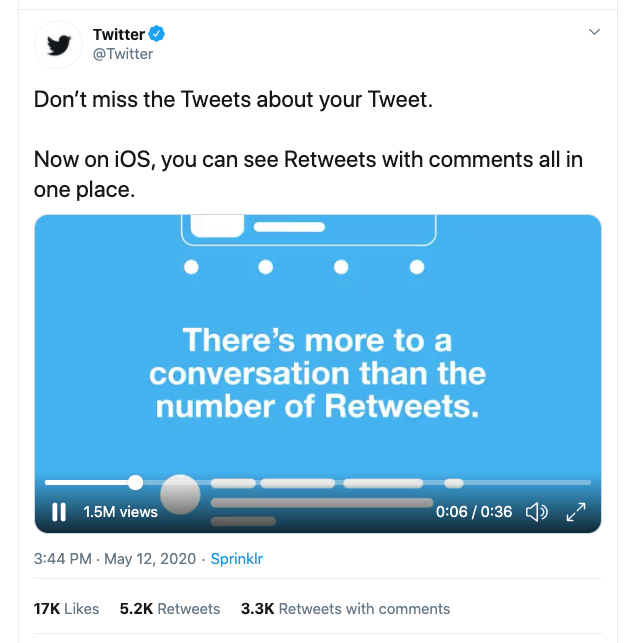 스크린샷에서 볼 수 있듯이 Tweet 작성자, Tweet 메트릭, 생성 시각(timestamp), 동영상, 동영상 조회 수 등 Tweet과 관련된 여러 정보가 화면에 표시됩니다. 이 외에도 스크린샷에는 보이지 않지만, 요청을 통해 여전히 가져올 수 있는 데이터가 여러 가지 있습니다.
API에 요청을 보낼 때 기본 응답은 단순하며, 기본 Tweet 필드(
스크린샷에서 볼 수 있듯이 Tweet 작성자, Tweet 메트릭, 생성 시각(timestamp), 동영상, 동영상 조회 수 등 Tweet과 관련된 여러 정보가 화면에 표시됩니다. 이 외에도 스크린샷에는 보이지 않지만, 요청을 통해 여전히 가져올 수 있는 데이터가 여러 가지 있습니다.
API에 요청을 보낼 때 기본 응답은 단순하며, 기본 Tweet 필드(id 및 text)만 포함합니다. 또한 사용 중인 엔드포인트에서 반환되는 기본(primary) 객체만 받게 되며, 기본 객체와 연관될 수 있는 기타 관련 데이터 객체는 기본적으로 포함되지 않습니다.
이러한 단순한 기본 응답과 fields, expansions 파라미터를 함께 사용하면, 사용 사례에 따라 필요한 필드만 선택적으로 요청할 수 있습니다.
추가 필드 및 객체 요청
curl --request GET --url 'https://api.x.com/2/tweets?ids=1260294888811347969' \
  --header 'Authorization: Bearer $BEARER_TOKEN'
{
    "data": [
        {
            "id": "1260294888811347969",
            "text": "내 Tweet에 대한 Tweet을 놓치지 마세요. \n\niOS에서 이제 댓글이 달린 Retweet을 한 곳에서 모두 볼 수 있습니다. https://t.co/oanjZfzC6y"
        }
    ]
}
- object model을 사용하거나 각 엔드포인트의 API 참조 문서 페이지에 있는 필드 목록을 검토하여 추가로 요청할 필드를 선택하세요. 이 경우 다음과 같은 추가 필드를 요청합니다: attachments, author_id, created_at, public_metrics.
-
위의 필드를 값으로 사용해 쉼표로 구분된 목록으로
tweet.fields쿼리 매개변수를 구성하세요:?tweet.fields=attachments,author_id,created_at,public_metrics - 앞에서 호출한 GET /tweets 요청에 쿼리 매개변수를 추가합니다.
curl --request GET --url 'https://api.x.com/2/tweets?ids=1260294888811347969&tweet.fields=attachments,author_id,created_at,public_metrics' \ --header 'Authorization: Bearer $BEARER_TOKEN'
응답:
{
    "data": [
        {
            "id": "1260294888811347969",
            "text": "내 Tweet에 대한 Tweet을 놓치지 마세요. \n\niOS에서 이제 댓글이 포함된 Retweet을 한곳에서 모두 볼 수 있습니다. https://t.co/oanjZfzC6y",
            "author_id": "783214",
            "public_metrics": {
                "retweet_count": 5219,
                "reply_count": 1828,
                "like_count": 17141,
                "quote_count": 3255
            },
            "attachments": {
                "media_keys": [
                    "13_1260294804770041858"
                ]
            },
            "created_at": "2020-05-12T19:44:51.000Z"
        }
    ]
}
- 다음으로, Tweet에 포함된 동영상 관련 필드를 요청합니다. 이를 위해
expansions매개변수에attachments.media_keys값을 지정하여 요청에 추가합니다.
curl --request GET --url 'https://api.x.com/2/tweets?ids=1260294888811347969&tweet.fields=attachments,author_id,created_at,public_metrics&expansions=attachments.media_keys' \
  --header 'Authorization: Bearer $BEARER_TOKEN'
{
    "data": [
        {
            "id": "1260294888811347969",
            "text": "내 Tweet에 대한 Tweet을 놓치지 마세요. \n\niOS에서 이제 댓글이 포함된 Retweet을 한곳에서 모두 확인할 수 있습니다. https://t.co/oanjZfzC6y",
            "public_metrics": {
                "retweet_count": 5219,
                "reply_count": 1828,
                "like_count": 17141,
                "quote_count": 3255
            },
            "created_at": "2020-05-12T19:44:51.000Z",
            "attachments": {
                "media_keys": [
                    "13_1260294804770041858"
                ]
            },
            "author_id": "783214"
        }
    ],
    "includes": {
        "media": [
            {
                "media_key": "13_1260294804770041858",
                "type": "video"
            }
        ]
    }
}
- 마지막으로 동영상의 조회수와 재생 시간을 요청하겠습니다. 이들은 기본 필드가 아니므로 명시적으로 요청해야 합니다. 요청 시
media.fields매개변수에 쉼표로 구분된 값public_metrics와duration_ms를 지정하세요.
curl --request GET --url 'https://api.x.com/2/tweets?ids=1260294888811347969&tweet.fields=attachments,author_id,created_at,public_metrics&expansions=attachments.media_keys&media.fields=duration_ms,public_metrics' --header 'Authorization: Bearer $BEARER_TOKEN'
응답은 이제 Tweet 스크린샷에서 볼 수 있는 모든 데이터를 포함합니다:
  {
    "data": [
        {
            "id": "1260294888811347969",
            "text": "당신의 트윗에 대한 트윗을 놓치지 마세요. \n\niOS에서 이제 댓글이 달린 리트윗을 한 곳에서 모두 볼 수 있습니다. https://t.co/oanjZfzC6y",
            "author_id": "783214",
            "public_metrics": {
                "retweet_count": 5219,
                "reply_count": 1828,
                "like_count": 17141,
                "quote_count": 3255
            },
            "created_at": "2020-05-12T19:44:51.000Z",
            "attachments": {
                "media_keys": [
                    "13_1260294804770041858"
                ]
            }
        }
    ],
    "includes": {
        "media": [
            {
                "duration_ms": 36503,
                "media_key": "13_1260294804770041858",
                "public_metrics": {
                    "view_count": 1534703
                },
                "type": "video"
            }
        ]
    }
}
- ids=1260294888811347969
- tweet.fields=attachments,author_id,created_at,public_metrics
- expansions=attachments.media_keys
- media.fields=public_metrics,duration_ms
?ids=1260294888811347969&tweet.fields=attachments,author\_id,created\_at,public\_metrics&expansions=attachments.media\_keys&media.fields=public\_metrics,duration\_ms
X API v2 페이로드 예제
Tweet
{
  "data": [
    {
      "conversation_id": "1304102743196356610",
      "id": "1307025659294674945",
      "possibly_sensitive": false,
      "public_metrics": {
        "retweet_count": 11,
        "reply_count": 2,
        "like_count": 70,
        "quote_count": 1
      },
      "entities": {
        "urls": [
          {
            "start": 74,
            "end": 97,
            "url": "https://t.co/oeF3ZHeKQQ",
            "expanded_url": "https://dev.to/twitterdev/understanding-the-new-tweet-payload-in-the-twitter-api-v2-1fg5",
            "display_url": "dev.to/twitterdev/und…",
            "images": [
              {
                "url": "https://pbs.twimg.com/news_img/1317156296982867969/2uLfv-Bh?format=jpg&name=orig",
                "width": 1128,
                "height": 600
              },
              {
                "url": "https://pbs.twimg.com/news_img/1317156296982867969/2uLfv-Bh?format=jpg&name=150x150",
                "width": 150,
                "height": 150
              }
            ],
            "status": 200,
            "title": "Understanding the new Tweet payload in the X API v2",
            "description": "X recently announced the new X API v2, rebuilt from the ground up to deliver new features...",
            "unwound_url": "https://dev.to/twitterdev/understanding-the-new-tweet-payload-in-the-twitter-api-v2-1fg5"
          }
        ]
      },
      "text": "Here’s an article that highlights the updates in the new Tweet payload v2 https://t.co/oeF3ZHeKQQ",
      "in_reply_to_user_id": "2244994945",
      "created_at": "2020-09-18T18:36:15.000Z",
      "author_id": "2244994945",
      "referenced_tweets": [
        {
          "type": "replied_to",
          "id": "1304102743196356610"
        }
      ],
      "lang": "en",
      "source": "Twitter Web App"
    }
  ],
  "includes": {
    "users": [
      {
        "created_at": "2013-12-14T04:35:55.000Z",
        "profile_image_url": "https://pbs.twimg.com/profile_images/1283786620521652229/lEODkLTh_normal.jpg",
        "entities": {
          "url": {
            "urls": [
              {
                "start": 0,
                "end": 23,
                "url": "https://t.co/3ZX3TNiZCY",
                "expanded_url": "https://developer.x.com/en/community",
                "display_url": "developer.x.com/en/community"
              }
            ]
          },
          "description": {
            "hashtags": [
              {
                "start": 17,
                "end": 28,
                "tag": "TwitterDev"
              },
              {
                "start": 105,
                "end": 116,
                "tag": "TwitterAPI"
              }
            ]
          }
        },
        "id": "2244994945",
        "verified": true,
        "location": "127.0.0.1",
        "description": "The voice of the #TwitterDev team and your official source for updates, news, and events, related to the #TwitterAPI.",
        "pinned_tweet_id": "1293593516040269825",
        "username": "TwitterDev",
        "public_metrics": {
          "followers_count": 513961,
          "following_count": 2039,
          "tweet_count": 3635,
          "listed_count": 1672
        },
        "name": "Twitter Dev",
        "url": "https://t.co/3ZX3TNiZCY",
        "protected": false
      }
    ],
    "tweets": [
      {
        "conversation_id": "1304102743196356610",
        "id": "1304102743196356610",
        "possibly_sensitive": false,
        "public_metrics": {
          "retweet_count": 31,
          "reply_count": 12,
          "like_count": 104,
          "quote_count": 4
        },
        "entities": {
          "mentions": [
            {
              "start": 146,
              "end": 158,
              "username": "suhemparack"
            }
          ],
          "urls": [
            {
              "start": 237,
              "end": 260,
              "url": "https://t.co/CjneyMpgCq",
              "expanded_url": "https://x.com/TwitterDev/status/1304102743196356610/video/1",
              "display_url": "pic.x.com/CjneyMpgCq"
            }
          ],
          "hashtags": [
            {
              "start": 8,
              "end": 19,
              "tag": "TwitterAPI"
            }
          ]
        },
        "attachments": {
          "media_keys": [
            "13_1303848070984024065"
          ]
        },
        "text": "새로운 #TwitterAPI에는 Tweet 페이로드에 대한 몇 가지 개선 사항이 포함되어 있습니다. 주요 차이점이 무엇인지 궁금하시죠? 🧐\n\n이 영상에서 @SuhemParack이 v1.1 Tweet 페이로드와 v2 엔드포인트에서 확인할 수 있는 내용을 비교합니다. https://t.co/CjneyMpgCq",
        "created_at": "2020-09-10T17:01:37.000Z",
        "author_id": "2244994945",
        "lang": "en",
        "source": "Twitter Media Studio"
      }
    ]
  }
}
Tweet 답글
{
  "data": [
    {
      "lang": "en",
      "conversation_id": "1296887091901718529",
      "text": "See how @PennMedCDH are using Twitter data to understand the COVID-19 health crisis 📊\n\nhttps://t.co/1tdA8uDWes",
      "referenced_tweets": [
        {
          "type": "replied_to",
          "id": "1296887091901718529"
        }
      ],
      "possibly_sensitive": false,
      "entities": {
        "annotations": [
          {
            "start": 30,
            "end": 36,
            "probability": 0.6318,
            "type": "Product",
            "normalized_text": "Twitter"
          }
        ],
        "mentions": [
          {
            "start": 8,
            "end": 19,
            "username": "PennMedCDH"
          }
        ],
        "urls": [
          {
            "start": 87,
            "end": 110,
            "url": "https://t.co/1tdA8uDWes",
            "expanded_url": "https://developer.x.com/en/use-cases/success-stories/penn",
            "display_url": "developer.x.com/en/use-cases/s…",
            "status": 200,
            "title": "Penn Medicine 디지털 헬스 센터",
            "description": "Penn Med 디지털 헬스 센터는 감정 분석, 보고된 증상, 주별 데이터 분석, COVID-19 발생에 대한 국경 데이터를 상세히 보여주는 차트가 포함된 COVID-19 Twitter 지도를 제작했습니다. 또한 Penn Med With You 이니셔티브는 Twitter의 지역별 집계 정보를 활용하여 웹사이트 및 문자 메시지 서비스에 정보를 제공합니다. 이 서비스는 해당 정보를 사용하여 관련성 있고 시의적절한 리소스를 배포합니다.",
            "unwound_url": "https://developer.x.com/en/use-cases/success-stories/penn"
          }
        ]
      },
      "id": "1296887316556980230",
      "public_metrics": {
        "retweet_count": 9,
        "reply_count": 3,
        "like_count": 26,
        "quote_count": 2
      },
      "author_id": "2244994945",
      "in_reply_to_user_id": "2244994945",
      "context_annotations": [
        {
          "domain": {
            "id": "46",
            "name": "Brand Category",
            "description": "브랜드 범위를 세분화하는 브랜드 버티컬 내 카테고리"
          },
          "entity": {
            "id": "781974596752842752",
            "name": "Services"
          }
        },
        {
          "domain": {
            "id": "47",
            "name": "Brand",
            "description": "브랜드 및 기업"
          },
          "entity": {
            "id": "10045225402",
            "name": "Twitter"
          }
        },
        {
          "domain": {
            "id": "123",
            "name": "Ongoing News Story",
            "description": "'Brexit'와 같은 진행 중인 뉴스"
          },
          "entity": {
            "id": "1220701888179359745",
            "name": "COVID-19"
          }
        }
      ],
      "source": "Twitter Web App",
      "created_at": "2020-08-21T19:10:05.000Z"
    }
  ],
  "includes": {
    "users": [
      {
        "created_at": "2013-12-14T04:35:55.000Z",
        "id": "2244994945",
        "protected": false,
        "username": "TwitterDev",
        "verified": true,
        "entities": {
          "url": {
            "urls": [
              {
                "start": 0,
                "end": 23,
                "url": "https://t.co/3ZX3TNiZCY",
                "expanded_url": "https://developer.x.com/en/community",
                "display_url": "developer.x.com/en/community"
              }
            ]
          },
          "description": {
            "hashtags": [
              {
                "start": 17,
                "end": 28,
                "tag": "TwitterDev"
              },
              {
                "start": 105,
                "end": 116,
                "tag": "TwitterAPI"
              }
            ]
          }
        },
        "description": "#TwitterDev 팀의 공식 채널이자 #TwitterAPI 관련 업데이트, 뉴스 및 이벤트에 대한 공식 소스입니다.",
        "pinned_tweet_id": "1293593516040269825",
        "public_metrics": {
          "followers_count": 513962,
          "following_count": 2039,
          "tweet_count": 3635,
          "listed_count": 1672
        },
        "location": "127.0.0.1",
        "name": "Twitter Dev",
        "profile_image_url": "https://pbs.twimg.com/profile_images/1283786620521652229/lEODkLTh_normal.jpg",
        "url": "https://t.co/3ZX3TNiZCY"
      },
      {
        "created_at": "2013-07-23T16:58:03.000Z",
        "id": "1615654896",
        "protected": false,
        "username": "PennMedCDH",
        "verified": false,
        "entities": {
          "url": {
            "urls": [
              {
                "start": 0,
                "end": 23,
                "url": "https://t.co/7eS9RuwIb9",
                "expanded_url": "http://centerfordigitalhealth.upenn.edu/",
                "display_url": "centerfordigitalhealth.upenn.edu"
              }
            ]
          },
          "description": {
            "mentions": [
              {
                "start": 0,
                "end": 13,
                "username": "PennMedicine"
              }
            ]
          }
        },
        "description": "@PennMedicine의 디지털 헬스 센터는 의료 분야 디지털 헬스 기술 발전이 미치는 영향을 연구하여 과학을 발전시킵니다.",
        "public_metrics": {
          "followers_count": 1348,
          "following_count": 455,
          "tweet_count": 1288,
          "listed_count": 92
        },
        "location": "Philadelphia, PA",
        "name": "Penn Med CDH",
        "profile_image_url": "https://pbs.twimg.com/profile_images/1067488849725726723/MoO3FQ44_normal.jpg",
        "url": "https://t.co/7eS9RuwIb9"
      }
    ],
    "tweets": [
      {
        "lang": "en",
        "conversation_id": "1296887091901718529",
        "text": "Dr. @RainaMerchant and her team at the Penn Medicine CDH are helping build the future of health care.\n\nThe team is using insights from social data in many different ways — ranging from uncovering risk factors to shedding light on public sentiment. 🔎",
        "possibly_sensitive": false,
        "entities": {
          "annotations": [
            {
              "start": 39,
              "end": 55,
              "probability": 0.8274,
              "type": "Organization",
              "normalized_text": "Penn Medicine CDH"
            }
          ],
          "mentions": [
            {
              "start": 4,
              "end": 18,
              "username": "RainaMerchant"
            }
          ]
        },
        "id": "1296887091901718529",
        "public_metrics": {
          "retweet_count": 9,
          "reply_count": 7,
          "like_count": 32,
          "quote_count": 0
        },
        "author_id": "2244994945",
        "source": "Twitter Web App",
        "created_at": "2020-08-21T19:09:12.000Z"
      }
    ]
  }
}
확장된 Tweet
{
  "data": [
    {
      "conversation_id": "1296121314218897408",
      "id": "1296121314218897408",
      "possibly_sensitive": false,
      "public_metrics": {
        "retweet_count": 54,
        "reply_count": 9,
        "like_count": 172,
        "quote_count": 23
      },
      "entities": {
        "urls": [
          {
            "start": 192,
            "end": 215,
            "url": "https://t.co/khXhTurm9x",
            "expanded_url": "https://devcommunity.x.com/t/hide-replies-now-available-in-the-new-twitter-api/140996",
            "display_url": "devcommunity.com/t/hide-replies…",
            "images": [
              {
                "url": "https://pbs.twimg.com/news_img/1296121315514957825/3CI24hSI?format=png&name=orig",
                "width": 400,
                "height": 400
              },
              {
                "url": "https://pbs.twimg.com/news_img/1296121315514957825/3CI24hSI?format=png&name=150x150",
                "width": 150,
                "height": 150
              }
            ],
            "status": 200,
            "title": "Hide replies now available in the new Twitter API",
            "description": "오늘 새로운 Twitter API에서 답글 숨기기 엔드포인트의 정식 출시를 발표하게 되어 기쁩니다. 답글 숨기기 엔드포인트를 사용하면 사용자가 자신의 Tweet에 대한 답글을 숨기거나 숨김 해제할 수 있는 도구를 구축할 수 있습니다. 사용자는 욕설, 주의를 산만하게 하거나 오해의 소지가 있는 댓글에 덜 주목하거나, 대화를 더 흥미롭게 만들기 위해 등 여러 이유로 답글을 관리합니다. 이 엔드포인트를 통해 Twitter 사용자가 답글을 더 빠르고 쉽게 숨기거나 숨김 해제할 수 있는 도구를 구축할 수 있습니다...",
            "unwound_url": "https://devcommunity.x.com/t/hide-replies-now-available-in-the-new-twitter-api/140996"
          }
        ],
        "hashtags": [
          {
            "start": 178,
            "end": 189,
            "tag": "TwitterAPI"
          }
        ]
      },
      "text": "The hide replies endpoint is launching today! \n\nDevelopers can hide replies to Tweets - a crucial way developers can help improve the health of the public conversation using the #TwitterAPI.\n\nhttps://t.co/khXhTurm9x",
      "created_at": "2020-08-19T16:26:16.000Z",
      "context_annotations": [
        {
          "domain": {
            "id": "65",
            "name": "Interests and Hobbies Vertical",
            "description": "Top level interests and hobbies groupings, like Food or Travel"
          },
          "entity": {
            "id": "848920371311001600",
            "name": "Technology",
            "description": "Technology and computing"
          }
        },
        {
          "domain": {
            "id": "66",
            "name": "Interests and Hobbies Category",
            "description": "A grouping of interests and hobbies entities, like Novelty Food or Destinations"
          },
          "entity": {
            "id": "848921413196984320",
            "name": "Computer programming",
            "description": "Computer programming"
          }
        }
      ],
      "author_id": "2244994945",
      "lang": "en",
      "source": "Twitter Web App"
    }
  ],
  "includes": {
    "users": [
      {
        "created_at": "2013-12-14T04:35:55.000Z",
        "profile_image_url": "https://pbs.twimg.com/profile_images/1283786620521652229/lEODkLTh_normal.jpg",
        "entities": {
          "url": {
            "urls": [
              {
                "start": 0,
                "end": 23,
                "url": "https://t.co/3ZX3TNiZCY",
                "expanded_url": "https://developer.x.com/en/community",
                "display_url": "developer.x.com/en/community"
              }
            ]
          },
          "description": {
            "hashtags": [
              {
                "start": 17,
                "end": 28,
                "tag": "TwitterDev"
              },
              {
                "start": 105,
                "end": 116,
                "tag": "TwitterAPI"
              }
            ]
          }
        },
        "id": "2244994945",
        "verified": true,
        "location": "127.0.0.1",
        "description": "The voice of the #TwitterDev team and your official source for updates, news, and events, related to the #TwitterAPI.",
        "pinned_tweet_id": "1293593516040269825",
        "username": "TwitterDev",
        "public_metrics": {
          "followers_count": 513962,
          "following_count": 2039,
          "tweet_count": 3635,
          "listed_count": 1672
        },
        "name": "Twitter Dev",
        "url": "https://t.co/3ZX3TNiZCY",
        "protected": false
      }
    ]
  }
}
미디어가 포함된 Tweet
{
"data": [
{
"lang": "en",
"conversation_id": "1293593516040269825",
"text": "It’s finally here! 🥁 Say hello to the new #TwitterAPI.\n\nWe’re rebuilding the X API v2 from the ground up to better serve our developer community. And today’s launch is only the beginning.\n\nhttps://t.co/32VrwpGaJw https://t.co/KaFSbjWUA8",
"attachments": {
"media_keys": [
"7_1293565706408038401"
]
},
"possibly_sensitive": false,
"entities": {
"annotations": [
{
"start": 78,
"end": 88,
"probability": 0.4381,
"type": "Product",
"normalized_text": "Twitter API"
}
],
"hashtags": [
{
"start": 42,
"end": 53,
"tag": "TwitterAPI"
}
],
"urls": [
{
"start": 195,
"end": 218,
"url": "https://t.co/32VrwpGaJw",
"expanded_url": "https://blog.x.com/developer/en_us/topics/tools/2020/introducing_new_twitter_api.html",
"display_url": "blog.x.com/developer/en_u…",
"images": [
{
"url": "https://pbs.twimg.com/news_img/1336475659279818754/_cmRh7QE?format=jpg&name=orig",
"width": 1200,
"height": 627
},
{
"url": "https://pbs.twimg.com/news_img/1336475659279818754/_cmRh7QE?format=jpg&name=150x150",
"width": 150,
"height": 150
}
],
"status": 200,
"title": "새롭게 개선된 X API 소개",
"description": "새로운 X API 소개 - 개발자들이 Twitter에서 일어나는 공개 대화에 전 세계를 연결할 수 있도록 새로운 기능을 더 빠르게 제공하기 위해 처음부터 다시 구축했습니다.",
"unwound_url": "https://blog.x.com/developer/en_us/topics/tools/2020/introducing_new_twitter_api.html"
},
{
"start": 219,
"end": 242,
"url": "https://t.co/KaFSbjWUA8",
"expanded_url": "https://x.com/TwitterDev/status/1293593516040269825/video/1",
"display_url": "pic.x.com/KaFSbjWUA8"
}
]
},
"id": "1293593516040269825",
"public_metrics": {
"retweet_count": 958,
"reply_count": 171,
"like_count": 2848,
"quote_count": 333
},
"author_id": "2244994945",
"context_annotations": [
{
"domain": {
"id": "46",
"name": "Brand Category",
"description": "브랜드 범위를 세분화하는 브랜드 버티컬 내 카테고리"
},
"entity": {
"id": "781974596752842752",
"name": "Services"
}
},
{
"domain": {
"id": "47",
"name": "Brand",
"description": "브랜드 및 기업"
},
"entity": {
"id": "10045225402",
"name": "Twitter"
}
},
{
"domain": {
"id": "65",
"name": "Interests and Hobbies Vertical",
"description": "음식 또는 여행과 같은 최상위 레벨 관심사 및 취미 그룹"
},
"entity": {
"id": "848920371311001600",
"name": "Technology",
"description": "기술 및 컴퓨팅"
}
},
{
"domain": {
"id": "66",
"name": "Interests and Hobbies Category",
"description": "특색 음식 또는 여행지와 같은 관심사 및 취미 엔티티의 그룹"
},
"entity": {
"id": "848921413196984320",
"name": "Computer programming",
"description": "컴퓨터 프로그래밍"
}
}
],
"source": "Twitter Web App",
"created_at": "2020-08-12T17:01:42.000Z"
}
],
"includes": {
"media": [
{
"height": 720,
"duration_ms": 34875,
"media_key": "7_1293565706408038401",
"type": "video",
"preview_image_url": "https://pbs.twimg.com/ext_tw_video_thumb/1293565706408038401/pu/img/66P2dvbU4a02jYbV.jpg",
"public_metrics": {
"view_count": 279438
},
"width": 1280
}
],
"users": [
{
"created_at": "2013-12-14T04:35:55.000Z",
"id": "2244994945",
"protected": false,
"username": "TwitterDev",
"verified": true,
"entities": {
"url": {
"urls": [
{
"start": 0,
"end": 23,
"url": "https://t.co/3ZX3TNiZCY",
"expanded_url": "https://developer.x.com/en/community",
"display_url": "developer.x.com/en/community"
}
]
},
"description": {
"hashtags": [
{
"start": 17,
"end": 28,
"tag": "TwitterDev"
},
{
"start": 105,
"end": 116,
"tag": "TwitterAPI"
}
]
}
},
"description": "#TwitterDev 팀의 공식 채널이자 #TwitterAPI 관련 업데이트, 뉴스 및 이벤트에 대한 공식 소스입니다.",
"pinned_tweet_id": "1293593516040269825",
"public_metrics": {
"followers_count": 513962,
"following_count": 2039,
"tweet_count": 3635,
"listed_count": 1672
},
"location": "127.0.0.1",
"name": "Twitter Dev",
"profile_image_url": "https://pbs.twimg.com/profile_images/1283786620521652229/lEODkLTh_normal.jpg",
"url": "https://t.co/3ZX3TNiZCY"
}
]
}
}`
### Retweet
`{
"data": [
{
"public_metrics": {
"retweet_count": 19,
"reply_count": 0,
"like_count": 0,
"quote_count": 0
},
"conversation_id": "1229851574555508737",
"id": "1229851574555508737",
"entities": {
"annotations": [
{
"start": 28,
"end": 38,
"probability": 0.261,
"type": "Product",
"normalized_text": "Alexa Skill"
},
{
"start": 44,
"end": 50,
"probability": 0.7332,
"type": "Product",
"normalized_text": "Twitter"
}
],
"mentions": [
{
"start": 3,
"end": 15,
"username": "suhemparack"
}
]
},
"text": "RT @suhemparack: I built an Alexa Skill for Twitter using APL that allows you to view Tweets and Trends on the echo show!\n\nCheck it out her…",
"created_at": "2020-02-18T19:33:59.000Z",
"possibly_sensitive": false,
"author_id": "2244994945",
"referenced_tweets": [
{
"type": "retweeted",
"id": "1229843515603144704"
}
],
"context_annotations": [
{
"domain": {
"id": "47",
"name": "Brand",
"description": "브랜드 및 회사"
},
"entity": {
"id": "10026792024",
"name": "Amazon"
}
},
{
"domain": {
"id": "48",
"name": "Product",
"description": "브랜드에서 제작한 제품. 예: Ford Explorer, Apple iPhone."
},
"entity": {
"id": "968221983803494400",
"name": "Amazon - Alexa",
"description": "Alexa"
}
},
{
"domain": {
"id": "46",
"name": "브랜드 카테고리",
"description": "브랜드 범위를 세분화하는 브랜드 버티컬 내 카테고리"
},
"entity": {
"id": "781974596752842752",
"name": "서비스"
}
},
{
"domain": {
"id": "47",
"name": "Brand",
"description": "브랜드 및 회사"
},
"entity": {
"id": "10045225402",
"name": "Twitter"
}
}
],
"source": "Twitter Web App",
"lang": "en"
}
],
"includes": {
"users": [
{
"profile_image_url": "https://pbs.twimg.com/profile_images/1283786620521652229/lEODkLTh_normal.jpg",
"username": "TwitterDev",
"name": "Twitter Dev",
"location": "127.0.0.1",
"url": "https://t.co/3ZX3TNiZCY",
"entities": {
"url": {
"urls": [
{
"start": 0,
"end": 23,
"url": "https://t.co/3ZX3TNiZCY",
"expanded_url": "https://developer.x.com/en/community",
"display_url": "developer.x.com/en/community"
}
]
},
"description": {
"hashtags": [
{
"start": 17,
"end": 28,
"tag": "TwitterDev"
},
{
"start": 105,
"end": 116,
"tag": "TwitterAPI"
}
]
}
},
"id": "2244994945",
"description": "The voice of the #TwitterDev team and your official source for updates, news, and events, related to the #TwitterAPI.",
"verified": true,
"public_metrics": {
"followers_count": 513962,
"following_count": 2039,
"tweet_count": 3635,
"listed_count": 1672
},
"pinned_tweet_id": "1293593516040269825",
"created_at": "2013-12-14T04:35:55.000Z",
"protected": false
},
{
"profile_image_url": "https://pbs.twimg.com/profile_images/1230703695051935747/TbQKe91L_normal.jpg",
"username": "suhemparack",
"name": "Suhem Parack",
"location": "Seattle, WA",
"url": "https://t.co/8IkCzClPCz",
"entities": {
"url": {
"urls": [
{
"start": 0,
"end": 23,
"url": "https://t.co/8IkCzClPCz",
"expanded_url": "https://developer.x.com",
"display_url": "developer.x.com"
}
]
},
"description": {
"mentions": [
{
"start": 42,
"end": 50,
"username": "Twitter"
}
]
}
},
"id": "857699969263964161",
"description": "Developer Relations for Academic Research @Twitter. Talk to me about research with Twitter data. Previously: Amazon Alexa. Views are my own",
"verified": false,
"public_metrics": {
"followers_count": 738,
"following_count": 512,
"tweet_count": 460,
"listed_count": 12
},
"pinned_tweet_id": "1296498078233571329",
"created_at": "2017-04-27T20:56:22.000Z",
"protected": false
}
],
"tweets": [
{
"public_metrics": {
"retweet_count": 19,
"reply_count": 1,
"like_count": 71,
"quote_count": 6
},
"conversation_id": "1229843515603144704",
"id": "1229843515603144704",
"entities": {
"annotations": [
{
"start": 11,
"end": 21,
"probability": 0.3342,
"type": "Product",
"normalized_text": "Alexa Skill"
},
{
"start": 27,
"end": 33,
"probability": 0.6727,
"type": "Product",
"normalized_text": "Twitter"
}
],
"urls": [
{
"start": 127,
"end": 150,
"url": "https://t.co/l5J8wq748G",
"expanded_url": "https://dev.to/twitterdev/building-an-alexa-skill-for-twitter-using-alexa-presentation-language-1aj0",
"display_url": "dev.to/twitterdev/bui…",
"status": 200,
"unwound_url": "https://dev.to/twitterdev/building-an-alexa-skill-for-twitter-using-alexa-presentation-language-1aj0"
}
]
},
"text": "I built an Alexa Skill for Twitter using APL that allows you to view Tweets and Trends on the echo show!\n\nCheck it out here 👇\n\nhttps://t.co/l5J8wq748G",
"created_at": "2020-02-18T19:01:58.000Z",
"possibly_sensitive": false,
"author_id": "857699969263964161",
"context_annotations": [
{
"domain": {
"id": "47",
"name": "Brand",
"description": "브랜드 및 회사"
},
"entity": {
"id": "10026792024",
"name": "Amazon"
}
},
{
"domain": {
"id": "48",
"name": "Product",
"description": "브랜드에서 제작한 제품. 예: Ford Explorer, Apple iPhone."
},
"entity": {
"id": "968221983803494400",
"name": "Amazon - Alexa",
"description": "Alexa"
}
},
{
"domain": {
"id": "46",
"name": "브랜드 카테고리",
"description": "브랜드 범위를 세분화하는 브랜드 버티컬 내 카테고리"
},
"entity": {
"id": "781974596752842752",
"name": "서비스"
}
},
{
"domain": {
"id": "47",
"name": "Brand",
"description": "브랜드 및 회사"
},
"entity": {
"id": "10045225402",
"name": "Twitter"
}
}
],
"source": "Twitter Web App",
"lang": "en"
}
]
}
}`
### Quote Tweet
`{
"data": [
{
"lang": "en",
"conversation_id": "1328399838128467969",
"text": "As planned, the Labs v2 endpoints referenced below have now been retired. Please let us know in the forums if you have questions or need help with the X API v2! https://t.co/JaxttUMmjX",
"referenced_tweets": [
{
"type": "quoted",
"id": "1327011423252144128"
}
],
"possibly_sensitive": false,
"entities": {
"annotations": [
{
"start": 151,
"end": 157,
"probability": 0.8115,
"type": "Product",
"normalized_text": "Twitter"
}
],
"urls": [
{
"start": 167,
"end": 190,
"url": "https://t.co/JaxttUMmjX",
"expanded_url": "https://x.com/TwitterDev/status/1327011423252144128",
"display_url": "twitter.com/TwitterDev/sta…"
}
]
},
"id": "1328399838128467969",
"public_metrics": {
"retweet_count": 7,
"reply_count": 4,
"like_count": 29,
"quote_count": 1
},
"author_id": "2244994945",
"context_annotations": [
{
"domain": {
"id": "46",
"name": "Brand Category",
"description": "브랜드 버티컬 내에서 브랜드 범위를 세분화하는 카테고리"
},
"entity": {
"id": "781974596752842752",
"name": "Services"
}
},
{
"domain": {
"id": "47",
"name": "Brand",
"description": "브랜드 및 기업"
},
"entity": {
"id": "10045225402",
"name": "Twitter"
}
},
{
"domain": {
"id": "65",
"name": "Interests and Hobbies Vertical",
"description": "음식 또는 여행과 같은 최상위 관심사 및 취미 그룹"
},
"entity": {
"id": "848920371311001600",
"name": "Technology",
"description": "기술 및 컴퓨팅"
}
},
{
"domain": {
"id": "66",
"name": "Interests and Hobbies Category",
"description": "특색 음식 또는 여행지와 같은 관심사 및 취미 엔티티 그룹"
},
"entity": {
"id": "848921413196984320",
"name": "Computer programming",
"description": "컴퓨터 프로그래밍"
}
}
],
"source": "Twitter Web App",
"created_at": "2020-11-16T18:09:36.000Z"
}
],
"includes": {
"users": [
{
"created_at": "2013-12-14T04:35:55.000Z",
"id": "2244994945",
"protected": false,
"username": "TwitterDev",
"verified": true,
"entities": {
"url": {
"urls": [
{
"start": 0,
"end": 23,
"url": "https://t.co/3ZX3TNiZCY",
"expanded_url": "https://developer.x.com/en/community",
"display_url": "developer.x.com/en/community"
}
]
},
"description": {
"hashtags": [
{
"start": 17,
"end": 28,
"tag": "TwitterDev"
},
{
"start": 105,
"end": 116,
"tag": "TwitterAPI"
}
]
}
},
"description": "The voice of the #TwitterDev team and your official source for updates, news, and events, related to the #TwitterAPI.",
"pinned_tweet_id": "1293593516040269825",
"public_metrics": {
"followers_count": 513962,
"following_count": 2039,
"tweet_count": 3635,
"listed_count": 1672
},
"location": "127.0.0.1",
"name": "Twitter Dev",
"profile_image_url": "https://pbs.twimg.com/profile_images/1283786620521652229/lEODkLTh_normal.jpg",
"url": "https://t.co/3ZX3TNiZCY"
}
],
"tweets": [
{
"lang": "en",
"conversation_id": "1327011423252144128",
"text": "👋 Friendly reminder that Twitter Developer Labs v2 hide replies and recent search will be retired next Monday, November 16! We encourage you to migrate to the new hide replies and recent search endpoints now available in the v2 #TwitterAPI. Details: https://t.co/r6z6CI7kEy",
"possibly_sensitive": false,
"entities": {
"annotations": [
{
"start": 26,
"end": 50,
"probability": 0.4387,
"type": "Product",
"normalized_text": "Twitter Developer Labs v2"
}
],
"hashtags": [
{
"start": 228,
"end": 239,
"tag": "TwitterAPI"
}
],
"urls": [
{
"start": 250,
"end": 273,
"url": "https://t.co/r6z6CI7kEy",
"expanded_url": "https://devcommunity.x.com/t/retiring-labs-v2-recent-search-and-hide-replies/145795",
"display_url": "devcommunity.com/t/retiring-lab…",
"images": [
{
"url": "https://pbs.twimg.com/news_img/1327011425240313856/PkurOyu1?format=jpg&name=orig",
"width": 1200,
"height": 630
},
{
"url": "https://pbs.twimg.com/news_img/1327011425240313856/PkurOyu1?format=jpg&name=150x150",
"width": 150,
"height": 150
}
],
"status": 200,
"title": "Retiring Labs v2 recent search and hide replies",
"description": "As we said in our Early Access and hide replies announcements, the following Twitter Developer Labs v2 endpoints will be retired on November 16th. Labs v2 recent search Labs v2 hide replies If called, these endpoints will respond with an HTTP 410 status and return no data. Based on your feedback from Labs, we incorporated corresponding functionality into the X API v2. The relevant documentation can be found using the links below. Click here to enroll in v2 access if you haven’t already...",
"unwound_url": "https://devcommunity.x.com/t/retiring-labs-v2-recent-search-and-hide-replies/145795"
}
]
},
"id": "1327011423252144128",
"public_metrics": {
"retweet_count": 8,
"reply_count": 2,
"like_count": 33,
"quote_count": 4
},
"author_id": "2244994945",
"context_annotations": [
{
"domain": {
"id": "46",
"name": "Brand Category",
"description": "브랜드 버티컬 내에서 브랜드 범위를 세분화하는 카테고리"
},
"entity": {
"id": "781974596752842752",
"name": "Services"
}
},
{
"domain": {
"id": "47",
"name": "Brand",
"description": "브랜드 및 기업"
},
"entity": {
"id": "10045225402",
"name": "Twitter"
}
},
{
"domain": {
"id": "65",
"name": "Interests and Hobbies Vertical",
"description": "음식 또는 여행과 같은 최상위 관심사 및 취미 그룹"
},
"entity": {
"id": "848920371311001600",
"name": "Technology",
"description": "기술 및 컴퓨팅"
}
},
{
"domain": {
"id": "66",
"name": "Interests and Hobbies Category",
"description": "특색 음식 또는 여행지와 같은 관심사 및 취미 엔티티 그룹"
},
"entity": {
"id": "848921413196984320",
"name": "Computer programming",
"description": "컴퓨터 프로그래밍"
}
}
],
"source": "Twitter Web App",
"created_at": "2020-11-12T22:12:32.000Z"
}
]
}
}
인용 Tweet 리트윗
{
    "data": [
    {
      "lang": "en",
      "conversation_id": "1225470895902412800",
      "text": "RT @AureliaSpecker: 📣 If you enjoyed the London commute tutorial I wrote in November last year, check out the refactored version that uses…",
      "referenced_tweets": [
        {
          "type": "retweeted",
          "id": "1224709550214873090"
        }
      ],
      "possibly_sensitive": false,
      "entities": {
        "annotations": [
          {
            "start": 42,
            "end": 47,
            "probability": 0.6999,
            "type": "Place",
            "normalized_text": "London"
          }
        ],
        "mentions": [
          {
            "start": 3,
            "end": 18,
            "username": "AureliaSpecker"
          }
        ]
      },
      "id": "1225470895902412800",
      "public_metrics": {
        "retweet_count": 12,
        "reply_count": 0,
        "like_count": 0,
        "quote_count": 0
      },
      "author_id": "2244994945",
      "context_annotations": [
        {
          "domain": {
            "id": "46",
            "name": "브랜드 카테고리",
            "description": "브랜드 버티컬 내에서 브랜드 범위를 세분화하는 카테고리"
          },
          "entity": {
            "id": "781974596752842752",
            "name": "서비스"
          }
        },
        {
          "domain": {
            "id": "47",
            "name": "브랜드",
            "description": "브랜드 및 기업"
          },
          "entity": {
            "id": "10045225402",
            "name": "Twitter"
          }
        },
        {
          "domain": {
            "id": "65",
            "name": "관심사 및 취미 버티컬",
            "description": "음식 또는 여행과 같은 최상위 수준의 관심사 및 취미 그룹"
          },
          "entity": {
            "id": "848920371311001600",
            "name": "기술",
            "description": "기술 and computing"
          }
        },
        {
          "domain": {
            "id": "66",
            "name": "관심사 및 취미 카테고리",
            "description": "신기한 음식 또는 여행지와 같은 관심사 및 취미 엔티티의 그룹"
          },
          "entity": {
            "id": "848921413196984320",
            "name": "컴퓨터 프로그래밍",
            "description": "컴퓨터 프로그래밍"
          }
        }
      ],
      "source": "Twitter for iPhone",
      "created_at": "2020-02-06T17:26:44.000Z"
    }
  ],
  "includes": {
    "users": [
      {
        "created_at": "2013-12-14T04:35:55.000Z",
        "id": "2244994945",
        "protected": false,
        "username": "TwitterDev",
        "verified": true,
        "entities": {
          "url": {
            "urls": [
              {
                "start": 0,
                "end": 23,
                "url": "https://t.co/3ZX3TNiZCY",
                "expanded_url": "https://developer.x.com/en/community",
                "display_url": "developer.x.com/en/community"
              }
            ]
          },
          "description": {
            "hashtags": [
              {
                "start": 17,
                "end": 28,
                "tag": "TwitterDev"
              },
              {
                "start": 105,
                "end": 116,
                "tag": "TwitterAPI"
              }
            ]
          }
        },
        "description": "#TwitterDev 팀의 공식 채널이자 #TwitterAPI 관련 업데이트, 뉴스 및 이벤트에 대한 공식 소스입니다.",
        "pinned_tweet_id": "1293593516040269825",
        "public_metrics": {
          "followers_count": 513962,
          "following_count": 2039,
          "tweet_count": 3635,
          "listed_count": 1672
        },
        "location": "127.0.0.1",
        "name": "Twitter Dev",
        "profile_image_url": "https://pbs.twimg.com/profile_images/1283786620521652229/lEODkLTh_normal.jpg",
        "url": "https://t.co/3ZX3TNiZCY"
      },
      {
        "created_at": "2013-01-18T23:45:43.000Z",
        "id": "1102321381",
        "protected": false,
        "username": "AureliaSpecker",
        "verified": false,
        "entities": {
          "description": {
            "mentions": [
              {
                "start": 7,
                "end": 17,
                "username": "TwitterUK"
              },
              {
                "start": 86,
                "end": 95,
                "username": "_dormrod"
              }
            ]
          }
        },
        "description": "devrel @TwitterUK • 런던에 사는 스위스인 • 반려식물 키우는 사람 • @_dormrod의 전속 미용사",
        "pinned_tweet_id": "1253069421322567681",
        "public_metrics": {
          "followers_count": 1036,
          "following_count": 1330,
          "tweet_count": 855,
          "listed_count": 26
        },
        "location": "London, UK",
        "name": "Aurelia Specker",
        "profile_image_url": "https://pbs.twimg.com/profile_images/1137517534104772608/8FBYgc6G_normal.jpg",
        "url": ""
      }
    ],
    "tweets": [
      {
        "lang": "en",
        "conversation_id": "1224709550214873090",
        "text": "📣 If you enjoyed the London commute tutorial I wrote in November last year, check out the refactored version that uses Twitter's new search endpoint 🚇 https://t.co/87XIPZmZBJ\n\n#DEVcommunity #Pythontutorial @TwitterDev @TwitterAPI https://t.co/dXrJYvn3hY",
        "referenced_tweets": [
          {
            "type": "quoted",
            "id": "1195000047089389573"
          }
        ],
        "possibly_sensitive": false,
        "entities": {
          "annotations": [
            {
              "start": 22,
              "end": 27,
              "probability": 0.7075,
              "type": "Place",
              "normalized_text": "London"
            },
            {
              "start": 120,
              "end": 126,
              "probability": 0.7355,
              "type": "Product",
              "normalized_text": "Twitter"
            }
          ],
          "mentions": [
            {
              "start": 206,
              "end": 217,
              "username": "TwitterDev"
            },
            {
              "start": 218,
              "end": 229,
              "username": "TwitterAPI"
            }
          ],
          "hashtags": [
            {
              "start": 176,
              "end": 189,
              "tag": "DEVcommunity"
            },
            {
              "start": 190,
              "end": 205,
              "tag": "Pythontutorial"
            }
          ],
          "urls": [
            {
              "start": 151,
              "end": 174,
              "url": "https://t.co/87XIPZmZBJ",
              "expanded_url": "https://bit.ly/2OrnrCC",
              "display_url": "bit.ly/2OrnrCC",
              "status": 200,
              "unwound_url": "https://dev.to/twitterdev/migrate-to-twitter-s-newly-released-labs-recent-search-endpoint-3npe"
            },
            {
              "start": 230,
              "end": 253,
              "url": "https://t.co/dXrJYvn3hY",
              "expanded_url": "https://x.com/AureliaSpecker/status/1195000047089389573",
              "display_url": "twitter.com/AureliaSpecker…"
            }
          ]
        },
        "id": "1224709550214873090",
        "public_metrics": {
          "retweet_count": 12,
          "reply_count": 0,
          "like_count": 43,
          "quote_count": 2
        },
        "author_id": "1102321381",
        "context_annotations": [
          {
            "domain": {
              "id": "46",
              "name": "브랜드 카테고리",
              "description": "브랜드 버티컬 내에서 브랜드 범위를 세분화하는 카테고리"
            },
            "entity": {
              "id": "781974596752842752",
              "name": "서비스"
            }
          },
          {
            "domain": {
              "id": "47",
              "name": "브랜드",
              "description": "브랜드 및 기업"
            },
            "entity": {
              "id": "10045225402",
              "name": "Twitter"
            }
          },
          {
            "domain": {
              "id": "65",
              "name": "관심사 및 취미 버티컬",
              "description": "음식 또는 여행과 같은 최상위 수준의 관심사 및 취미 그룹"
            },
            "entity": {
              "id": "848920371311001600",
              "name": "기술",
              "description": "기술 및 컴퓨팅"
            }
          },
          {
            "domain": {
              "id": "66",
              "name": "관심사 및 취미 카테고리",
              "description": "특이 음식 또는 여행지와 같은 관심사 및 취미 엔티티의 그룹"
            },
            "entity": {
              "id": "848921413196984320",
              "name": "컴퓨터 프로그래밍",
              "description": "컴퓨터 프로그래밍"
            }
          }
        ],
        "source": "Twitter Web App",
        "created_at": "2020-02-04T15:01:25.000Z"
      }
    ]
  }
}